On This Page
Generating a CSR for Bank of America Decryption
Bank of America
IMPORTANT
These steps apply to setting up
decryption only. If you are integrating the merchant
decryption model of Apple Pay into your system, follow the steps in Generating a CSR for Merchant Decryption instead.
Bank of America
For decryption, you will use your account in the
Bank of America
Bank of America
BA360
to generate a
certificate signing request (CSR). You will use the Apple Pay Registration page
within the BA360
.If you do not have an Admin account or an account with write access, contact your
Account Admin,
Bank of America
sales engineer, alliance partner, or
technical account manager.- Follow these steps at theBank of AmericaBA360to generate a CSR:
- Log in to yourmerchant account in theBank of AmericaBA360.
ADDITIONAL INFORMATION
ADDITIONAL INFORMATION
- In the left navigation panel, selectPayment Configuration.
- ChooseDigital Payment Solutions.
ADDITIONAL INFORMATION
The Digital Payment Solutions page appears. - ClickConfigurefor Apple Pay.
ADDITIONAL INFORMATION
The Apple Pay Registration page appears.ADDITIONAL INFORMATION
This image shows the Apple Pay Registration page in theBank of AmericaBA360.Figure:
Apple Pay Registration Page in theBank of AmericaBA360Interface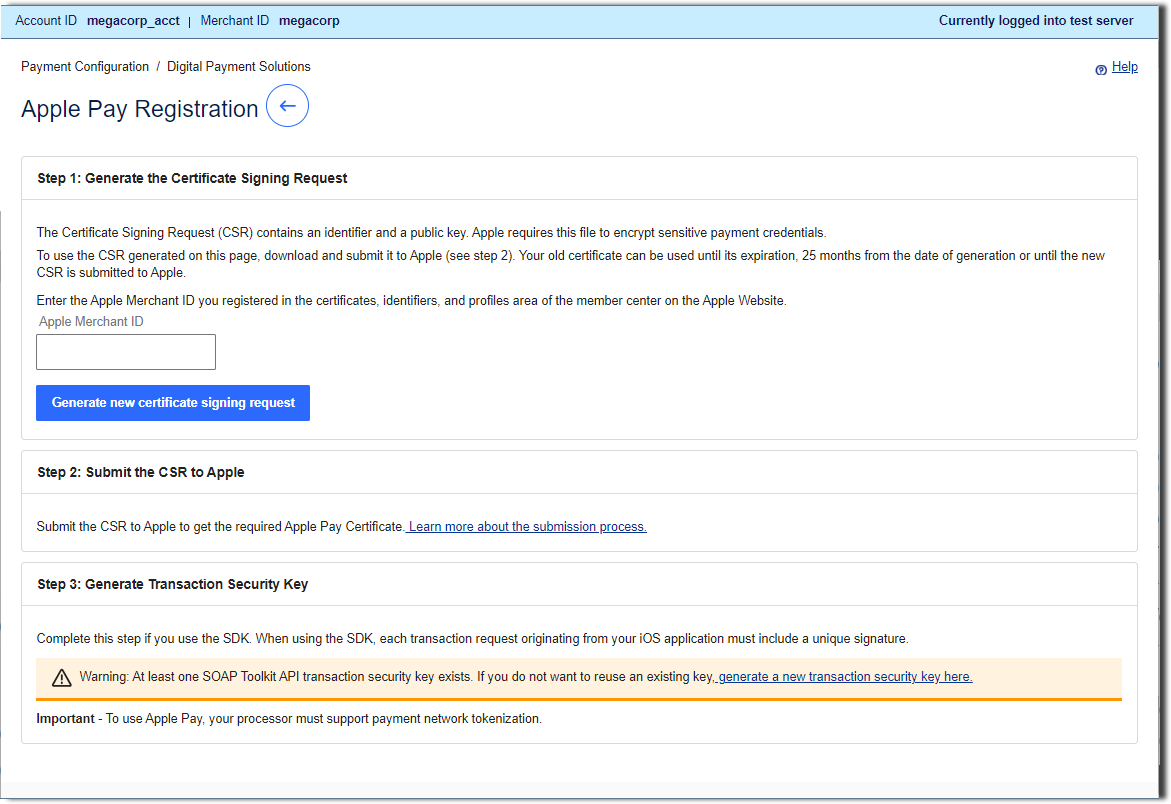
- Enter the Apple merchant ID that you created and registered in your Apple Developer account.
ADDITIONAL INFORMATION
These steps are described in Registering a New Merchant ID in Your Apple Developer Account. This value should match the id you set up with Apple including the "merchant" prefix. - ClickGenerate new certificate signing request.
- Click the download icon next to the key.
- Download the certificate request file (a file with a.certSigningRequestfile extension) to your local machine.
- Use your browser controls to save the file to your local machine.
ADDITIONAL INFORMATION
In the next task, you will upload the CSR file to your Apple Developer account.