On This Page
Payments Developer Guide
This section describes how to use this guide and where to find further
information.
- Audience and Purpose
- This guide is written for application developers who want to use theREST APIto integrate payment card processing into an order management system.Implementing theBank of Americapayment services requires software development skills. You must write code that uses the API request and response fields to integrate the payment card services into your existing order management system.
- Conventions
- These statements appear in this document:IMPORTANTAnImportantstatement contains information essential to successfully completing a task or learning a concept.WARNINGAWarningcontains information or instructions, which, if not heeded, can result in a security risk, irreversible loss of data, or significant cost in time or revenue or both.
Recent Revisions to This Document
26.08.01
Updated REST Example: Processing an Authorization with a Card Verification Number
to include payment account reference number in response.
26.05.01
This revision contains only
editorial changes and no technical updates.
26.04.01
Added related reference information (Related to this Page) to applicable topics.
Added Void a Payment.
26.01.01
This revision contains only editorial changes and no technical
updates.
Introduction to Payments
This introduction provides the basic information that you need to successfully
process payment transactions. It also provides an overview of the payments industry
and provides workflows for each process.
With
Bank of America
payment services, you can process payment cards
(tokenized or non-tokenized), digital payments such as Apple Pay and Google Pay, and
customer ID transactions. You can process payments across the globe and across
multiple channels with scalability and security. Bank of America
supports a large number of payment cards and offers a wide choice of gateways and
financial institutions, all through one connection.Financial Institutions and Payment Networks
Financial institutions and payment networks enable payment services to function. These
entities work together to complete the full payment cycle.
Customer Financial Institutions (Issuers)
A customer financial institution, also known as an
issuer
, provides payment cards to
and underwrites lines of credit for their customers. The issuer provides monthly statements
and collects payments. The issuer must follow the rules of the payment card companies to which
they belong. Payment Networks
Payment networks manage communications between acquirers and issuing banks. They also develop
industry standards, support their brands, and establish fees for acquiring institutions.
Some payment networks, such as Visa and Mastercard, are trade associations that do not issue
cards. Issuers are members of these associations, and they issue cards under license from the
association.
Payment Processors
Payment processors connect with acquirers. Before you can accept payments, you must
register with .
GPX
GPX
This table lists the processors and corresponding card types that are supported for
payment services.
IMPORTANT
Only the card types explicitly listed here are
supported.
Payment Processor | Supported Card Types | Notes |
|---|---|---|
GPX | Visa, Mastercard, American Express,
Discover, Diners Club, JCB | USD is the only currency supported with
American Express, Discover, Diners Club, and JCB. With Visa and
Mastercard, you can use any currency that is supported by both
GPX and Bank of America .
|
Card Types
You can process payments with these card types:
- American Express
- China UnionPay
- Diners Club
- Discover
- JCB
- Mastercard
- Visa
For a list of supported card types, see Payment Processors.
Co-Badged Cards
Co-badged cards are credit and debit cards that integrate two or more payment networks.
Co-Branded Cards
Co-branded cards are credit cards that are branded with a merchant's logo, brand, or other identifier as well as the payment network logo. These cards are not limited for use at the branded merchant and can be used at any merchant that accepts credit cards.
Prepaid Cards
Prepaid cards enable cardholders to pay for goods and services using money stored directly on
the card.
Private Label Cards
Private label cards are issued by private companies. They enable cardholders to borrow money
to pay for goods exclusively at the issuing company’s stores.
Quasi-Cash
Quasi-cash transactions involve instruments that are directly convertible to cash such as web
wallets, travelers checks, cryptocurrency, and lottery tickets.
Transaction Types
This topic provides information about transaction types that are supported by your processor.
Card-Not-Present Transactions
When a customer provides a card number, but the card and the customer are not physically
present at the merchant's location, the purchase is known as a
card-not-present
transaction
. Typical card-not-present transactions are internet and phone transactions.
Card-not-present transactions pose an additional level of risk to your business because the
customer’s identification cannot be verified. You can reduce that risk by using features such
as the Address Verification System (AVS) and Card Verification Numbers (CVNs). The AVS and
CVNs provide additional protection from fraud by verifying the validity of the customer’s
information and notifying you when discrepancies occur.Payment Services
These services enable customers to purchase goods and services. They also enable merchants to
receive payments from customer accounts, to provide refunds, and to void transactions.
Authorization Reversal
The authorization reversal service releases the hold that an authorization placed on a
customer’s payment card funds.
Each card-issuing financial institution has its own rules for deciding whether an
authorization reversal succeeds or fails. When a reversal fails, contact the card-issuing
financial institution to learn whether there is a different way to reverse the
authorization.
GPX
supports authorization reversal after void (ARAV),
therefore you can reverse an authorization after you void the associated capture.An authorization reversal is a follow-on transaction that uses the request ID returned from
an authorization. The main purpose of a follow-on transaction is to link two transactions. The
request ID links the follow-on transaction to the original transaction. The authorization
request ID is used to look up the customer’s billing and account information in the
Bank of America
database. You are not required to include those fields in the full
authorization reversal request. The original transaction and follow-on transaction are linked
in the database and in BA360
.The full authorization reversal service works for debit cards and prepaid
cards in addition to credit cards.
IMPORTANT
You cannot perform an authorization reversal if a transaction is in a
review state, which can occur if you use a fraud management service. You must reject the
transaction prior to authorization reversal. For more information, see the fraud management
documentation in
BA360
.Automatic Partial Authorization Reversal
Automatic partial authorization reversals are supported for:
- Credit cards
- Debit cards and prepaid cards.
- Quasi-cash.
If the capture amount is less than the authorization amount,
Bank of America
automatically performs a partial authorization reversal before it sends the capture request
to the processor. The results of a successful partial authorization reversal are:- The capture amount matches the new authorization amount at the payment card company.
- The hold on the unused credit card funds might be released. The issuing bank decides whether or not to release the hold on unused funds.Not all issuers act on a request for a partial authorization reversal. Therefore,Bank of Americacannot guarantee that the funds will be released.
Refund
Refund
Refunds are payment refunds from a merchant to the cardholder after a
cardholder pays for a product or service and that payment is captured by the merchant. When a
refund request is successful, the issuer transfers funds from the merchant bank (acquirer)
account to the customer's account. It typically takes 2 to 4 days for the acquirer to transfer
funds from your merchant account.
There are two types of refunds: a
follow-on refund
that is linked to
an original capture or sale, and a stand-alone credit
that is not linked to an original
capture or sale.WARNING
You should carefully control access to your
refund and
credit services. Do not request
this service directly from your customer interface. Instead, incorporate this service as part
of your customer service process. This process reduces the potential for fraudulent
transactions.Follow-on Refund
Follow-on Refund
Refund and Credit Workflow
This workflow applies to follow-on credits, also known as refunds, and stand-alone credits.
It begins when you send a request for a refund or credit.
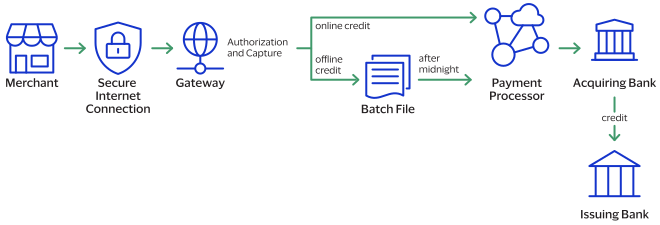
- The merchant sends the refund or credit request toBank of America.
- For online refunds and credits,Bank of Americavalidates the order information then sends the request to the payment processor.
- The processor validates the request and forwards it to the acquiring bank.
- The acquiring bank transfers funds to the issuing bank.
IMPORTANT
Not all processors support stand-alone credits.
Void
A void cancels a capture or credit request that you submitted to
Bank of America
but has not already been submitted to your processor. Capture and credit requests are usually
submitted to your processor once a day, so your window for successfully voiding a capture or
credit request is small. A void request is declined when the capture or credit request has
already been sent to the processor.After a void is processed, you cannot credit or capture the funds. You must perform a new
transaction to capture or credit the funds. Further, when you void a capture, a hold remains
on the authorized funds. If you are not going to re-capture the authorization, you should request an authorization reversal to release the hold on the unused
funds.
A void uses the capture or credit request ID to link the transactions. The authorization
request ID is used to look up the customer’s billing and account information, so there is no
need to include those fields in the void request. You cannot perform a follow-on credit
against a capture that has been voided.
Payment Features
You can apply features to different payment services to enhance the customer payment
processing experience. This section includes an overview of these features:
Micropayments
Services:
- Authorization
- Capture
- Refund
Micropayments
are payments for less than one unit in the transaction’s currency. Relaxed Requirements for Address Data and Expiration Date in Payment Transactions
With relaxed requirements for address data and the expiration date, not all standard
payment request fields are required. It is your responsibility to determine whether your
account is enabled to use this feature and which fields are required.
Related Information
- See Relaxed Requirements for Address Data and Expiration Date in Payment Transactions for information about how to process payments with relaxed requirements for address data and expiration date.
Introduction to Credentialed Transactions
Credentialed transactions are transactions that involve either storing a customer's
payment credentials for future transactions or using a customer's previously-stored
payment credentials. When processing a credentialed transaction, you must indicate the
type of credentialed transaction and the reason for the transaction. Credentialed
transactions are also known as
credential-on-file
(COF) or card-on-file
transactions.These are the types of credentialed transactions you can process:
Payment Account Reference (PAR)
The PAR is a network-generated reference number that identifies a transaction for which
you provided one of the following:
- Primary account number (PAN)
- Network-generated token for a PAN
This reference number provides a link to the cardholder account and to all transactions
for that account. It is returned in the response message for dual-message transactions
and single-message PIN-debit transactions. The API field for this reference number is
processorInformation.paymentAccountReferenceNumber
.Testing the Payment Services
To ensure that requests are processed correctly, you must test the basic success and error
conditions for each service you plan to use.
Requirements for Testing
Before you can test, contact customer support to activate the credit
card services and configure your account for testing. You must also contact your processor
to set up your processor account.
IMPORTANT
When building your connection to the
Bank of America
payment gateway, ensure that you have implemented controls to prevent card testing or card
enumeration attacks on your platform. When we detect suspicious
transaction activity associated with your merchant ID, including a card testing or card
enumeration attack, Bank of America
reserves the right to enable fraud
management tools on your behalf in order to mitigate the attack. The fraud team might also
implement internal controls to mitigate attack activity. These controls block traffic that
is perceived as fraudulent. Additionally, if you are using one of our fraud tools and
experience a significant attack, our internal team might modify or add rules to your
configuration to help prevent the attack and minimize the threat to our infrastructure.
However, any actions taken by Bank of America
would not replace the need for you
to follow industry standard best practices to protect your systems, servers, and
platforms.Follow these requirements when you test your system:
- Use your regular merchant ID.
- Use a real combination for the city, state, and postal code.
- Use a real combination for the area code and telephone number.
- Use a nonexistent account and domain name for the customer’s email address.
- REST API test endpoint:POSThttps://apitest.merchant-services.bankofamerica.com/pts/v2/payments
Test Card Numbers
Use these payment card numbers to test the authorization, capture, and credit services.
Remove the spaces from the test card numbers when sending them to the test system. Do not use
real payment card numbers. To test card types that are not included in the list, use an
account number that is in the card’s BIN range. For best results, try each test with a
different service request and with different test payment card numbers.
IMPORTANT
The test card numbers that are provided are
formatted with Xs for zeroes in the card number. When testing with these card numbers, remove the spaces and replace each X with a 0 (zero).
- American Express—3782 8224 631X XX5
- Discover—6X11 1111 1111 1117
- JCB—3566 1111 1111 1113
- Maestro (International)
- 5X33 9619 89X9 17
- 5868 2416 0825 5333 38
- Maestro (UK Domestic)—the issue number is not required for Maestro (UK Domestic) transactions.
- 6759 4111 XXXX XXX8
- 6759 56XX 45XX 5727 054
- 5641 8211 1116 6669
- Mastercard
- 2222 42XX XXXX 1113
- 2222 63XX XXXX 1125
- 5555 5555 5555 4444
- Visa—4111 1111 1111 1111
Using Amounts to Simulate Errors
You can simulate error messages by requesting authorization, capture, or credit services with specific amounts that trigger the error messages. These triggers work only on the test server, not on the production server.
Each payment processor uses its own error messages.
Test American Express Card Verification
Before using CVN with American Express, it is strongly recommended that you follow these
steps:
- Contact customer support to have your account configured for CVN. Until you do this, you will receive a1in theprocessorInformation.cardVerification.resultCoderesponse field.
- Test your system in production using a small currency amount, such as one currency unit. Instead of using the test account numbers, use a real payment card account number, and send an incorrect CVN in the request for authorization. The card should be refused and the request declined.
Standard Payment Processing
This section shows you how to process various authorization, capture, credit, and sales
transactions.
Authorization with a Card Verification Number
This section shows you how to process an authorization with a Card Verification Number
(CVN).
CVN Results
The response includes a raw response code and a mapped response code:
- The raw response code is the value returned by the processor. This value is returned in theprocessorInformation.cardVerification.resultCodeRawfield. Use this value only for debugging purposes; do not use it to determine the card verification response.
- The mapped response code is the pre-defined value that corresponds to the raw response code. This value is returned in theprocessorInformation.cardVerification.resultCodefield.
Even when the CVN does not match the expected value, the issuing bank might still authorize the transaction. You will receive a CVN decline, but you can still capture the transaction because it has been authorized by the bank. However, you must review the order to ensure that it is legitimate.
Settling authorizations that fail the CVN check might have an impact on the fees charged by your bank. Contact your bank for details about how card verification management might affect your discount rate.
When a CVN decline is received for the authorization in a sale request, the capture request is not processed unless you set the
processingInformation.authorizationOptions.ignoreCvResult
field to true
.- CVN Results for American Express
- A value of1in theprocessorInformation.cardVerification.resultCodefield indicates that your account is not configured to use card verification. Contact customer support to have your account enabled for this feature.
- CVN Results for Discover
- CVN Results for Visa and Mastercard
- A CVN code ofDorNcauses the request to be declined with a reason code value of230. You can still capture the transaction, but you must review the order to ensure that it is legitimate.Bank of America, not the issuer, assigns the CVN decline to the authorization. You can capture any authorization that has a valid authorization code from the issuer, even when the request receives a CVN decline.When the issuer does not authorize the transaction and the CVN does not match, the request is declined because the card is refused. You cannot capture the transaction.
Endpoint
Production:
POST
https://api.merchant-services.bankofamerica.com
/pts/v2/paymentsTest:
POST
https://apitest.merchant-services.bankofamerica.com
/pts/v2/paymentsRequired Fields for Processing an Authorization with a Card Verification Number
- orderInformation.amountDetails.currency
- orderInformation.amountDetails.totalAmount
- orderInformation.billTo.address1
- orderInformation.billTo.administrativeArea
- orderInformation.billTo.country
- orderInformation.billTo.email
- orderInformation.billTo.firstName
- orderInformation.billTo.lastName
- orderInformation.billTo.locality
- orderInformation.billTo.postalCode
- paymentInformation.card.expirationMonth
- paymentInformation.card.expirationYear
- paymentInformation.card.number
- paymentInformation.card.securityCode
- paymentInformation.card.type
- paymentInformation.card.securityCode
Optional Fields for Processing an Authorization with a Card Verification Number
You can use these optional fields to include additional information when processing
an authorization with a card verification number.
- paymentInformation.card.securityCodeIndicator
- processingInformation.authorizationOptions.ignoreCvResult
REST Example: Processing an Authorization with a Card Verification Number
Request
{
    "paymentInformation": {
        "card": {
        "number": "4111111111111111",
        "expirationMonth": "12",
        "expirationYear": "2031",
        "type": "001",
        "securityCode": "999"
        }
    },
    "orderInformation": {
        "amountDetails": {
        "totalAmount": "49.95",
        "currency": "USD"
    },
     "billTo": {
        "firstName": "John",
        "lastName": "Doe",
        "address1": "1295 Charleston Rd.",
        "locality": "Mountain View",
        "administrativeArea": "CA",
        "postalCode": "94043",
        "country": "US",
        "email": "jdoe@example.com",
        "phoneNumber": "650-965-6000"
        }
    }
}
Response to a Successful Request
{
    "_links": {
        "authReversal": {
            "method": "POST",
            "href": "/pts/v2/payments/6554147587216874903954/reversals"
        },
        "self": {
            "method": "GET",
            "href": "/pts/v2/payments/6554147587216874903954"
        },
        "capture": {
            "method": "POST",
            "href": "/pts/v2/payments/6554147587216874903954/captures"
        }
    },
    "clientReferenceInformation": {
        "code": "1655414758839"
    },
    "id": "6554147587216874903954",
    "orderInformation": {
        "amountDetails": {
            "authorizedAmount": "49.95",
            "currency": "USD"
        }
    },
    "paymentAccountInformation": {
        "card": {
            "type": "001"
        }
    },
    "paymentInformation": {
        "tokenizedCard": {
            "type": "001"
        },
        "card": {
            "type": "001"
        }
    },
    "pointOfSaleInformation": {
        "terminalId": "111111"
    },
    "processorInformation": {
        "paymentAccountReferenceNumber": "1234A1B2C3D4E5F6G7H8J9K0L1M2N3",
        "approvalCode": "888888",
        "networkTransactionId": "123456789619999",
        "transactionId": "123456789619999",
        "responseCode": "100",
        "avs": {
            "code": "X",
            "codeRaw": "I1"
        }
    },
    "reconciliationId": "67546603C43Z6JWN",
    "status": "AUTHORIZED",
    "submitTimeUtc": "2022-06-16T21:25:58Z"
}
Authorization with Strong Customer Authentication
Exemption
This section shows you how to process an authorization with a strong customer authentication
(SCA) exemption.
You can use SCA exemptions to streamline the payment process. SCA exemptions are part of the
European second Payment Services Directive (PSD2) and allow certain types of low-risk
transactions to bypass additional authentication steps while still remaining compliant with
PSD2. You can choose which exemption can be applied to a transaction, but the card-issuing
bank actually grants an SCA exemption during card authentication.
You can process an authorization with two types of SCA exemptions:
- Exemption on Authorization: Send an authorization without payer authentication and request an SCA exemption on the authorization. If it is not approved, you may be required to request further authentication upon retry.
- Exemption on Authentication: Request an SCA exemption during payer authentication and if successful, send an authorization including the SCA exemption details.
Depending on your processor, use one of these exemption fields:
IMPORTANT
If you send more than one SCA exemption field with a single
authentication, the transaction is denied.
- Authentication Outage: Payer authentication is not available for this transaction due to a system outage.
- B2B Corporate Card: Payment cards specifically for business-to-business transactions are exempt.
- Delegated Authentication: Payer authentication was performed outside of the authorization workflow.
- Follow-On Installment Payment: Installment payments of a fixed amount are exempt after the first transaction.
- Follow-On Recurring Payment: Recurring payments of a fixed amount are exempt after the first transaction.
- Low Risk: The average fraud levels associated with this transaction are considered low.
- Low Value: The transaction value does not warrant SCA.
- Merchant Initiated Transactions: As follow-on transactions, merchant-initiated transactions are exempt.
- Stored Credential Transaction: Credentials are authenticated before storing, so stored credential transactions are exempt.
- Trusted Merchant: Merchants registered as trusted beneficiaries.
Fields Specific to the Strong Customer Authentication Exemptions
Use one of these fields to request an SCA exemption:
Endpoint
Production:
POST
https://api.merchant-services.bankofamerica.com
/pts/v2/paymentsTest:
POST
https://apitest.merchant-services.bankofamerica.com
/pts/v2/paymentsRequired Fields for Processing an Authorization with an SCA Exemption
- orderInformation.amountDetails.currency
- orderInformation.amountDetails.totalAmount
- orderInformation.billTo.address1
- orderInformation.billTo.administrativeArea
- orderInformation.billTo.country
- orderInformation.billTo.email
- orderInformation.billTo.firstName
- orderInformation.billTo.lastName
- orderInformation.billTo.locality
- orderInformation.billTo.postalCode
- paymentInformation.card.expirationMonth
- paymentInformation.card.expirationYear
- paymentInformation.card.number
- paymentInformation.card.type
REST Example: Processing an Authorization with an SCA Exemption for Low-Value
Transactions
Request
{
  "consumerAutenticationInformation" : {
  	"strongAuthentication" : {
  	  "lowValueExemptionIndicator" : "1"
  	}
  },
  "orderInformation" : {
    "billTo" : {
      "country" : "US",
      "lastName" : "Kim",
      "address1" : "201 S. Division St.",
      "postalCode" : "48104-2201",
      "locality" : "Ann Arbor",
      "administrativeArea" : "MI",
      "firstName" : "Kyong-Jin",
      "email" : "test@bankofamerica.com"
    },
    "amountDetails" : {
      "totalAmount" : "100.00",
      "currency" : "eur"
    }
  },
  "paymentInformation" : {
    "card" : {
      "expirationYear" : "2031",
      "number" : "4111111111111111",
      "expirationMonth" : "12"
    }
  }
}
Response to a Successful Request
{
    "_links": {
        "authReversal": {
            "method": "POST",
            "href": "/pts/v2/payments/6709780221406171803955/reversals"
        },
        "self": {
            "method": "GET",
            "href": "/pts/v2/payments/6709780221406171803955"
        },
        "capture": {
            "method": "POST",
            "href": "/pts/v2/payments/6709780221406171803955/captures"
        }
    },
    "clientReferenceInformation": {
        "code": "1670978022258"
    },
    "id": "6709780221406171803955",
    "orderInformation": {
        "amountDetails": {
            "authorizedAmount": "100.00",
            "currency": "eur"
        }
    },
    "paymentAccountInformation": {
        "card": {
            "type": "001"
        }
    },
    "paymentInformation": {
        "tokenizedCard": {
            "type": "001"
        },
        "card": {
            "type": "001"
        }
    },
    "pointOfSaleInformation": {
        "terminalId": "123456"
    },
    "processorInformation": {
        "approvalCode": "888888",
        "networkTransactionId": "123456789619999",
        "transactionId": "123456789619999",
        "responseCode": "100",
        "avs": {
            "code": "X",
            "codeRaw": "I1"
        }
    },
    "reconciliationId": "62859554PBDEMI43",
    "status": "AUTHORIZED",
    "submitTimeUtc": "2022-12-14T00:33:42Z"
}
Account Verification with a Zero Amount Authorization
Account verification with zero amount authorization is a standard e-commerce practice
where you send a zero amount transaction to verify a card is valid and whether the card
is lost or stolen. You cannot capture a zero amount authorization.
Most card networks refer to card account validation as zero amount authorization (ZAA).
These card networks have their own names for the service:
- Discover Zero Dollar Authorization
- Visa Account Verification
Processor-Specific Information
- GPX
- AVS and CVN are supported.
- Card types: Mastercard, Visa
Endpoint
Production:
POST
https://api.merchant-services.bankofamerica.com
/pts/v2/paymentsTest:
POST
https://apitest.merchant-services.bankofamerica.com
/pts/v2/paymentsRequired Fields for Account Verification with Zero Amount Authorization
- orderInformation.amountDetails.currency
- orderInformation.amountDetails.totalAmount
- Set this value to0.
- orderInformation.billTo.address1
- orderInformation.billTo.administrativeArea
- orderInformation.billTo.country
- orderInformation.billTo.email
- orderInformation.billTo.firstName
- orderInformation.billTo.lastName
- orderInformation.billTo.locality
- orderInformation.billTo.postalCode
- paymentInformation.card.expirationMonth
- paymentInformation.card.expirationYear
- paymentInformation.card.number
REST Example: Account Verification with a Zero Amount Authorization
Authorization Reversal
This section provides the information about how to process an authorization reversal.
Reversing an authorization releases the hold on the customer’s payment card funds that the
issuing bank placed when processing the authorization.
For a debit card or prepaid card in which only a partial amount was approved, the amount of
the reversal must be the amount that was authorized, not the amount that was requested.
All supported card types can process authorization reversals.
Endpoint
Production:
POST
https://api.merchant-services.bankofamerica.com
/pts/v2/payments/{id}
/reversalsTest:
POST
https://apitest.merchant-services.bankofamerica.com
/pts/v2/payments/{id}
/reversalsThe is the transaction ID returned in the
authorization response.
{id}
Required Fields for Processing an Authorization Reversal
- clientReferenceInformation.code
- reversalInformation.amountDetails.currency
- reversalInformation.amountDetails.totalAmount
- The amount of the reversal must be the same as the authorization amount that was included in the authorization response message. Do not use the amount that was requested in the authorization request message.
REST Example: Processing an Authorization Reversal
Request
{
    "clientReferenceInformation": {
      "code": "test123"
    }
    "reversalInformation" : {
        "amountDetails" : {
            "totalAmount" : "100.00",
            "currency" : "USD"
        }
    }
}
Response to a Successful Request
{
    "_links" : {
      "self" : {
          "method" : "GET",
          "href" : "/pts/v2/reversals/6869460219566537303955"
      }
    },
    "clientReferenceInformation" : {
        "code" : "RTS-Auth-Reversal"
    },
    "id" : "6869460219566537303955",
    "orderInformation" : {
        "amountDetails" : {
            "currency" : "USD"
        }
    },
    "processorInformation" : {
        "responseCode" : "200"
    },
    "reconciliationId" : "82kBK3qDNtls",
    "reversalAmountDetails" : {
        "reversedAmount" : "100.00",
        "currency" : "USD"
    },
    "status" : "REVERSED",
    "submitTimeUtc" : "2023-06-16T20:07:02Z"
}
Partial Authorization Reversal
A partial authorization reversal releases a partial amount of the authorized funds held on the customer’s payment card. Process a partial authorization reversal when the captured funds are less than the total authorized amount. This typically occurs when the final bill amount is less than the total amount of the combined original authorization and incremental authorizations.
Primary use cases include:
- Variable amount services
- Hotels release unused pre-authorized amounts after checkout.
- Car rentals release unused security hold portions.
- Fuel stations release funds when the final pump amount is less than the initial pre-authorization.
- Partial shipment and fulfillment
- You ship part of an order and do not charge for the remainder of the order.
- Subscription boxes or bundles include items that are unavailable.
Process partial authorization reversals in these sequences:
- Pre-authorization or standard authorization, then a partial authorization reversal, and lastly a capture.
- Pre-authorization, then an incremental authorization, then a partial authorization reversal, and lastly a capture.
The total authorized amount during a reversal or capture request is the original
authorized amount plus the incremental authorized amount minus any previous partial
authorized reversal amounts and non-voided captures.
Supported Card Types
Partial authorization reversals support these card types:
- American Express
- Discover
- Maestro
- Maestro International
- JCB (in US and European Union (EU) regions)
- Mastercard
- Visa
American Express Card Requirements
When you process a payment with an American Express card, reverse any remaining
authorized funds that are not captured. For example, if the total amount of the
initial authorization and all of the incremental authorizations is 100.00, and the
captured amount is 80.00, then reverse the difference of 20.00.
Processing an Incremental Authorization with a Partial Authorization
Reversal
Complete these tasks to reverse any remaining authorized funds that are not captured:
- Send an initial authorization request that places a hold on the customer's funds and saves the card as a card-on-file. This is also known as an estimated authorization request. For more information, see theCredentialed Transactions Developer Guide.
- For every anticipated additional charge, send an incremental authorization. For more information, see Incremental Authorization.
- When the customer is ready to complete the payment, send a capture request for the final amount. For more information, see Capture.
- If there are remaining authorized funds that are not captured, send a partial authorization reversal to remove the hold on the funds.
Relaxed Error Scenarios
Errors are relaxed for these scenarios:
- When the reversal amount is not equal to the authorized amount, an error does not occur unless the reversal amount is greater than the authorized amount.
- You can process multiple partial authorization reversals, and an error occurs only when the reversal amount exceeds the total remaining authorized amount.
- Transactions can be reversed and settled multiple times as long as the total reversal and settled amount do not exceed the total authorized amount.
Relaxed error codes include:
- 237: Decline - The authorization has already been reversed (AUTH_ALREADY_REVERSED)
- 238: Decline - The transaction has already been settled (TRANSACTION_ALREADY_SETTLED)
- 243: Decline - The transaction has already been settled or reversed (TRANSACTION_ALREADY_REVERSED_OR_SETTLED)
Endpoint
Production:
POST
https://api.merchant-services.bankofamerica.com
/pts/v2/payments/{id}
/reversalsTest:
POST
https://apitest.merchant-services.bankofamerica.com
/pts/v2/payments/{id}
/reversalsThe is the transaction ID returned in the
authorization response.
{id}
Required Fields for Partial Authorization
Reversal
- clientReferenceInformation.code
- orderInformation.amountDetails.currency
- reversalInformation.amountDetails.totalAmount
- Set to the amount that you want to reverse that does not exceed the amount of remaining authorized funds.
REST Example: Partial Authorization Reversal
Request
{
  "clientReferenceInformation": {
    "code": "test123"
  },
  "reversalInformation": {
    "amountDetails": {
      "totalAmount": "20.00"
    }
  },
  "orderInformation": {
    "amountDetails": {
      "currency": "USD"
    }
  }
}
Response to a Successful Request
{
    "_links" : {
      "self" : {
          "method" : "GET",
          "href" : "/pts/v2/reversals/6869460219566537303955"
      }
    },
    "clientReferenceInformation" : {
        "code" : "RTS-Auth-Reversal"
    },
    "id" : "6869460219566537303955",
    "orderInformation" : {
        "amountDetails" : {
            "currency" : "USD"
        }
    },
    "processorInformation" : {
        "responseCode" : "200"
    },
    "reconciliationId" : "82kBK3qDNtls",
    "reversalAmountDetails" : {
        "reversedAmount" : "20.00",
        "currency" : "USD"
    },
    "status" : "REVERSED",
    "submitTimeUtc" : "2026-06-16T20:07:02Z"
}
Time-Out Authorization Reversal
When you do not receive a response message after sending an authorization request, this
feature enables you to reverse the authorization that you requested.
IMPORTANT
Wait 60 seconds before requesting a time-out authorization
reversal.
Include the
clientReferenceInformation.transactionId
field in the original request for an
authorization. The value of the merchant transaction ID must be unique for 180 days.When the original transaction fails, the response message for the reversal request
includes these fields:
- reversalAmountDetails.originalTransactionAmount
- processorInformation.responseCode
Requirements
Unless your processor supports authorization reversal after void (ARAV), time-out
authorization reversals are supported only for authorizations that have not been
captured and settled.
Endpoint
Production:
POST
https://api.merchant-services.bankofamerica.com
/pts/v2/reversalsTest:
POST
https://apitest.merchant-services.bankofamerica.com
/pts/v2/reversalsRequired Fields for a Time-Out Authorization
Reversal
- clientReferenceInformation.transactionId
- Set to theclientReferenceInformation.codefield value from the authorization request that is being reversed.
- Identifier that links the reversal request to the original request.
- orderInformation.amountDetails.currency
- reversalInformation.amountDetails.totalAmount
- The amount of the reversal must be the same as the authorization amount that was included in the authorization response message. Do not use the amount that was requested in the authorization request message.
REST Example: Time-Out Authorization Reversal
Request
{
  "clientReferenceInformation": {
    "transactionId": "987654321"
 },
   "reversalInformation": {
     "amountDetails": {
       "totalAmount": "100.00",
       "currency": "ABC"
     },
     "reason": "testing"
  }
}
Response to Successful Request
{
  "_links" : {
    "self" : {
      "method" : "GET",
      "href" : "/pts/v2/reversals/6869460219566537303955"
    }
  },
  "clientReferenceInformation" : {
    "code" : "RTS-Auth-Reversal"
  },
  "id" : "6869460219566537303955",
  "orderInformation" : {
    "amountDetails" : {
      "currency" : "ABC"
    }
  },
  "processorInformation" : {
    "responseCode" : "200"
  },
  "reconciliationId" : "82kBK3qDNtls",
  "reversalAmountDetails" : {
    "reversedAmount" : "100.00",
    "currency" : "ABC"
  },
  "status" : "REVERSED",
  "submitTimeUtc" : "2023-06-16T20:07:02Z"
}=
Sale
This section provides the information you need in order to process a sale
transaction.
A sale combines an authorization and a capture into a single transaction.
Endpoint
Production:
POST
https://api.merchant-services.bankofamerica.com
/pts/v2/paymentsTest:
POST
https://apitest.merchant-services.bankofamerica.com
/pts/v2/paymentsRequired Fields for a Sale
- orderInformation.amountDetails.currency
- orderInformation.amountDetails.totalAmount
- orderInformation.billTo.address1
- orderInformation.billTo.administrativeArea
- orderInformation.billTo.country
- orderInformation.billTo.email
- orderInformation.billTo.firstName
- orderInformation.billTo.lastName
- orderInformation.billTo.locality
- orderInformation.billTo.postalCode
- paymentInformation.card.expirationMonth
- paymentInformation.card.expirationYear
- paymentInformation.card.number
- processingInformation.capture
- Set the value totrue.
REST Example: Sale
Request
{
  "processingInformation": {
    "capture": true
  },
  "orderInformation" : {
    "billTo" : {
    "country" : "US",
    "lastName" : "VDP",
    "address1" : "201 S. Division St.",
    "postalCode" : "48104-2201",
    "locality" : "Ann Arbor",
    "administrativeArea" : "MI",
    "firstName" : "RTS",
    "email" : "test@bankofamerica.com"
  },
    "amountDetails" : {
      "totalAmount" : "100.00",
      "currency" : "usd"
     }
   },
  "paymentInformation" : {
    "card" : {
      "expirationYear" : "2031",
      "number" : "4111111111111111",
      "expirationMonth" : "12",
      "type" : "001
    }
  }
}
Response to a Successful Request
Not all fields are returned in this example.
{
  "_links" : {
    "void" : {
      "method" : "POST",
      "href" : "/pts/v2/payments/6485004068966546103093/voids"
    },
    "self" : {
      "method" : "GET",
      "href" : "/pts/v2/payments/6485004068966546103093"
    }
  },
  "clientReferenceInformation" : {
    "code" : "RTS-Auth"
  },
  "id" : "6485004068966546103093",
  "orderInformation" : {
    "amountDetails" : {
      "totalAmount" : "100.00",
      "authorizedAmount" : "100.00",
      "currency" : "usd"
    }
  },
  "paymentAccountInformation" : {
    "card" : {
      "type" : "001"
    }
  },
  "paymentInformation" : {
    "tokenizedCard" : {
      "type" : "001"
    },
    "card" : {
      "type" : "001"
    }
  },
  "processorInformation" : {
    "systemTraceAuditNumber" : "841109",
    "approvalCode" : "831000",
    "merchantAdvice" : {
      "code" : "01",
      "codeRaw" : "M001"
    },
    "responseDetails" : "ABC",
    "networkTransactionId" : "016153570198200",
    "retrievalReferenceNumber" : "208720841109",
    "consumerAuthenticationResponse" : {
      "code" : "2",
      "codeRaw" : "2"
    },
    "transactionId" : "016153570198200",
    "responseCode" : "00",
    "avs" : {
      "code" : "Y",
      "codeRaw" : "Y"
    }
  },
  "reconciliationId" : "6485004068966546103093",
  "status" : "AUTHORIZED",
  "submitTimeUtc" : "2022-03-28T20:46:47Z"
}
Capture
This section describes how to capture an authorized transaction.
American Express Incremental Authorizations
When you capture funds that were authorized from incremental authorizations and do not
capture the total amount, you are required to reverse the remaining unused authorized
amount. For example, if the total of the initial authorization and all of the incremental
authorizations is $100, and the amount that you capture is $80, then you must reverse the
difference of $20.
To reverse funds from incremental authorizations, send a partial authorization reversal
request. For more information, see Partial Authorization Reversal.
Endpoint
Production:
POST
https://api.merchant-services.bankofamerica.com
/pts/v2/payments/{id}
/capturesTest:
POST
https://apitest.merchant-services.bankofamerica.com
/pts/v2/payments/{id}
/capturesThe is the transaction ID
returned in the authorization response.
{id}
Required Fields for Capturing an Authorization
- clientReferenceInformation.code
- This field value maps from the original authorization, sale, or credit transaction.
- orderInformation.amountDetails.currency
- orderInformation.amountDetails.totalAmount
REST Example: Capturing an Authorization
Request
{
    "clientReferenceInformation": {
        "code": "1662997399711"
    },
    "orderInformation": {
        "amountDetails": {
            "totalAmount": 100,
            "currency": "USD"
        }
    },
    "paymentAccountInformation": {
        "card": {
        	"number": "4111111111111111",
            "type": "001"
        }
    }
}
Response to a Successful Request
{
    "_links": {
        "authReversal": {
            "method": "POST",
            "href": "/pts/v2/payments/6629976031336699803954/reversals"
        },
        "self": {
            "method": "GET",
            "href": "/pts/v2/payments/6629976031336699803954"
        },
        "capture": {
            "method": "POST",
            "href": "/pts/v2/payments/6629976031336699803954/captures"
        }
    },
    "clientReferenceInformation": {
        "code": "1662997399711"
    },
    "id": "6629976031336699803954",
    "orderInformation": {
        "amountDetails": {
            "authorizedAmount": "100.00",
            "currency": "USD"
        }
    },
    "paymentAccountInformation": {
        "card": {
            "type": "001"
        }
    },
    "paymentInformation": {
        "tokenizedCard": {
            "type": "001"
        },
        "card": {
            "type": "001"
        }
    },
    "pointOfSaleInformation": {
        "terminalId": "111111"
    },
    "processorInformation": {
        "approvalCode": "888888",
        "networkTransactionId": "123456789619999",
        "transactionId": "123456789619999",
        "responseCode": "100",
        "avs": {
            "code": "1"
        }
    },
    "reconciliationId": "61117545B7TY1MP6",
    "status": "AUTHORIZED",
    "submitTimeUtc": "2022-09-12T15:46:43Z"
}
Stand-Alone Credit
This section shows you how to process a credit, which
is not linked to a capture or sale. There is no time limit for requesting a credit.
Endpoint
Production:
POST
https://api.merchant-services.bankofamerica.com
/pts/v2/credits/Test:
POST
https://apitest.merchant-services.bankofamerica.com
/pts/v2/credits/Required Fields for Processing a Credit
- orderInformation.amountDetails.currency
- orderInformation.amountDetails.totalAmount
- orderInformation.billTo.address1
- orderInformation.billTo.administrativeArea
- orderInformation.billTo.country
- orderInformation.billTo.email
- orderInformation.billTo.firstName
- orderInformation.billTo.lastName
- orderInformation.billTo.locality
- orderInformation.billTo.postalCode
- paymentInformation.card.expirationMonth
- paymentInformation.card.expirationYear
- paymentInformation.card.number
REST Example: Processing a Stand-Alone Credit
Request
{
  "orderInformation" : {
    "billTo" : {
      "country" : "US",
      "lastName" : "Kim",
      "address1" : "201 S. Division St.",
      "postalCode" : "48104-2201",
      "locality" : "Ann Arbor",
      "administrativeArea" : "MI",
      "firstName" : "Kyong-Jin",
      "email" : "test@bankofamerica.com"
    },
    "amountDetails" : {
      "totalAmount" : "100.00",
      "currency" : "eur"
    }
  },
  "paymentInformation" : {
    "card" : {
      "expirationYear" : "2031",
      "number" : "4111111111111111",
      "expirationMonth" : "12"
    }
  }
}
Response to a Successful Request
{
    "_links": {
        "void": {
            "method": "POST",
            "href": "/pts/v2/credits/6663069906146706403954/voids"
        },
        "self": {
            "method": "GET",
            "href": "/pts/v2/credits/6663069906146706403954"
        }
    },
    "clientReferenceInformation": {
        "code": "1666306990717"
    },
    "creditAmountDetails": {
        "currency": "eur",
        "creditAmount": "100.00"
    },
    "id": "6663069906146706403954",
    "orderInformation": {
        "amountDetails": {
            "currency": "eur"
        }
    },
    "paymentAccountInformation": {
        "card": {
            "type": "001"
        }
    },
    "paymentInformation": {
        "tokenizedCard": {
            "type": "001"
        },
        "card": {
            "type": "001"
        }
    },
    "processorInformation": {
        "approvalCode": "888888",
        "networkTransactionId": "016153570198200",
        "responseCode": "100"
    },
    "reconciliationId": "66490108K9CLFJPN",
    "status": "PENDING",
    "submitTimeUtc": "2022-10-20T23:03:10Z"
}
Time-Out Void for a Capture, Sale, Refund, or Credit
Time-Out Void for a Capture, Sale,
Refund
, or Credit
When you do not receive a response message after requesting a capture, sale,
refund
, or credit
, this
feature enables you to void the transaction that you requested.Include the
clientReferenceInformation.transactionId
field in the original request for a
capture, sale, refund
, or credit
. The value of the merchant transaction ID must be unique for 180
days.When the original transaction fails, the response message for the reversal request
includes these fields:
- voidAmountDetails.originalTransactionAmount
- processorInformation.responseCode
Endpoint
Production:
POST
https://api.merchant-services.bankofamerica.com
/pts/v2/voids/Test:
POST
https://apitest.merchant-services.bankofamerica.com
/pts/v2/voids/Required Fields for a Time-Out Void for a Capture, Sale, Refund, or Credit
Refund
, or Credit
- clientReferenceInformation.transactionId
REST Example: Time-Out Void for a Capture, Sale, Refund, or Credit
Capture, Sale, Refund, or Credit
Request
{
  "clientReferenceInformation": {
    "transactionId": "987654321"
  }
}
Response to a Successful
Request
{
  "_links": {
    "self": {
      "method": "GET",
        "href": "/pts/v2/voids/6541933390746728203005"
    }
  },
  "clientReferenceInformation": {
    "code": "1654193339056"
  },
  "id": "6541933390746728203005",
  "orderInformation": {
    "amountDetails": {
      "currency": "USD"
    }
  },
  "status": "VOIDED",
  "submitTimeUtc": "2022-06-02T18:08:59Z",
  "voidAmountDetails": {
    "currency": "usd",
    "voidAmount": "100.00"
  }
}
Void a Payment
This section describes how to void a payment that was submitted but not yet processed by the
processor. A payment is also known as a sale, which is an authorization and capture in one API
request. Include the payment ID in the void request endpoint to cancel the payment.
Endpoint
Production:
POST
https://api.merchant-services.bankofamerica.com
/pts/v2/payments/{id}
/voidsTest:
POST
https://apitest.merchant-services.bankofamerica.com
/pts/v2/payments/{id}
/voidsThe is the transaction ID returned in the
sale response.
{id}
Required Fields for Voiding a Payment
- clientReferenceInformation.code
REST Example: Voiding a Payment
Request
{
    "clientReferenceInformation": {
        "code": "123456789012"
    }
}
Response to a Successful Request
{
    "submitTimeUtc": "2025-03-11T16:39:30Z",
    "processorInformation": {
        "approvalCode": "OK1272",
        "responseCode": "000"
    },
    "consumerAuthenticationResponse": {
        "systemTraceAuditNumber": "500036"
    },
    "orderInformation": {
        "amountDetails": {
            "authorizedAmount": "110.00"
        }
    },
    "message": "Successful transaction.",
    "clientReferenceInformation": {
        "code": "123456789012"
    },
    "reconciliationId": "000000050000771",
    "id": "7417111702443232235535",
    "_links": {
        "self": {
            "method": "GET",
            "href": "/pts/v2/voids/7417111702443232235535"
        }
    },
    "status": "VOIDED"
}
Split Shipments Processing
Split shipments enable you to split an order into multiple shipments with multiple
captures. You can use this feature when a customer orders a product that is not yet
available.
IMPORTANT
Split shipments are not available for
Mastercard transactions in the IDR currency on
GPX
.Multiple partial captures
and split shipments
are not the same feature.
The processor provides the multiple partial captures feature, while Bank of America
provides the split shipment feature.Requirements for Using Split Shipments
The requirements for using split shipments are you must use
GPX
and contact customer support to have your account
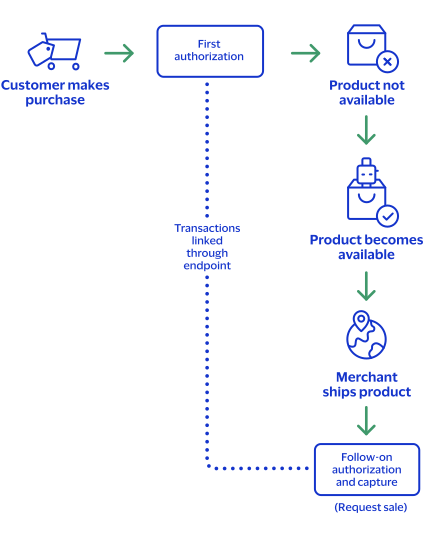
configured for this feature. Authorizing a Sale for a Product Not Yet Available
When the customer purchases a product that is not yet available, you can request an
authorization and a sale. First request an authorization to ensure that funds are
available. After the product becomes available, ship the product and request a sale.
Bank of America
then links the follow-on authorization to the first
authorization, and then links to the capture request.Figure:
Authorizing a Sale for a Product not yet Available
Step 1: Requesting an authorization
Request an authorization to ensure that funds are available before the product is
available for immediate shipment. The authorization request requires no additional
fields or requirements than a basic authorization.
Step 2: Processing a sale
When the product becomes available, ship the product and request a sale. The follow-on
authorization requires you to submit a sale request that includes the
processingInformation.linkId
field in addition to the
basic fields required for every sale request. The
processingInformation.linkId
field in an
authorization request triggers the split-shipment functionality. Set the
processingInformation.linkId
field to the
{id}
value from the endpoint. Field Specific to authorizing a sale for a product not yet available:
First Authorization Response: The
{id}
value is
returned in the endpoint.Follow-on Authorization Request:
processingInformation.linkId=SWVdPS5IM
Step 3:
Bank of America
attempts to link the follow-on authorization
request to the first authorization- If theprocessingInformation.linkIdvalue is valid, the follow-on authorization is linked to the original authorization in theBA360and in reports.
- If theprocessingInformation.linkIdvalue is not valid, the follow-on authorization is not linked to the original authorization in theBA360and in reports.
Step 4:
Bank of America
links the capture request- If theprocessingInformation.linkIdvalue for the follow-on authorization was valid, all three transactions (first authorization, follow-on authorization, capture) are linked together in theBA360and in reports.
- If theprocessingInformation.linkIdvalue for the follow-on authorization was not valid, the second authorization and capture are linked to each other in theBA360and in reports, but they are not linked to the first authorization.
See Basic Authorization for information on how to
process a basic authorization. See Sale for information on how to process
a sale.
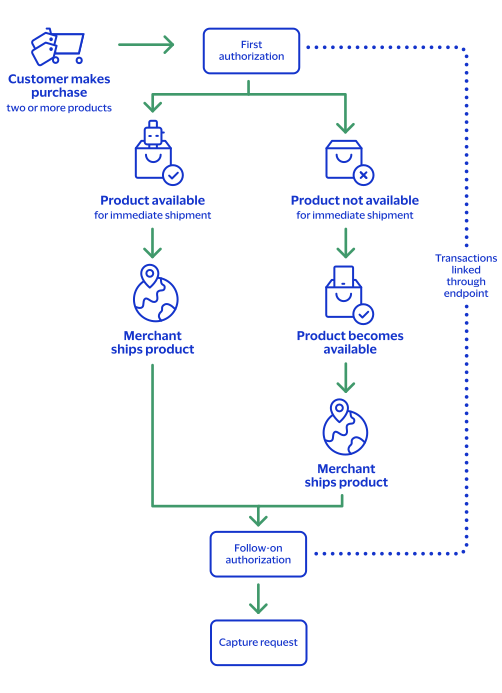
Processing Two Authorizations and a Capture for Multiple Products
When the customer purchases a product that is not yet available, you can request two
authorizations and a capture. First request an authorization to ensure that funds are
available, and then ship the available products. After the remaining products become
available, request follow-on authorization to ensure funds are still available. Ship the
remaining products, and request a capture.
Bank of America
links the follow-on
authorization to the first authorization and the capture request to the other
transactions.Figure:
Processing Two Authorizations and a Capture for Multiple Products
Step 1: Requesting an authorization
Request an authorization to ensure that funds are available for one or more of the products
that are available for immediate shipment. The authorization request requires no additional
fields or requirements than a basic authorization.
Step 2: Requesting a follow-on authorization
After the product becomes available, request a follow-on authorization to ensure that funds
are still available. The follow-on authorization request must include the
processingInformation.linkId
field in addition to the basic
fields required for every authorization request. The
processingInformation.linkId
field in an authorization
request triggers the split shipment functionality. Set the
processingInformation.linkId
field to the
{id}
value from the endpoint. Field specific to requesting a follow-on authorization request:
First Authorization Response: The
{id}
value is returned in
the endpoint.Follow-on Authorization Request:
processingInformation.linkId=SWVdPS5IM
Step 3:
Bank of America
attempts to link the follow-on authorization request
to the first authorization- If theprocessingInformation.linkIdvalue is valid, the follow-on authorization is linked to the original authorization in theBA360and in reports.
- If theprocessingInformation.linkIdvalue is not valid, the follow-on authorization is not linked to the original authorization in theBA360and in reports.
Step 4: Requesting a capture
You ship the product and request a capture. The capture request requires
only the basic fields as any capture request.
Step 5:
Bank of America
attempts to link the capture request to the other
transactionsAll three transactions (first authorization, follow-on authorization,
capture) are linked together in the
BA360
and in reports.See Basic Authorization for information on how to
process a basic authorization. See Capture for information on how
to process a capture.
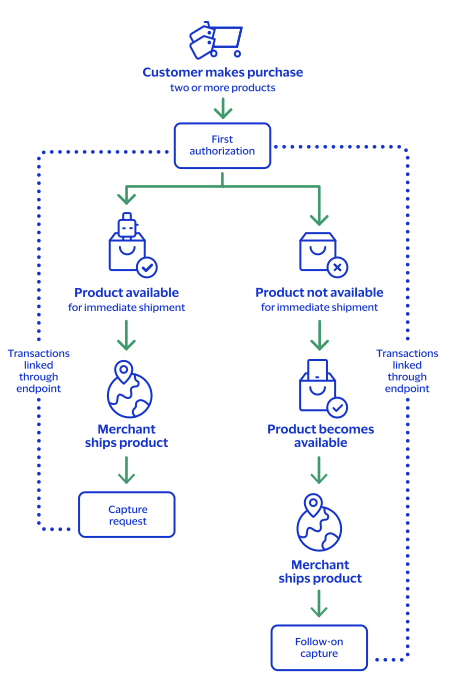
Processing an Authorization and Two Captures for Multiple Products
When the customer orders multiple products and one is not available, you must request an
authorization to ensure funds are available. You ship the products that are available and
request a capture for the amount of the shipped products. When the remaining product becomes
available, ship the product and request a follow-on capture for the amount of the product.
Bank of America
performs a system-generated authorization for the follow-on
capture request. Bank of America
then links the capture request. You receive the
status of the follow-on capture request and its associated system-generated authorization. Figure:
Processing an Authorization and Two Captures for Multiple Products
Step 1: Requesting an authorization
Request an authorization to ensure that funds are available for one or more products that are
available for immediate shipment. The authorization request requires no additional fields or
requirements other than a basic authorization.
Step 2: Requesting a capture
Ship the available product and request a capture while you wait for the remaining product to
become available. The capture request requires only the basic fields as any capture request.
Step 3: Requesting a follow-on capture
When the remaining product becomes available, ship it and request a capture for that amount.
The capture request requires only the basic fields as any capture request.
Step 4:
Bank of America
performs a system-generated authorizationBank of America
performs a system-generated authorization for the follow-on
capture request and link it to the original authorization in the BA360
and
in reports. Bank of America
processes the capture request as a split shipment
request because your account is already enabled for split shipments. Step 5:
Bank of America
attempts to link the capture request to the other
transactionsThe capture is linked to the authorizations in the
BA360
and in reports
through the request IDs as with any capture. All four transactions (first authorization,
system-generated authorization, first capture, follow-on capture) are linked together in the
BA360
and in reports.Step 6:
Bank of America
provides the statusThe status of the follow-on capture request and its associated system-generated authorization
becomes available.
See Basic Authorization for information on how to
process a basic authorization. See Capture for information on how
to process a capture.
Processing Payments Using Credentials
This section provides the information you need in order to process payments using
credentials.
Customer-Initiated Transactions with Credentials on
File
A customer-initiated transaction (CIT) is a transaction initiated by the customer. There
are two types of CITs:
- Customer transactions during which the credentials are stored for futurecustomer-initiated transactions.
- Customer transactions during which the credentials are stored for futuremerchant-initiated transactions.
Customers can initiate a CIT at a merchant payment terminal, through an online purchase
transaction, or by making a purchase using a previously stored credential. When storing
cardholder data for a CIT, you must also include 3-D Secure authentication credentials
to ensure that the CIT can successfully process. Authentication credentials can be
stored for future use with the card credentials by doing a non-payment authentication
(NPA).
BA360
BA360
You can create a new customer-initiated transaction in the
BA360
by
going to the One-Time Payments section and requesting a new authorization. When you
have entered the customer's information, you can store the customer's credentials
with the customer's permission in the Payment Information section. By doing so, you
can perform merchant-initiated transactions for payments that the customer has
pre-approved. For more information on how to perform a MIT in the
BA360
,
see Merchant-Initiated No-Show Transactions with PAN.Storing Customer Credentials with a CIT and PAN
Before you can perform a merchant-initiated transaction (MIT) or a customer-initiated
transaction (CIT) with credentials-on-file (COF), you must store the customer's
credentials for later use. Further, before you can store the user's credentials, you
must get the customer's consent to store their private information. This is also known
as establishing a relationship with the customer.
Required Fields for Storing Customer Credentials During a CIT
REST Example: Storing Customer Credentials During a CIT
Request
{
    "processingInformation": {
        "authorizationOptions": {
            "initiator": {
                "credentialStoredOnFile": "true"
            }
        }
    },
    "orderInformation": {
        "billTo": {
            "firstName": "John",
            "lastName": "Doe",
            "address1": "201 S. Division St.",
            "postalCode": "48104-2201",
            "locality": "Ann Arbor",
            "administrativeArea": "MI",
            "country": "US",
            "email": "test@bankofamerica.com",
            "phoneNumber": "5554327113"
        },
        "amountDetails": {
            "totalAmount": "100.00",
            "currency": "USD"
        }
    },
    "paymentInformation": {
        "card": {
            "expirationYear": "2031",
            "number": "4111xxxxxxxxxxxx",
            "expirationMonth": "12"
        }
    }
}
Response to a Successful Request
{
    "_links": {
        "authReversal": {
            "method": "POST",
            "href": "/pts/v2/payments/6528187198946076303004/reversals"
        },
        "self": {
            "method": "GET",
            "href": "/pts/v2/payments/6528187198946076303004"
        },
        "capture": {
            "method": "POST",
            "href": "/pts/v2/payments/6528187198946076303004/captures"
        }
    },
    "clientReferenceInformation": {
        "code": "1652818719876"
    },
    "id": "6528187198946076303004",
    "orderInformation": {
        "amountDetails": {
            "authorizedAmount": "100.00",
            "currency": "USD"
        }
    },
    "paymentAccountInformation": {
        "card": {
            "type": "001"
        }
    },
    "paymentInformation": {
        "tokenizedCard": {
            "type": "001"
        },
        "card": {
            "type": "001"
        }
    },
    "pointOfSaleInformation": {
        "terminalId": "111111"
    },
    "processorInformation": {
        "approvalCode": "888888",
        "networkTransactionId": "123456789619999",
        "transactionId": "123456789619999",
        "responseCode": "100",
        "avs": {
            "code": "X",
            "codeRaw": "I1"
        }
    },
    "reconciliationId": "63165088Z3AHV91G",
    "status": "AUTHORIZED",
    "submitTimeUtc": "2022-05-17T20:18:40Z"
}
Storing Customer Credentials with a CIT and Token Management
Token Management
Before you can perform a merchant-initiated transaction (MIT) or a customer-initiated
transaction (CIT) with credentials-on-file (COF), you must get the customer's consent to store their payment credentials. This is also known as establishing a relationship with the customer. After you have their consent, you can store their payment credentials for later use.
Creating a Token Management Token
Token Management
TokenWhen sending the initial CIT, you can create a
Token Management
token to
store the customer's credentials for the subsequent MITs. To create a Token Management
token, include the
processingInformation.actionTokenTypes
field in the
authorization request. Set the field to one of these values based on the Token Management
token type you want to create: - Customer
- Customer tokens store one or more customer payment instrument tokens and shipping address tokens.
- Including a customer token in subsequent MITs eliminates the need to include billing information, card information, and the previous transaction's ID.
- "processingInformation": { "actionTokenTypes": [ "customer" ]
- Payment Instrument
- Payment instrument tokens store an instrument identifier token, card information, and billing information. Payment instruments are not linked to a customer token. Including a payment instrument in subsequent MITs eliminates the need to include billing information, card information, and the previous transaction's ID.
- "processingInformation": { "actionTokenTypes": [ "paymentInstrument" ]
- Instrument Identifier
- Instrument identifier tokens store a PAN. Including an instrument identifier in subsequent MITs eliminates the need to include a PAN and the previous transaction's ID.
- "processingInformation": { "actionTokenTypes": [ "instrumentIdentifier" ]
- Instrument Identifier, Payment Instrument, and Customer Identifier
- You can also create multipleToken Managementtoken types in the same authorization. This example includes an instrument identifier, a payment instrument, and a customer token in the same authorization:
- "processingInformation": { "actionTokenTypes": [ "instrumentIdentifier", "paymentInstrument", "customer" ]
Required Fields for Storing Customer Credentials with a
CIT and Token Management
Token Management
REST Example: Storing Customer Credentials with a CIT and
Token Management
Token Management
Request
{
  "processingInformation": {
    "actionList": [
      "TOKEN_CREATE"
    ],
    "actionTokenTypes": [
      "instrumentIdentifier"
    ]
  },
  "paymentInformation": {
    "card": {
      "number": "4111111111111111",
      "expirationMonth": "12",
      "expirationYear": "2031",
      "securityCode": "123"
    }
  },
  "orderInformation": {
    "amountDetails": {
      "totalAmount": "102.21",
      "currency": "USD"
    },
    "billTo": {
      "firstName": "John",
      "lastName": "Doe",
      "address1": "1 Market St",
      "locality": "san francisco",
      "administrativeArea": "CA",
      "postalCode": "94105",
      "country": "US",
      "email": "test@bankofamerica.com",
      "phoneNumber": "4158880000"
    }
  }
}
Response to a Successful Request
{
  "_links": {
    "authReversal": {
      "method": "POST",
      "href": "/pts/v2/payments/6972267090226779103955/reversals"
    },
    "self": {
      "method": "GET",
      "href": "/pts/v2/payments/6972267090226779103955"
    },
    "capture": {
      "method": "POST",
      "href": "/pts/v2/payments/6972267090226779103955/captures"
    }
  },
  "clientReferenceInformation": {
    "code": "TC50171_3"
  },
  "id": "6972267090226779103955",
  "orderInformation": {
    "amountDetails": {
      "authorizedAmount": "102.21",
      "currency": "USD"
    }
  },
  "paymentAccountInformation": {
    "card": {
      "type": "001"
    }
  },
  "paymentInformation": {
    "tokenizedCard": {
      "type": "001"
    },
    "card": {
      "type": "001"
    }
  },
  "pointOfSaleInformation": {
    "terminalId": "111111"
  },
  "processorInformation": {
    "paymentAccountReferenceNumber": "V0010013022298169667504231315",
    "approvalCode": "888888",
    "networkTransactionId": "123456789619999",
    "transactionId": "123456789619999",
    "responseCode": "100",
    "avs": {
      "code": "X",
      "codeRaw": "I1"
    }
  },
  "reconciliationId": "62506622XNMR6Q1Y",
  "status": "AUTHORIZED",
  "submitTimeUtc": "2023-10-13T19:51:49Z",
  "tokenInformation": {
    "instrumentidentifierNew": false,
    "instrumentIdentifier": {
      "state": "ACTIVE",
      "id": "7010000000016241111"
    }
  }
}
Using Stored Customer Credentials During a CIT
After customers store their credentials on file, you can retrieve these credentials to
use with subsequent transactions.
Required Fields for Using Customer Credentials During a
CIT
- orderInformation.amountDetails.currency
- orderInformation.amountDetails.totalAmount
- orderInformation.billTo.address1
- orderInformation.billTo.administrativeArea
- orderInformation.billTo.country
- orderInformation.billTo.email
- orderInformation.billTo.firstName
- orderInformation.billTo.lastName
- orderInformation.billTo.locality
- orderInformation.billTo.phoneNumber
- orderInformation.billTo.postalCode
- paymentInformation.card.expirationMonth
- paymentInformation.card.expirationYear
- paymentInformation.card.number
- processingInformation.authorizationOptions. initiator. storedCredentialUsed
- Set the value totrue.
Card-Specific Required Field for Retrieving Customer
Credentials During a CIT
Discover
Discover requires the authorization amount from the original transaction in addition
to the above required fields.
- processingInformation.authorizationOptions.initiator.merchantInitiatedTransaction. originalAuthorizedAmount
REST Example: Retrieving Customer Credentials During a CIT
Request
{
    "processingInformation": {
        "authorizationOptions": {
            "initiator": {
                "storedCredentialUsed": "true"
            }
        }
    },
    "orderInformation": {
        "billTo": {
            "firstName": "John",
            "lastName": "Doe",
            "address1": "201 S. Division St.",
            "postalCode": "48104-2201",
            "locality": "Ann Arbor",
            "administrativeArea": "MI",
            "country": "US",
            "email": "test@bankofamerica.com",
            "phoneNumber": "5554327113"
        },
        "amountDetails": {
            "totalAmount": "100.00",
            "currency": "USD",
            "originalAmount": "100"
               // Discover card Only
        }
    },
    "paymentInformation": {
        "card": {
            "expirationYear": "2031",
            "number": "4111xxxxxxxxxxxx",
            "expirationMonth": "12"
        }
    },
   "processorInformation": {
   		"transactionId": "12345678961000"
   }
}
Response to a Successful Request
},
    "paymentAccountInformation": {
        "card": {
            "type": "002"
        }
    },
    "paymentInformation": {
        "tokenizedCard": {
            "type": "002"
        },
        "card": {
            "type": "002"
        }
    },
    "pointOfSaleInformation": {
        "terminalId": "111111"
    },
    "processorInformation": {
        "approvalCode": "888888",
        "authIndicator": "1",
        "networkTransactionId": "123456789619999",
        "transactionId": "123456789619999",
        "responseCode": "100",
        "avs": {
            "code": "X",
            "codeRaw": "I1"
        }
    },
    "reconciliationId": "63740353A3AJ2NSH",
    "status": "AUTHORIZED",
    "submitTimeUtc": "2022-05-20T19:13:06Z"
}
Delayed Transaction
Delayed charge transaction is performed to process a supplemental
account charge after original services have been rendered and respective payment has
been processed.
This section describes how to process a merchant-initiated delayed transaction, also
known as a delayed charge, using these payment types:
Merchant-Initiated Delayed Transaction with PAN
Delayed charge transaction is performed to process a supplemental
account charge after original services have been rendered and respective payment has
been processed.
Supported Card Types
These are the supported card types for processing credentialed transactions:
- American Express
- Carta Si
- Cartes Bancaires
- Dankort
- Delta
- Eurocard
- JCB
- Maestro (UK Domestic)
- Mastercard
- Visa
- Visa Electron
Endpoint
Production:
POST
https://api.merchant-services.bankofamerica.com
/pts/v2/paymentsTest:
POST
https://apitest.merchant-services.bankofamerica.com
/pts/v2/paymentsRequired Fields for Processing a Merchant-Initiated Delayed Transaction
Use these required fields to process a merchant-initiated delayed transaction.
- orderInformation.amountDetails.currency
- orderInformation.amountDetails.totalAmount
- orderInformation.billTo.address1
- orderInformation.billTo.administrativeArea
- orderInformation.billTo.country
- orderInformation.billTo.email
- orderInformation.billTo.firstName
- orderInformation.billTo.lastName
- orderInformation.billTo.locality
- orderInformation.billTo.phoneNumber
- orderInformation.billTo.postalCode
- paymentInformation.card.expirationMonth
- paymentInformation.card.expirationYear
- paymentInformation.card.number
- processorInformation.cardReferenceData
- Required only for token transactions with Discover or Diners Club. Set this field to theprocessorInformation.cardReferenceDatafield that was in the response message when you obtained the customer's credentials.
- processingInformation. authorizationOptions.initiator. merchantInitiatedTransaction. previousTransactionId
- Discover: set to the transaction ID from the original transaction.
- Visa: set to the last successful transaction ID.
- processingInformation.authorizationOptions.initiator. merchantInitiatedTransaction.reason
- Set the value to2.
- Required only for Discover, Mastercard, and Visa.
- processingInformation. authorizationOptions. initiator. type
- Set the value tomerchant.
- issuerInformation.transactionInformation
- Required only for token transactions with Discover or Diners Club. Set this field to theprocessorInformation.transactionIDfield that was in the response message when you obtained the customer's credentials.
Card-Specific Required Field for Processing a Merchant-Initiated Transactions
Discover
The listed card requires an additional field:
- processingInformation. authorizationOptions. initiator. merchantInitiatedTransaction. originalAuthorizedAmount
- Provide the original transaction amount.
REST Example: Processing a Merchant-Initiated Delayed Authorization Transaction
Request
{
    "orderInformation": {
		"billTo" : {
    		"country" : "US",
    		"lastName" : "Kim",
    		"address1" : "201 S. Division St.",
    		"postalCode" : "48104-2201",
    		"locality" : "Ann Arbor",
    		"administrativeArea" : "MI",
    		"firstName" : "Kyong-Jin",
            "phoneNumber": "5554327113",
    		"email" : "test@bankofamerica.com"
    	},
        "amountDetails": {
            "totalAmount": "120.00",
            "currency": "USD"
        }
    },
    "paymentInformation": {
        "card": {
            "expirationYear": "2031",
            "number": "4111xxxxxxxxxxxx",
            "expirationMonth": "12"
        }
    },
    "processingInformation": {
        "authorizationOptions": {
            "initiator": {
        		"type": "merchant",
            	"merchantInitiatedTransaction": {
            		"originalAuthorizedAmount": "100",
            		    // Discover only
            		"previousTransactionId": "123456789619999",
            		"reason": "2"
            	}
            }
        }
    }
}
Response to a Successful Request
{
    "_links": {
        "authReversal": {
            "method": "POST",
            "href": "/pts/v2/payments/6534213653516599003001/reversals"
        },
        "self": {
            "method": "GET",
            "href": "/pts/v2/payments/6534213653516599003001"
        },
        "capture": {
            "method": "POST",
            "href": "/pts/v2/payments/6534213653516599003001/captures"
        }
    },
    "clientReferenceInformation": {
        "code": "1653421365327"
    },
    "id": "6534213653516599003001",
    "orderInformation": {
        "amountDetails": {
            "authorizedAmount": "120.00",
            "currency": "USD"
        }
    },
    "paymentAccountInformation": {
        "card": {
            "type": "002"
        }
    },
    "paymentInformation": {
        "tokenizedCard": {
            "type": "002"
        },
        "card": {
            "type": "002"
        }
    },
    "pointOfSaleInformation": {
        "terminalId": "111111"
    },
    "processorInformation": {
        "approvalCode": "888888",
        "authIndicator": "1",
        "networkTransactionId": "123456789619999",
        "transactionId": "123456789619999",
        "responseCode": "100",
        "avs": {
            "code": "X",
            "codeRaw": "I1"
        }
    },
    "reconciliationId": "64365475T3K10Q1D",
    "status": "AUTHORIZED",
    "submitTimeUtc": "2022-05-24T19:42:45Z"
}
Merchant-Initiated Delayed Transaction with Token Management
Token Management
Delayed charge transaction is performed to process a supplemental
account charge after original services have been rendered and respective payment has
been processed.
This section describes how to process a merchant-initiated delayed transaction using
these TMS token types:
- Customer
- Customer tokens store one or more customer payment instrument tokens and shipping address tokens.
- Including a customer token eliminates the need to include billing information, card information, and the previous transaction's ID.
- "paymentInformation": { "customer": { "id": "07C9CA98022DA498E063A2598D0AA400" } }
- Payment Instrument
- Payment instrument tokens store an instrument identifier token, card information, and billing information. Payment instruments are not linked to a customer token.
- Including a payment instrument eliminates the need to include billing information, card information, and the previous transaction's ID.
- "paymentInformation": { "paymentInstrument": { "id": "07CA24EF20F9E2C9E063A2598D0A8565" } }
- Instrument Identifier
- Instrument identifier tokens store only a PAN. Including an instrument identifier eliminates the need to include a PAN and the previous transaction's ID.
- "paymentInformation": { "instrumentIdentifier": { "id": "7010000000016241111" } }
Supported Card Types
These are the supported card types for processing credentialed transactions:
- American Express
- Carta Si
- Cartes Bancaires
- Dankort
- Delta
- Eurocard
- JCB
- Maestro (UK Domestic)
- Mastercard
- Visa
- Visa Electron
Endpoint
Production:
POST
https://api.merchant-services.bankofamerica.com
/pts/v2/paymentsTest:
POST
https://apitest.merchant-services.bankofamerica.com
/pts/v2/paymentsRequired Fields for MIT Delayed Transaction with Token Management
Token Management
Include these Required Fields
- orderInformation.amountDetails.currency
- orderInformation.amountDetails.totalAmount
- paymentInformation.[tokentype].id
- Where[tokentype]is theToken Managementtoken type you are using:
- customer
- instrumentIdentifier
- paymentInstrument
- processingInformation. authorizationOptions. initiator. merchantInitiatedTransaction. reason
- Set the value to2.
- Required only for Discover, Mastercard, and Visa.
Instrument Identifier Required Fields
If you are using the
paymentInformation.instrumentIdentifier.id
token, include these required fields in addition to the required fields listed
above.- orderInformation.billTo.address1
- orderInformation.billTo.administrativeArea
- orderInformation.billTo.buildingNumber
- Required forRedecard customer validation.
- orderInformation.billTo.country
- orderInformation.billTo.email
- orderInformation.billTo.firstName
- orderInformation.billTo.lastName
- orderInformation.billTo.locality
- orderInformation.billTo.phoneNumber
- orderInformation.billTo.postalCode
- paymentInformation.card.expirationMonth
- paymentInformation.card.expirationYear
Card-Specific Required Fields
Include these fields when processing an authorization with these card types.
The listed card type requires an additional field.
- Diners Club
- processorInformation.cardReferenceData:
- Required only for token transactions. Set this field to theprocessorInformation.cardReferenceDatafield that was in the response message when you obtained the customer's credentials.
- issuerInformation.transactionInformation:
- Required only for token transactions. Set this field to theprocessorInformation.transactionIDfield that was in the response message when you obtained the customer's credentials.
- Discover
- processingInformation.authorizationOptions.initiator. merchantInitiatedTransaction.originalAuthorizedAmount
- Set to the original transaction amount.
- processorInformation.cardReferenceData
- Required only for token transactions. Set this field to theprocessorInformation.cardReferenceDatafield that was in the response message when you obtained the customer's credentials.
- issuerInformation.transactionInformation
- Required only for token transactions. Set this field to theprocessorInformation.transactionIDfield that was in the response message when you obtained the customer's credentials.
Example: MIT Delayed Transaction with Token Management Instrument
Identifier
Token Management
Instrument
IdentifierRequest
{
  "processingInformation": {
    "authorizationOptions": {
      "initiator": {
        "merchantInitiatedTransaction": {
          "reason": "2"
        }
      }
    }
  },
  "paymentInformation": {
    "card": {
      "expirationMonth": "12",
      "expirationYear": "2031"
    },
    "instrumentIdentifier": {
      "id": "7010000000016241111"
    }
  },
  "orderInformation": {
    "amountDetails": {
      "totalAmount": "102.21",
      "currency": "USD"
    },
    "billTo": {
      "firstName": "John",
      "lastName": "Doe",
      "address1": "1 Market St",
      "locality": "san francisco",
      "administrativeArea": "CA",
      "postalCode": "94105",
      "country": "US",
      "email": "test@bankofamerica.com",
      "phoneNumber": "4158880000"
    }
  }
}
Response to a Successful Request
{
  "_links": {
    "authReversal": {
      "method": "POST",
      "href": "/pts/v2/payments/6976922830456934003954/reversals"
    },
    "self": {
      "method": "GET",
      "href": "/pts/v2/payments/6976922830456934003954"
    },
    "capture": {
      "method": "POST",
      "href": "/pts/v2/payments/6976922830456934003954/captures"
    }
  },
  "clientReferenceInformation": {
    "code": "1697692283160"
  },
  "id": "6976922830456934003954",
  "orderInformation": {
    "amountDetails": {
      "authorizedAmount": "102.21",
      "currency": "USD"
    }
  },
  "paymentAccountInformation": {
    "card": {
      "type": "001"
    }
  },
  "paymentInformation": {
    "tokenizedCard": {
      "type": "001"
    },
    "instrumentIdentifier": {
      "id": "7010000000016241111",
      "state": "ACTIVE"
    },
    "card": {
      "type": "001"
    }
  },
  "pointOfSaleInformation": {
    "terminalId": "111111"
  },
  "processingInformation": {
    "paymentSolution": "015"
  },
  "processorInformation": {
    "paymentAccountReferenceNumber": "V0010013022298169667504231315",
    "approvalCode": "888888",
    "networkTransactionId": "123456789619999",
    "transactionId": "123456789619999",
    "responseCode": "100",
    "avs": {
      "code": "X",
      "codeRaw": "I1"
    }
  },
  "reconciliationId": "62700184NNMR6XFK",
  "status": "AUTHORIZED",
  "submitTimeUtc": "2023-10-19T05:11:23Z"
}
Example: MIT Delayed Transaction with Token Management Payment
Instrument
Token Management
Payment
InstrumentRequest
{
  "processingInformation": {
    "authorizationOptions": {
      "initiator": {
        "merchantInitiatedTransaction": {
          "reason": "2"
        }
      }
    }
  },
  "paymentInformation": {
    "paymentInstrument": {
      "id": "080AE120369A7947E063A2598D0A718F"
    }
  },
  "orderInformation": {
    "amountDetails": {
      "totalAmount": "102.21",
      "currency": "USD"
    }
  }
}
Response to a Successful Request
{
  "_links": {
    "authReversal": {
      "method": "POST",
      "href": "/pts/v2/payments/6976917718796256603955/reversals"
    },
    "self": {
      "method": "GET",
      "href": "/pts/v2/payments/6976917718796256603955"
    },
    "capture": {
      "method": "POST",
      "href": "/pts/v2/payments/6976917718796256603955/captures"
    }
  },
  "clientReferenceInformation": {
    "code": "1697691771976"
  },
  "id": "6976917718796256603955",
  "orderInformation": {
    "amountDetails": {
      "authorizedAmount": "102.21",
      "currency": "USD"
    }
  },
  "paymentAccountInformation": {
    "card": {
      "type": "001"
    }
  },
  "paymentInformation": {
    "tokenizedCard": {
      "type": "001"
    },
    "instrumentIdentifier": {
      "id": "7010000000016241111",
      "state": "ACTIVE"
    },
    "paymentInstrument": {
      "id": "080AE120369A7947E063A2598D0A718F"
    },
    "card": {
      "type": "001"
    }
  },
  "pointOfSaleInformation": {
    "terminalId": "111111"
  },
  "processingInformation": {
    "paymentSolution": "015"
  },
  "processorInformation": {
    "paymentAccountReferenceNumber": "V0010013022298169667504231315",
    "approvalCode": "888888",
    "networkTransactionId": "123456789619999",
    "transactionId": "123456789619999",
    "responseCode": "100",
    "avs": {
      "code": "X",
      "codeRaw": "I1"
    }
  },
  "reconciliationId": "62700629BNN13VGW",
  "status": "AUTHORIZED",
  "submitTimeUtc": "2023-10-19T05:02:52Z"
}
Example: MIT Delayed Transaction with Token Management Customer token
Token Management
Customer tokenRequest
{
  "processingInformation": {
    "authorizationOptions": {
      "initiator": {
        "merchantInitiatedTransaction": {
          "reason": "2"
        }
      }
    }
  },
  "paymentInformation": {
    "customer": {
      "id": "080AC9AB60C92AA2E063A2598D0A0C74"
    }
  },
  "orderInformation": {
    "amountDetails": {
      "totalAmount": "102.21",
      "currency": "USD"
    }
  }
}
Response to a Successful Request
{
  "_links": {
    "authReversal": {
      "method": "POST",
      "href": "/pts/v2/payments/6976916433716228003955/reversals"
    },
    "self": {
      "method": "GET",
      "href": "/pts/v2/payments/6976916433716228003955"
    },
    "capture": {
      "method": "POST",
      "href": "/pts/v2/payments/6976916433716228003955/captures"
    }
  },
  "clientReferenceInformation": {
    "code": "1697691643458"
  },
  "id": "6976916433716228003955",
  "orderInformation": {
    "amountDetails": {
      "authorizedAmount": "102.21",
      "currency": "USD"
    }
  },
  "paymentAccountInformation": {
    "card": {
      "type": "001"
    }
  },
  "paymentInformation": {
    "tokenizedCard": {
      "type": "001"
    },
    "instrumentIdentifier": {
      "id": "7010000000016241111",
      "state": "ACTIVE"
    },
    "paymentInstrument": {
      "id": "080AE6DB37B09557E063A2598D0AA4C9"
    },
    "card": {
      "type": "001"
    },
    "customer": {
      "id": "080AC9AB60C92AA2E063A2598D0A0C74"
    }
  },
  "pointOfSaleInformation": {
    "terminalId": "111111"
  },
  "processingInformation": {
    "paymentSolution": "015"
  },
  "processorInformation": {
    "paymentAccountReferenceNumber": "V0010013022298169667504231315",
    "approvalCode": "888888",
    "networkTransactionId": "123456789619999",
    "transactionId": "123456789619999",
    "responseCode": "100",
    "avs": {
      "code": "X",
      "codeRaw": "I1"
    }
  },
  "reconciliationId": "62700435FNN143RY",
  "status": "AUTHORIZED",
  "submitTimeUtc": "2023-10-19T05:00:43Z"
}
Incremental Transaction
An incremental authorization is used to increase the total amount
authorized for a payment if the initial authorization does not cover the total cost of
goods and services. An incremental transaction is an additional amount to the original
authorization. The final authorized total includes amounts for both the initial and the
incremental authorizations. Incremental transactions are limited to certain merchant
categories, such as rental, lodging, transit, amusement parks, restaurants, and
bars.
This section describes how to process an incremental transaction using these payment
types:
Merchant-Initiated Incremental Transaction with PAN
An incremental authorization is used to increase the total amount
authorized for a payment if the initial authorization does not cover the total cost of
goods and services. An incremental transaction is an additional amount to the original
authorization. The final authorized total includes amounts for both the initial and the
incremental authorizations. Incremental transactions are limited to certain merchant
categories, such as rental, lodging, transit, amusement parks, restaurants, and
bars.
To create an incremental transaction
using the
BA360
, choose one of these options: - Account Top Up
- No Show
Supported Card Types
These are the supported card types for processing credentialed transactions:
- American Express
- Carta Si
- Cartes Bancaires
- Dankort
- Delta
- Eurocard
- JCB
- Maestro (UK Domestic)
- Mastercard
- Visa
- Visa Electron
Limitations
You can request up to 100 incremental authorizations for each transaction, in
addition to the original authorization.
Interchange optimization and split shipments are not supported.
American Express Requirements
When you are processing a payment with an American Express credit card, you are
required to reverse any remaining authorized funds that are not captured. For
example, if the total of the initial authorization and all of the incremental
authorizations is $100, and the amount that you capture is $80, then you must
reverse the difference of $20.
To reverse funds from incremental authorizations, send a partial authorization
reversal request. For more information, see Partial Authorization Reversal.
Endpoint
Production:
POST
https://api.merchant-services.bankofamerica.com
/pts/v2/paymentsTest:
POST
https://apitest.merchant-services.bankofamerica.com
/pts/v2/paymentsTime-Out Authorization Reversals for Incremental Transactions
When you do not receive a response message after sending an incremental transaction
request, you can reverse the incremental transaction. When processing a time-out
authorization reversal for an incremental transaction, include the
clientReferenceInformation.transactionId
request field and
set it to the clientReferenceInformation.code
field value that
your payment terminal assigned to it in the incremental transaction. For more information about how to process a time-out authorization reversal, see
Time-Out Authorization Reversal.
After successfully processing a time-out authorization reversal, you can resend the
incremental authorization with a new unique field value in the
clientReferenceInformation.code
request field.Required Fields for Processing Merchant-Initiated Incremental Transactions
Use these required fields to process merchant-initiated incremental transactions.
- issuerInformation.transactionInformation
- Required only for token transactions with Discover or Diners Club. Set this field to theprocessorInformation.transactionIDfield that was in the response message when you obtained the customer's credentials.
- orderInformation.amountDetails.currency
- orderInformation.amountDetails.totalAmount
- processingInformation. authorizationOptions. initiator. merchantInitiatedTransaction. previousTransactionId
- processingInformation. authorizationOptions. initiator. merchantInitiatedTransaction. reason
- Set the value to5.
- Required only for Discover and Visa.
- processingInformation. authorizationOptions.initiator. type
- Set the value tomerchant.
- processorInformation.cardReferenceData
- Required only for token transactions with Discover or Diners Club. Set this field to theprocessorInformation.cardReferenceDatafield that was in the response message when you obtained the customer's credentials.
REST Example: Processing Merchant-Initiated Incremental Transactions
Request
{
    "orderInformation": {
		"billTo" : {
    		"country" : "US",
    		"lastName" : "Kim",
    		"address1" : "201 S. Division St.",
    		"postalCode" : "48104-2201",
    		"locality" : "Ann Arbor",
    		"administrativeArea" : "MI",
    		"firstName" : "Kyong-Jin",
            "phoneNumber": "5554327113",
    		"email" : "test@bankofamerica.com"
    	},
        "amountDetails": {
            "totalAmount": "120.00",
            "currency": "USD"
        }
    },
    "paymentInformation": {
        "card": {
            "expirationYear": "2031",
            "number": "4111xxxxxxxxxxxx",
            "expirationMonth": "12"
        }
    },
    "processingInformation": {
        "authorizationOptions": {
            "initiator": {
        	"type": "merchant",
            	"merchantInitiatedTransaction": {
            		"originalAuthorizedAmount": "100",
                            // Required for Discover
            		"previousTransactionId": "123456789619999",
            		"reason": "5"
            	}
            }
        }
    }
}
Response to a Successful Request
{
    "_links": {
        "authReversal": {
            "method": "POST",
            "href": "/pts/v2/payments/6533225006556860003002/reversals"
        },
        "self": {
            "method": "GET",
            "href": "/pts/v2/payments/6533225006556860003002"
        },
        "capture": {
            "method": "POST",
            "href": "/pts/v2/payments/6533225006556860003002/captures"
        }
    },
    "clientReferenceInformation": {
        "code": "1653322500637"
    },
    "id": "6533225006556860003002",
    "orderInformation": {
        "amountDetails": {
            "authorizedAmount": "100.00",
            "currency": "USD"
        }
    },
    "paymentAccountInformation": {
        "card": {
            "type": "001"
        }
    },
    "paymentInformation": {
        "tokenizedCard": {
            "type": "001"
        },
        "card": {
            "type": "001"
        }
    },
    "pointOfSaleInformation": {
        "terminalId": "111111"
    },
    "processorInformation": {
        "approvalCode": "888888",
        "networkTransactionId": "123456789619999",
        "transactionId": "123456789619999",
        "responseCode": "100",
        "avs": {
            "code": "X",
            "codeRaw": "I1"
        }
    },
    "reconciliationId": "64143477A3AJ4P2Z",
    "status": "AUTHORIZED",
    "submitTimeUtc": "2022-05-23T16:15:00Z"
}
Merchant-Initiated Incremental Transaction with Token Management
Token Management
An incremental authorization is used to increase the total amount
authorized for a payment if the initial authorization does not cover the total cost of
goods and services. An incremental transaction is an additional amount to the original
authorization. The final authorized total includes amounts for both the initial and the
incremental authorizations. Incremental transactions are limited to certain merchant
categories, such as rental, lodging, transit, amusement parks, restaurants, and
bars.
This section describes how to process a merchant-initiated incremental transaction using
these
Token Management
token types:- Customer
- Customer tokens store one or more customer payment instrument tokens and shipping address tokens.
- Including a customer token eliminates the need to include billing information, card information, and the previous transaction's ID.
- "paymentInformation": { "customer": { "id": "07C9CA98022DA498E063A2598D0AA400" } }
- Payment Instrument
- Payment instrument tokens store an instrument identifier token, card information, and billing information. Payment instruments are not linked to a customer token.
- Including a payment instrument eliminates the need to include billing information, card information, and the previous transaction's ID.
- "paymentInformation": { "paymentInstrument": { "id": "07CA24EF20F9E2C9E063A2598D0A8565" } }
- Instrument Identifier
- Instrument identifier tokens store only a PAN. Including an instrument identifier eliminates the need to include a PAN and the previous transaction's ID.
- "paymentInformation": { "instrumentIdentifier": { "id": "7010000000016241111" } }
To create an incremental transaction
using the
BA360
, choose one of these options: - Account Top Up
- No Show
Supported Card Types
These are the supported card types for processing credentialed transactions:
- American Express
- Carta Si
- Cartes Bancaires
- Dankort
- Delta
- Eurocard
- JCB
- Maestro (UK Domestic)
- Mastercard
- Visa
- Visa Electron
Limitations
You can request up to 100 incremental authorizations for each transaction, in
addition to the original authorization.
Interchange optimization and split shipments are not supported.
American Express Requirements
When you are processing a payment with an American Express credit card, you are
required to reverse any remaining authorized funds that are not captured. For
example, if the total of the initial authorization and all of the incremental
authorizations is $100, and the amount that you capture is $80, then you must
reverse the difference of $20.
To reverse funds from incremental authorizations, send a partial authorization
reversal request. For more information, see Partial Authorization Reversal.
Endpoint
Production:
POST
https://api.merchant-services.bankofamerica.com
/pts/v2/paymentsTest:
POST
https://apitest.merchant-services.bankofamerica.com
/pts/v2/paymentsTime-Out Authorization Reversals for Incremental Transactions
When you do not receive a response message after sending an incremental transaction
request, you can reverse the incremental transaction. When processing a time-out
authorization reversal for an incremental transaction, include the
clientReferenceInformation.transactionId
request field and
set it to the clientReferenceInformation.code
field value that
your payment terminal assigned to it in the incremental transaction. For more information about how to process a time-out authorization reversal, see
Time-Out Authorization Reversal.
After successfully processing a time-out authorization reversal, you can resend the
incremental authorization with a new unique field value in the
clientReferenceInformation.code
request field.Required Fields for MIT Incremental Transaction with Token Management
Token Management
Include these Required Fields
- orderInformation.amountDetails.currency
- orderInformation.amountDetails.totalAmount
- paymentInformation.[tokentype].id
- Where[tokentype]is theToken Managementtoken type you are using:
- customer
- instrumentIdentifier
- paymentInstrument
- processingInformation. authorizationOptions.initiator. merchantInitiatedTransaction. reason
- Set the value to5.
- Required only for Discover and Visa.
Instrument Identifier Required Fields
If you are using the
paymentInformation.instrumentIdentifier.id
token, include these required fields in addition to the required fields listed
above.- orderInformation.billTo.address1
- orderInformation.billTo.administrativeArea
- orderInformation.billTo.buildingNumber
- Required forRedecard customer validation.
- orderInformation.billTo.country
- orderInformation.billTo.email
- orderInformation.billTo.firstName
- orderInformation.billTo.lastName
- orderInformation.billTo.locality
- orderInformation.billTo.phoneNumber
- orderInformation.billTo.postalCode
- paymentInformation.card.expirationMonth
- paymentInformation.card.expirationYear
Card-Specific Required Fields
Include these fields when processing an authorization with these card types.
The listed card type requires an additional field.
- Diners Club
- processorInformation.cardReferenceData:
- Required only for token transactions. Set this field to theprocessorInformation.cardReferenceDatafield that was in the response message when you obtained the customer's credentials.
- issuerInformation.transactionInformation:
- Required only for token transactions. Set this field to theprocessorInformation.transactionIDfield that was in the response message when you obtained the customer's credentials.
- Discover
- processingInformation.authorizationOptions.initiator. merchantInitiatedTransaction.originalAuthorizedAmount
- Set to the original transaction amount.
- processorInformation.cardReferenceData
- Required only for token transactions. Set this field to theprocessorInformation.cardReferenceDatafield that was in the response message when you obtained the customer's credentials.
- issuerInformation.transactionInformation
- Required only for token transactions. Set this field to theprocessorInformation.transactionIDfield that was in the response message when you obtained the customer's credentials.
Example: MIT Incremental Transaction with a Token Management Instrument
Identifier
Token Management
Instrument
IdentifierRequest
{
  "processingInformation": {
    "authorizationOptions": {
      "initiator": {
        "merchantInitiatedTransaction": {
          "reason": "5"
        }
      }
    }
  },
  "paymentInformation": {
    "card": {
      "expirationMonth": "12",
      "expirationYear": "2031"
    },
    "instrumentIdentifier": {
      "id": "7010000000016241111"
    }
  },
  "orderInformation": {
    "amountDetails": {
      "totalAmount": "102.21",
      "currency": "USD"
    },
    "billTo": {
      "firstName": "John",
      "lastName": "Doe",
      "address1": "1 Market St",
      "locality": "san francisco",
      "administrativeArea": "CA",
      "postalCode": "94105",
      "country": "US",
      "email": "test@bankofamerica.com",
      "phoneNumber": "4158880000"
    }
  }
}
Response to a Successful Request
{
  "_links": {
    "authReversal": {
      "method": "POST",
      "href": "/pts/v2/payments/6976922830456934003954/reversals"
    },
    "self": {
      "method": "GET",
      "href": "/pts/v2/payments/6976922830456934003954"
    },
    "capture": {
      "method": "POST",
      "href": "/pts/v2/payments/6976922830456934003954/captures"
    }
  },
  "clientReferenceInformation": {
    "code": "1697692283160"
  },
  "id": "6976922830456934003954",
  "orderInformation": {
    "amountDetails": {
      "authorizedAmount": "102.21",
      "currency": "USD"
    }
  },
  "paymentAccountInformation": {
    "card": {
      "type": "001"
    }
  },
  "paymentInformation": {
    "tokenizedCard": {
      "type": "001"
    },
    "instrumentIdentifier": {
      "id": "7010000000016241111",
      "state": "ACTIVE"
    },
    "card": {
      "type": "001"
    }
  },
  "pointOfSaleInformation": {
    "terminalId": "111111"
  },
  "processingInformation": {
    "paymentSolution": "015"
  },
  "processorInformation": {
    "paymentAccountReferenceNumber": "V0010013022298169667504231315",
    "approvalCode": "888888",
    "networkTransactionId": "123456789619999",
    "transactionId": "123456789619999",
    "responseCode": "100",
    "avs": {
      "code": "X",
      "codeRaw": "I1"
    }
  },
  "reconciliationId": "62700184NNMR6XFK",
  "status": "AUTHORIZED",
  "submitTimeUtc": "2023-10-19T05:11:23Z"
}
Example: MIT Incremental Transaction with a Token Management Payment
Instrument
Token Management
Payment
InstrumentRequest
{
  "processingInformation": {
    "authorizationOptions": {
      "initiator": {
        "merchantInitiatedTransaction": {
          "reason": "5"
        }
      }
    }
  },
  "paymentInformation": {
    "paymentInstrument": {
      "id": "080AE120369A7947E063A2598D0A718F"
    }
  },
  "orderInformation": {
    "amountDetails": {
      "totalAmount": "102.21",
      "currency": "USD"
    }
  }
}
Response to a Successful Request
{
  "_links": {
    "authReversal": {
      "method": "POST",
      "href": "/pts/v2/payments/6976917718796256603955/reversals"
    },
    "self": {
      "method": "GET",
      "href": "/pts/v2/payments/6976917718796256603955"
    },
    "capture": {
      "method": "POST",
      "href": "/pts/v2/payments/6976917718796256603955/captures"
    }
  },
  "clientReferenceInformation": {
    "code": "1697691771976"
  },
  "id": "6976917718796256603955",
  "orderInformation": {
    "amountDetails": {
      "authorizedAmount": "102.21",
      "currency": "USD"
    }
  },
  "paymentAccountInformation": {
    "card": {
      "type": "001"
    }
  },
  "paymentInformation": {
    "tokenizedCard": {
      "type": "001"
    },
    "instrumentIdentifier": {
      "id": "7010000000016241111",
      "state": "ACTIVE"
    },
    "paymentInstrument": {
      "id": "080AE120369A7947E063A2598D0A718F"
    },
    "card": {
      "type": "001"
    }
  },
  "pointOfSaleInformation": {
    "terminalId": "111111"
  },
  "processingInformation": {
    "paymentSolution": "015"
  },
  "processorInformation": {
    "paymentAccountReferenceNumber": "V0010013022298169667504231315",
    "approvalCode": "888888",
    "networkTransactionId": "123456789619999",
    "transactionId": "123456789619999",
    "responseCode": "100",
    "avs": {
      "code": "X",
      "codeRaw": "I1"
    }
  },
  "reconciliationId": "62700629BNN13VGW",
  "status": "AUTHORIZED",
  "submitTimeUtc": "2023-10-19T05:02:52Z"
}
Example: MIT Incremental Transaction with a Token Management Customer
token
Token Management
Customer
tokenRequest
{
  "processingInformation": {
    "authorizationOptions": {
      "initiator": {
        "merchantInitiatedTransaction": {
          "reason": "5"
        }
      }
    }
  },
  "paymentInformation": {
    "customer": {
      "id": "080AC9AB60C92AA2E063A2598D0A0C74"
    }
  },
  "orderInformation": {
    "amountDetails": {
      "totalAmount": "102.21",
      "currency": "USD"
    }
  }
}
Response to a Successful Request
{
  "_links": {
    "authReversal": {
      "method": "POST",
      "href": "/pts/v2/payments/6976916433716228003955/reversals"
    },
    "self": {
      "method": "GET",
      "href": "/pts/v2/payments/6976916433716228003955"
    },
    "capture": {
      "method": "POST",
      "href": "/pts/v2/payments/6976916433716228003955/captures"
    }
  },
  "clientReferenceInformation": {
    "code": "1697691643458"
  },
  "id": "6976916433716228003955",
  "orderInformation": {
    "amountDetails": {
      "authorizedAmount": "102.21",
      "currency": "USD"
    }
  },
  "paymentAccountInformation": {
    "card": {
      "type": "001"
    }
  },
  "paymentInformation": {
    "tokenizedCard": {
      "type": "001"
    },
    "instrumentIdentifier": {
      "id": "7010000000016241111",
      "state": "ACTIVE"
    },
    "paymentInstrument": {
      "id": "080AE6DB37B09557E063A2598D0AA4C9"
    },
    "card": {
      "type": "001"
    },
    "customer": {
      "id": "080AC9AB60C92AA2E063A2598D0A0C74"
    }
  },
  "pointOfSaleInformation": {
    "terminalId": "111111"
  },
  "processingInformation": {
    "paymentSolution": "015"
  },
  "processorInformation": {
    "paymentAccountReferenceNumber": "V0010013022298169667504231315",
    "approvalCode": "888888",
    "networkTransactionId": "123456789619999",
    "transactionId": "123456789619999",
    "responseCode": "100",
    "avs": {
      "code": "X",
      "codeRaw": "I1"
    }
  },
  "reconciliationId": "62700435FNN143RY",
  "status": "AUTHORIZED",
  "submitTimeUtc": "2023-10-19T05:00:43Z"
}
No-Show Transactions
A no-show authorization occurs when a merchant charges a customer after
the customer makes a reservation, and does not show up to claim the reservation. In this
situation, the customer is charged an agreed upon fee for not showing up as
expected.
This section describes how to process a merchant-initiated no-show transaction using
these payment types:
Merchant-Initiated No-Show Transactions with PAN
A no-show authorization occurs when a merchant charges a customer after
the customer makes a reservation, and does not show up to claim the reservation. In this
situation, the customer is charged an agreed upon fee for not showing up as
expected.
Supported Card Types
These are the supported card types for processing credentialed transactions:
- American Express
- Carta Si
- Cartes Bancaires
- Dankort
- Delta
- Eurocard
- JCB
- Maestro (UK Domestic)
- Mastercard
- Visa
- Visa Electron
Endpoint
Production:
POST
https://api.merchant-services.bankofamerica.com
/pts/v2/paymentsTest:
POST
https://apitest.merchant-services.bankofamerica.com
/pts/v2/paymentsRequired Fields for Processing Merchant-Initiated No-Show Charges
Use these required fields to process a merchant-initiated no-show charges transaction.
- issuerInformation.transactionInformation
- Required only for token transactions with Discover or Diners Club. Set this field to theprocessorInformation.transactionIDfield that was in the response message when you obtained the customer's credentials.
- orderInformation.amountDetails.currency
- orderInformation.amountDetails.totalAmount
- orderInformation.billTo.address1
- orderInformation.billTo.administrativeArea
- orderInformation.billTo.country
- orderInformation.billTo.email
- orderInformation.billTo.firstName
- orderInformation.billTo.lastName
- orderInformation.billTo.locality
- orderInformation.billTo.phoneNumber
- orderInformation.billTo.postalCode
- paymentInformation.card.expirationMonth
- paymentInformation.card.expirationYear
- paymentInformation.card.number
- processingInformation. authorizationOptions. initiator. merchantInitiatedTransaction. previousTransactionId
- American Express: set to the transaction ID from the original transaction.
- Discover: set to the transaction ID from the original transaction.
- Visa: set to the last successful transaction ID.
- processingInformation. authorizationOptions. initiator. merchantInitiatedTransaction. reason
- Set the value to4.
- Required only for Discover, Mastercard, and Visa.
- processingInformation. authorizationOptions. initiator. type
- Set the value tomerchant.
- processorInformation.cardReferenceData
- Required only for token transactions with Discover or Diners Club. Set this field to theprocessorInformation.cardReferenceDatafield that was in the response message when you obtained the customer's credentials.
Optional Field for Processing Merchant-Initiated No-Show Charges
You can use these optional fields to include additional information when authorizing
a request for an MIT no-show charge:
- processingInformation. authorizationOptions. initiator. storedCredentialUsed
- If the payment information is COF information, set totrue.
REST Example: Processing Merchant-Initiated No-Show Transactions
Request
{
    "processingInformation": {
        "authorizationOptions": {
            "initiator": {
        		"type": "merchant",
            	"merchantInitiatedTransaction": {
            		"originalAuthorizedAmount": "100", //Discover only
            		"previousTransactionId": "123456789619999",
            		"reason": "4"
            	}
            }
        }
    },
    "orderInformation": {
		"billTo" : {
    		"country" : "US",
    		"lastName" : "Kim",
    		"address1" : "201 S. Division St.",
    		"postalCode" : "48104-2201",
    		"locality" : "Ann Arbor",
    		"administrativeArea" : "MI",
    		"firstName" : "Kyong-Jin",
            "phoneNumber": "5554327113",
    		"email" : "test@bankofamerica.com"
    	},
        "amountDetails": {
            "totalAmount": "150.00",
            "currency": "USD"
        }
    },
    "paymentInformation": {
        "card": {
            "expirationYear": "2031",
            "number": "4111xxxxxxxxxxxx",
            "expirationMonth": "12"
        }
    }
}
Response to a Successful Request
{
    "_links": {
        "authReversal": {
            "method": "POST",
            "href": "/pts/v2/payments/6534214295466223903006/reversals"
        },
        "self": {
            "method": "GET",
            "href": "/pts/v2/payments/6534214295466223903006"
        },
        "capture": {
            "method": "POST",
            "href": "/pts/v2/payments/6534214295466223903006/captures"
        }
    },
    "clientReferenceInformation": {
        "code": "1653421429522"
    },
    "id": "6534214295466223903006",
    "orderInformation": {
        "amountDetails": {
            "authorizedAmount": "150.00",
            "currency": "USD"
        }
    },
    "paymentAccountInformation": {
        "card": {
            "type": "001"
        }
    },
    "paymentInformation": {
        "tokenizedCard": {
            "type": "001"
        },
        "card": {
            "type": "001"
        }
    },
    "pointOfSaleInformation": {
        "terminalId": "111111"
    },
    "processorInformation": {
        "approvalCode": "888888",
        "networkTransactionId": "123456789619999",
        "transactionId": "123456789619999",
        "responseCode": "100",
        "avs": {
            "code": "X",
            "codeRaw": "I1"
        }
    },
    "reconciliationId": "64365823G3K7HFAM",
    "status": "AUTHORIZED",
    "submitTimeUtc": "2022-05-24T19:43:49Z"
}
Merchant-Initiated No-Show Transaction with Token Management
Token Management
A no-show authorization occurs when a merchant charges a customer after
the customer makes a reservation, and does not show up to claim the reservation. In this
situation, the customer is charged an agreed upon fee for not showing up as
expected.
This section describes how to process a merchant-initiated no-show transaction using
these
Token Management
token types: - Customer
- Customer tokens store one or more customer payment instrument tokens and shipping address tokens.
- Including a customer token eliminates the need to include billing information, card information, and the previous transaction's ID.
- "paymentInformation": { "customer": { "id": "07C9CA98022DA498E063A2598D0AA400" } }
- Payment Instrument
- Payment instrument tokens store an instrument identifier token, card information, and billing information. Payment instruments are not linked to a customer token.
- Including a payment instrument eliminates the need to include billing information, card information, and the previous transaction's ID.
- "paymentInformation": { "paymentInstrument": { "id": "07CA24EF20F9E2C9E063A2598D0A8565" } }
- Instrument Identifier
- Instrument identifier tokens store only a PAN. Including an instrument identifier eliminates the need to include a PAN and the previous transaction's ID.
- "paymentInformation": { "instrumentIdentifier": { "id": "7010000000016241111" } }
Supported Card Types
These are the supported card types for processing credentialed transactions:
- American Express
- Carta Si
- Cartes Bancaires
- Dankort
- Delta
- Eurocard
- JCB
- Maestro (UK Domestic)
- Mastercard
- Visa
- Visa Electron
Endpoint
Production:
POST
https://api.merchant-services.bankofamerica.com
/pts/v2/paymentsTest:
POST
https://apitest.merchant-services.bankofamerica.com
/pts/v2/paymentsRequired Fields for MIT No-Show Transaction with Token Management
Token Management
Include these Required Fields
- orderInformation.amountDetails.currency
- orderInformation.amountDetails.totalAmount
- paymentInformation.[tokentype].id
- Where[tokentype]is theToken Managementtoken type you are using:
- customer
- instrumentIdentifier
- paymentInstrument
- processingInformation. authorizationOptions. initiator. merchantInitiatedTransaction.reason
- Set the value to4.
- Required only for Discover, Mastercard, and Visa.
Instrument Identifier Required Fields
If you are using the
paymentInformation.instrumentIdentifier.id
token, include these required fields in addition to the required fields listed
above.- orderInformation.billTo.address1
- orderInformation.billTo.administrativeArea
- orderInformation.billTo.buildingNumber
- Required forRedecard customer validation.
- orderInformation.billTo.country
- orderInformation.billTo.email
- orderInformation.billTo.firstName
- orderInformation.billTo.lastName
- orderInformation.billTo.locality
- orderInformation.billTo.phoneNumber
- orderInformation.billTo.postalCode
- paymentInformation.card.expirationMonth
- paymentInformation.card.expirationYear
Card-Specific Required Fields
Include these fields when processing an authorization with these card types.
The listed card type requires an additional field.
- Diners Club
- processorInformation.cardReferenceData:
- Required only for token transactions. Set this field to theprocessorInformation.cardReferenceDatafield that was in the response message when you obtained the customer's credentials.
- issuerInformation.transactionInformation:
- Required only for token transactions. Set this field to theprocessorInformation.transactionIDfield that was in the response message when you obtained the customer's credentials.
- Discover
- processingInformation.authorizationOptions.initiator. merchantInitiatedTransaction.originalAuthorizedAmount
- Set to the original transaction amount.
- processorInformation.cardReferenceData
- Required only for token transactions. Set this field to theprocessorInformation.cardReferenceDatafield that was in the response message when you obtained the customer's credentials.
- issuerInformation.transactionInformation
- Required only for token transactions. Set this field to theprocessorInformation.transactionIDfield that was in the response message when you obtained the customer's credentials.
Example: MIT No-Show Transaction with a Token Management Instrument
Identifier
Token Management
Instrument
IdentifierRequest
{
  "processingInformation": {
    "authorizationOptions": {
      "initiator": {
        "merchantInitiatedTransaction": {
          "reason": "4"
        }
      }
    }
  },
  "paymentInformation": {
    "card": {
      "expirationMonth": "12",
      "expirationYear": "2031"
    },
    "instrumentIdentifier": {
      "id": "7010000000016241111"
    }
  },
  "orderInformation": {
    "amountDetails": {
      "totalAmount": "102.21",
      "currency": "USD"
    },
    "billTo": {
      "firstName": "John",
      "lastName": "Doe",
      "address1": "1 Market St",
      "locality": "san francisco",
      "administrativeArea": "CA",
      "postalCode": "94105",
      "country": "US",
      "email": "test@bankofamerica.com",
      "phoneNumber": "4158880000"
    }
  }
}
Response to a Successful Request
{
  "_links": {
    "authReversal": {
      "method": "POST",
      "href": "/pts/v2/payments/6976922830456934003954/reversals"
    },
    "self": {
      "method": "GET",
      "href": "/pts/v2/payments/6976922830456934003954"
    },
    "capture": {
      "method": "POST",
      "href": "/pts/v2/payments/6976922830456934003954/captures"
    }
  },
  "clientReferenceInformation": {
    "code": "1697692283160"
  },
  "id": "6976922830456934003954",
  "orderInformation": {
    "amountDetails": {
      "authorizedAmount": "102.21",
      "currency": "USD"
    }
  },
  "paymentAccountInformation": {
    "card": {
      "type": "001"
    }
  },
  "paymentInformation": {
    "tokenizedCard": {
      "type": "001"
    },
    "instrumentIdentifier": {
      "id": "7010000000016241111",
      "state": "ACTIVE"
    },
    "card": {
      "type": "001"
    }
  },
  "pointOfSaleInformation": {
    "terminalId": "111111"
  },
  "processingInformation": {
    "paymentSolution": "015"
  },
  "processorInformation": {
    "paymentAccountReferenceNumber": "V0010013022298169667504231315",
    "approvalCode": "888888",
    "networkTransactionId": "123456789619999",
    "transactionId": "123456789619999",
    "responseCode": "100",
    "avs": {
      "code": "X",
      "codeRaw": "I1"
    }
  },
  "reconciliationId": "62700184NNMR6XFK",
  "status": "AUTHORIZED",
  "submitTimeUtc": "2023-10-19T05:11:23Z"
}
Example: MIT No-Show Transaction with a Token Management Payment
Instrument
Token Management
Payment
InstrumentRequest
{
  "processingInformation": {
    "authorizationOptions": {
      "initiator": {
        "merchantInitiatedTransaction": {
          "reason": "4"
        }
      }
    }
  },
  "paymentInformation": {
    "paymentInstrument": {
      "id": "080AE120369A7947E063A2598D0A718F"
    }
  },
  "orderInformation": {
    "amountDetails": {
      "totalAmount": "102.21",
      "currency": "USD"
    }
  }
}
Response to a Successful Request
{
  "_links": {
    "authReversal": {
      "method": "POST",
      "href": "/pts/v2/payments/6976917718796256603955/reversals"
    },
    "self": {
      "method": "GET",
      "href": "/pts/v2/payments/6976917718796256603955"
    },
    "capture": {
      "method": "POST",
      "href": "/pts/v2/payments/6976917718796256603955/captures"
    }
  },
  "clientReferenceInformation": {
    "code": "1697691771976"
  },
  "id": "6976917718796256603955",
  "orderInformation": {
    "amountDetails": {
      "authorizedAmount": "102.21",
      "currency": "USD"
    }
  },
  "paymentAccountInformation": {
    "card": {
      "type": "001"
    }
  },
  "paymentInformation": {
    "tokenizedCard": {
      "type": "001"
    },
    "instrumentIdentifier": {
      "id": "7010000000016241111",
      "state": "ACTIVE"
    },
    "paymentInstrument": {
      "id": "080AE120369A7947E063A2598D0A718F"
    },
    "card": {
      "type": "001"
    }
  },
  "pointOfSaleInformation": {
    "terminalId": "111111"
  },
  "processingInformation": {
    "paymentSolution": "015"
  },
  "processorInformation": {
    "paymentAccountReferenceNumber": "V0010013022298169667504231315",
    "approvalCode": "888888",
    "networkTransactionId": "123456789619999",
    "transactionId": "123456789619999",
    "responseCode": "100",
    "avs": {
      "code": "X",
      "codeRaw": "I1"
    }
  },
  "reconciliationId": "62700629BNN13VGW",
  "status": "AUTHORIZED",
  "submitTimeUtc": "2023-10-19T05:02:52Z"
}
Example: MIT No-Show Transaction with a Token Management Customer
Token Management
CustomerRequest
{
  "processingInformation": {
    "authorizationOptions": {
      "initiator": {
        "merchantInitiatedTransaction": {
          "reason": "4"
        }
      }
    }
  },
  "paymentInformation": {
    "customer": {
      "id": "080AC9AB60C92AA2E063A2598D0A0C74"
    }
  },
  "orderInformation": {
    "amountDetails": {
      "totalAmount": "102.21",
      "currency": "USD"
    }
  }
}
Response to a Successful Request
{
  "_links": {
    "authReversal": {
      "method": "POST",
      "href": "/pts/v2/payments/6976916433716228003955/reversals"
    },
    "self": {
      "method": "GET",
      "href": "/pts/v2/payments/6976916433716228003955"
    },
    "capture": {
      "method": "POST",
      "href": "/pts/v2/payments/6976916433716228003955/captures"
    }
  },
  "clientReferenceInformation": {
    "code": "1697691643458"
  },
  "id": "6976916433716228003955",
  "orderInformation": {
    "amountDetails": {
      "authorizedAmount": "102.21",
      "currency": "USD"
    }
  },
  "paymentAccountInformation": {
    "card": {
      "type": "001"
    }
  },
  "paymentInformation": {
    "tokenizedCard": {
      "type": "001"
    },
    "instrumentIdentifier": {
      "id": "7010000000016241111",
      "state": "ACTIVE"
    },
    "paymentInstrument": {
      "id": "080AE6DB37B09557E063A2598D0AA4C9"
    },
    "card": {
      "type": "001"
    },
    "customer": {
      "id": "080AC9AB60C92AA2E063A2598D0A0C74"
    }
  },
  "pointOfSaleInformation": {
    "terminalId": "111111"
  },
  "processingInformation": {
    "paymentSolution": "015"
  },
  "processorInformation": {
    "paymentAccountReferenceNumber": "V0010013022298169667504231315",
    "approvalCode": "888888",
    "networkTransactionId": "123456789619999",
    "transactionId": "123456789619999",
    "responseCode": "100",
    "avs": {
      "code": "X",
      "codeRaw": "I1"
    }
  },
  "reconciliationId": "62700435FNN143RY",
  "status": "AUTHORIZED",
  "submitTimeUtc": "2023-10-19T05:00:43Z"
}
Installment Payments
An installment payment is a single purchase of goods or services billed to a customer in
multiple transactions over a period of time agreed to by you and the customer. The agreement
enables you to charge a specific amount at specified intervals.
Installments Service for Installment Payments
IMPORTANT
Do not use this document if you are using the Installments service. When
using the Installments service,
Bank of America
saves and stores payment
credentials for installment transactions, ensuring compliance with COF best practices. Customer-Initiated Installment Payments with PAN
An installment payment is a single purchase of goods or services
billed to a customer in multiple transactions over a period of time agreed to by you
and the customer, and sometimes, the issuing bank. The agreement enables you to
charge a specific amount at specified intervals. For customers, installment payments
provide greater purchasing power and lower impact on their monthly budget. For you,
offering installment payments at checkout can help increase the number of
successfully completed purchases.
Before you can accept installment payments, you and your
acquirer must agree on the maximum number of installments you can accept, which can
be different for each card type.
IMPORTANT
Do not use this document if you are using the
Installments service. When using the Installments service,
Bank of America
saves and stores payment credentials for installment transactions, ensuring
compliance with COF best practices. Supported Card Types
These are the supported card types for processing credentialed transactions:
- American Express
- Mastercard
- Visa
Successful Response
You must store the
network transaction ID
from the successful response message
to include in subsequent MIT authorization requests in order to associate the CIT to
the MIT. The network transaction ID is the processorInformation.networkTransactionId
field value.Store the
network transaction ID
, which is the processorInformation.networkTransactionId
field value, from the
successful response message. You must include the network transaction ID in
subsequent MIT authorization requests in order to associate the CIT to the MIT.Required Fields for Initial Customer-Initiated Installment
Payments with a PAN
- orderInformation.amountDetails.currency
- orderInformation.amountDetails.totalAmount
- orderInformation.billTo.address1
- orderInformation.billTo.administrativeArea
- orderInformation.billTo.country
- orderInformation.billTo.email
- orderInformation.billTo.firstName
- orderInformation.billTo.lastName
- orderInformation.billTo.locality
- orderInformation.billTo.phoneNumber
- orderInformation.billTo.postalCode
- paymentInformation.card.expirationMonth
- paymentInformation.card.expirationYear
- paymentInformation.card.number
- processingInformation. authorizationOptions. initiator. credentialStoredOnFile
- Set the value totrue.
- processingInformation. authorizationOptions. initiator. type
- Set the value tocustomer.
- processingInformation. commerceIndicator
- Set the value tointernet,MOTO, or a payer authentication value.
Card-Specific Required Fields for Authorizing Initial Installment Payments
Use this required field if you are authorizing an initial installment payment using the
card type referenced below.
- Mastercard
- processingInformation.authorizationOptions.initiator. merchantInitiatedTransaction.reason
- Set the value to9.
REST Example: Authorizing Initial Customer-Initiated Installment Payments with a
PAN
Request
{
    "processingInformation": {
        "commerceIndicator": "internet",
        "authorizationOptions": {
            "initiator": {
                "type": "customer",
                "credentialStoredOnFile": "true",
                "merchantInitiatedTransaction": {
                    "reason": "9"   //Mastercard only
                }
            }
        }
    },
    "orderInformation": {
        "billTo": {
            "firstName": "John",
            "lastName": "Doe",
            "address1": "201 S. Division St.",
            "postalCode": "48104-2201",
            "locality": "Ann Arbor",
            "administrativeArea": "MI",
            "country": "US",
            "phoneNumber": "5554327113",
            "email": "test@bankofamerica.com"
        },
        "amountDetails": {
            "totalAmount": "100.00",
            "currency": "USD"
        }
    },
    "paymentInformation": {
        "card": {
            "expirationYear": "2031",
            "number": "4111xxxxxxxxxxxx",
            "expirationMonth": "12"
        }
    }
}
Response to a Successful Request
{
    "_links": {
        "authReversal": {
            "method": "POST",
            "href": "/pts/v2/payments/6528187198946076303004/reversals"
        },
        "self": {
            "method": "GET",
            "href": "/pts/v2/payments/6528187198946076303004"
        },
        "capture": {
            "method": "POST",
            "href": "/pts/v2/payments/6528187198946076303004/captures"
        }
    },
    "clientReferenceInformation": {
        "code": "1652818719876"
    },
    "id": "6528187198946076303004",
    "orderInformation": {
        "amountDetails": {
            "authorizedAmount": "100.00",
            "currency": "USD"
        }
    },
    "paymentAccountInformation": {
        "card": {
            "type": "001"
        }
    },
    "paymentInformation": {
        "tokenizedCard": {
            "type": "001"
        },
        "card": {
            "type": "001"
        }
    },
    "pointOfSaleInformation": {
        "terminalId": "111111"
    },
    "processorInformation": {
        "approvalCode": "888888",
        "networkTransactionId": "123456789619999",
        "transactionId": "123456789619999",
        "responseCode": "100",
        "avs": {
            "code": "X",
            "codeRaw": "I1"
        }
    },
    "reconciliationId": "63165088Z3AHV91G",
    "status": "AUTHORIZED",
    "submitTimeUtc": "2022-05-17T20:18:40Z"
}
Customer-Initiated Installment Payment with Token Management
Token Management
An installment payment is a single purchase of goods or services
billed to a customer in multiple transactions over a period of time agreed to by you
and the customer, and sometimes, the issuing bank. The agreement enables you to
charge a specific amount at specified intervals. For customers, installment payments
provide greater purchasing power and lower impact on their monthly budget. For you,
offering installment payments at checkout can help increase the number of
successfully completed purchases.
Before you can accept installment payments, you and your
acquirer must agree on the maximum number of installments you can accept, which can
be different for each card type.
IMPORTANT
Do not use this document if you are using the
Installments service. When using the Installments service,
Bank of America
saves and stores payment credentials for installment transactions, ensuring
compliance with COF best practices. Supported Card Types
These are the supported card types for processing credentialed transactions:
- American Express
- Carta Si
- Cartes Bancaires
- Dankort
- Delta
- Eurocard
- JCB
- Maestro (UK Domestic)
- Mastercard
- Visa
- Visa Electron
Creating a Token Management Token
Token Management
TokenWhen sending the initial CIT, you can create a
Token Management
token to
store the customer's credentials for the subsequent MITs. To create a Token Management
token, include the
processingInformation.actionTokenTypes
field in the
authorization request. Set the field to one of these values based on the Token Management
token type you want to create: - Customer
- Customer tokens store one or more customer payment instrument tokens and shipping address tokens.
- Including a customer token in subsequent MITs eliminates the need to include billing information, card information, and the previous transaction's ID.
- "processingInformation": { "actionTokenTypes": [ "customer" ]
- Payment Instrument
- Payment instrument tokens store an instrument identifier token, card information, and billing information. Payment instruments are not linked to a customer token. Including a payment instrument in subsequent MITs eliminates the need to include billing information, card information, and the previous transaction's ID.
- "processingInformation": { "actionTokenTypes": [ "paymentInstrument" ]
- Instrument Identifier
- Instrument identifier tokens store a PAN. Including an instrument identifier in subsequent MITs eliminates the need to include a PAN and the previous transaction's ID.
- "processingInformation": { "actionTokenTypes": [ "instrumentIdentifier" ]
- Instrument Identifier, Payment Instrument, and Customer Identifier
- You can also create multipleToken Managementtoken types in the same authorization. This example includes an instrument identifier, a payment instrument, and a customer token in the same authorization:
- "processingInformation": { "actionTokenTypes": [ "instrumentIdentifier", "paymentInstrument", "customer" ]
Endpoint
Production:
POST
https://api.merchant-services.bankofamerica.com
/pts/v2/paymentsTest:
POST
https://apitest.merchant-services.bankofamerica.com
/pts/v2/paymentsRequired Fields for CIT Installment Payments with
TMS
- orderInformation.amountDetails.currency
- orderInformation.amountDetails.totalAmount
- orderInformation.billTo.address1
- orderInformation.billTo.administrativeArea
- orderInformation.billTo.country
- orderInformation.billTo.email
- orderInformation.billTo.firstName
- orderInformation.billTo.lastName
- orderInformation.billTo.locality
- orderInformation.billTo.phoneNumber
- orderInformation.billTo.postalCode
- paymentInformation.card.expirationMonth
- paymentInformation.card.expirationYear
- paymentInformation.card.number
- processingInformation.actionList
- Set the value toTOKEN_CREATE.
- processingInformation.actionTokenTypes
- Set to one or more of these values:
- customer
- instrumentIdentifier
- paymnentInstrument
- processingInformation.commerceIndicator
- Set the value tointernet,MOTO, or a payer authentication value.
Card-Specific Required Fields for Authorizing Initial Installment Payments
Use this required field if you are authorizing an initial installment payment using the
card type referenced below.
- Mastercard
- processingInformation.authorizationOptions.initiator. merchantInitiatedTransaction.reason
- Set the value to9.
REST Example: CIT Installment Payment with TMS
Request
{
  "processingInformation": {
    "actionList": [
      "TOKEN_CREATE"
    ],
    "actionTokenTypes": [
      "instrumentIdentifier"
    ],
    "commerceIndicator": "internet"
  },
  "paymentInformation": {
    "card": {
      "number": "411111111111XXXX",
      "expirationMonth": "12",
      "expirationYear": "2031"
    }
  },
  "orderInformation": {
    "amountDetails": {
      "totalAmount": "102.21",
      "currency": "USD"
    },
    "billTo": {
      "firstName": "John",
      "lastName": "Doe",
      "address1": "1 Market St",
      "locality": "san francisco",
      "administrativeArea": "CA",
      "postalCode": "94105",
      "country": "US",
      "email": "test@bankofamerica.com",
      "phoneNumber": "4158880000"
    }
  }
}
Response to a Successful Request
{
  "_links": {
    "authReversal": {
      "method": "POST",
      "href": "/pts/v2/payments/6972267090226779103955/reversals"
    },
    "self": {
      "method": "GET",
      "href": "/pts/v2/payments/6972267090226779103955"
    },
    "capture": {
      "method": "POST",
      "href": "/pts/v2/payments/6972267090226779103955/captures"
    }
  },
  "clientReferenceInformation": {
    "code": "TC50171_3"
  },
  "id": "6972267090226779103955",
  "orderInformation": {
    "amountDetails": {
      "authorizedAmount": "102.21",
      "currency": "USD"
    }
  },
  "paymentAccountInformation": {
    "card": {
      "type": "001"
    }
  },
  "paymentInformation": {
    "tokenizedCard": {
      "type": "001"
    },
    "card": {
      "type": "001"
    }
  },
  "pointOfSaleInformation": {
    "terminalId": "111111"
  },
  "processorInformation": {
    "paymentAccountReferenceNumber": "V0010013022298169667504231315",
    "approvalCode": "888888",
    "networkTransactionId": "123456789619999",
    "transactionId": "123456789619999",
    "responseCode": "100",
    "avs": {
      "code": "X",
      "codeRaw": "I1"
    }
  },
  "reconciliationId": "62506622XNMR6Q1Y",
  "status": "AUTHORIZED",
  "submitTimeUtc": "2023-10-13T19:51:49Z",
  "tokenInformation": {
    "instrumentidentifierNew": false,
    "instrumentIdentifier": {
      "state": "ACTIVE",
      "id": "7010000000016241111"
    }
  }
}
Customer-Initiated Installment Payment with Enrollable
Network Tokens
An installment payment is a single purchase of goods or services
billed to a customer in multiple transactions over a period of time agreed to by you
and the customer, and sometimes, the issuing bank. The agreement enables you to
charge a specific amount at specified intervals. For customers, installment payments
provide greater purchasing power and lower impact on their monthly budget. For you,
offering installment payments at checkout can help increase the number of
successfully completed purchases.
IMPORTANT
Do not use this document if you are using the
Installments service. When using the Installments service,
Bank of America
saves and stores payment credentials for installment transactions, ensuring
compliance with COF best practices. Using Enrollable Network Tokens
The
Token Management Service
can enroll certain network tokens
,
known as device tokens, into an instrument identifier token for future payments.
Device tokens
store and encrypt card-on-file information which enables
customers to make quick and easy purchases using their mobile device. When
authorizing a credentialed payment with a device token, you must create and store
the device token in a Token Management
instrument identifier token. To
do this, include the device token information in the paymentInformation.tokenizedCard
fields and set the token creation
fields to create an instrument identifier token.Follow-on merchant-initiated transactions are performed using the created instrument
identifier as the payment information. For more information about how to request a
merchant-initiated transaction, see Merchant-Initiated Installment Payment with Token Management.
Device tokens are also known as
digital payments
, digital wallets
, and
tokenized cards
.Network Token Types
In your request, include the
processingInformation.paymentSolution
field to identify the device
token type you are using, and set it to one of these possible values:- 001: Apple Pay
- 004:Bank of AmericaIn-App Solution
- 005: Masterpass
- 006: Android Pay
- 007: Chase Pay
- 008: Samsung Pay
- 012: Google Pay
- 014: Mastercard credential-on-file (COF) payment network token
- 015: Visa credential-on-file (COF) payment network token
- 027: Click to Pay
- visacheckout:Visa Click to Pay.
Endpoint
Production:
POST
https://api.merchant-services.bankofamerica.com
/pts/v2/paymentsTest:
POST
https://apitest.merchant-services.bankofamerica.com
/pts/v2/paymentsRequired Fields for a CIT Installment Payment with
Enrollable Network Tokens
- orderInformation.amountDetails.currency
- orderInformation.amountDetails.totalAmount
- orderInformation.billTo.address1
- orderInformation.billTo.administrativeArea
- orderInformation.billTo.country
- orderInformation.billTo.email
- orderInformation.billTo.firstName
- orderInformation.billTo.lastName
- orderInformation.billTo.locality
- orderInformation.billTo.phoneNumber
- orderInformation.billTo.postalCode
- paymentInformation.tokenizedCard.expirationMonth
- paymentInformation.tokenizedCard.expirationYear
- paymentInformation.tokenizedCard.number
- paymentInformation.tokenizedCard.transactionType
- Set the value to1.
- processingInformation.actionList
- Set the value toTOKEN_CREATE.
- processingInformation.actionTokenTypes
- Set the value toinstrumentIdentifier.
- processingInformation.commerceIndicator
- Set the value tointernet.
- processingInformation.paymentSolution
- Set to one of these possible values:
- 001: Apple Pay
- 004:Bank of AmericaIn-App Solution
- 005: Masterpass
- 006: Android Pay
- 007: Chase Pay
- 008: Samsung Pay
- 012: Google Pay
- 014: Mastercard credential-on-file (COF) payment network token
- 015: Visa credential-on-file (COF) payment network token
- 027: Click to Pay
- visacheckout:Visa Click to Pay.
Example: CIT Installment Payments with Enrollable Network
Tokens
Request
{
  "processingInformation": {
    "actionList": [
      "TOKEN_CREATE"
    ],
    "actionTokenTypes": [
      "instrumentIdentifier"
    ],
    "commerceIndicator": "internet",
    "paymentSolution": "001"
  },
  "paymentInformation": {
    "tokenizedCard": {
      "number": "4111111111111111",
      "expirationMonth": "02",
      "expirationYear": "2025",
      "transactionType": "1"
    }
  },
  "orderInformation": {
    "amountDetails": {
      "totalAmount": "102.21",
      "currency": "USD"
    },
    "billTo": {
      "firstName": "John",
      "lastName": "Smith",
      "address1": "123 Happy St",
      "locality": "Austin",
      "administrativeArea": "TX",
      "postalCode": "78757",
      "country": "US",
      "email": "test@bankofamerica.com",
      "phoneNumber": "444-4444-4444"
    }
  }
}
Response to a Successful Request
{
  "_links": {
    "authReversal": {
      "method": "POST",
      "href": "/pts/v2/payments/7094060020036241803954/reversals"
    },
    "self": {
      "method": "GET",
      "href": "/pts/v2/payments/7094060020036241803954"
    },
    "capture": {
      "method": "POST",
      "href": "/pts/v2/payments/7094060020036241803954/captures"
    }
  },
  "clientReferenceInformation": {
    "code": "1709406002076"
  },
  "id": "7094060020036241803954",
  "orderInformation": {
    "amountDetails": {
      "authorizedAmount": "102.21",
      "currency": "USD"
    }
  },
  "paymentAccountInformation": {
    "card": {
      "type": "001"
    }
  },
  "paymentInformation": {
    "tokenizedCard": {
      "type": "001"
    },
    "card": {
      "type": "001"
    }
  },
  "pointOfSaleInformation": {
    "terminalId": "111111"
  },
  "processorInformation": {
    "approvalCode": "888888",
    "networkTransactionId": "123456789619999",
    "transactionId": "123456789619999",
    "responseCode": "100",
    "avs": {
      "code": "X",
      "codeRaw": "I1"
    }
  },
  "reconciliationId": "60616704ST7Q27K2",
  "status": "AUTHORIZED",
  "submitTimeUtc": "2024-03-02T19:00:02Z",
  "tokenInformation": {
    "instrumentidentifierNew": false,
    "instrumentIdentifier": {
      "state": "ACTIVE",
      "id": "7010000000016241111"
    }
  }
}
Merchant-Initiated Installment Payments with PAN
After the initial CIT installment payment, subsequent installment payments are
merchant-initiated transactions (MITs).
Prerequisites
The first transaction in an installment payment is a
customer-initiated
transaction
(CIT). Before you can perform a subsequent merchant-initiated
transaction
(MIT), you must store the customer's credentials for later use.
Before you can store the user's credentials, you must get the customer's consent to
store their private information. This process is also known as establishing a
relationship with the customer.Supported Card Types
These are the supported card types for processing credentialed transactions:
- American Express
- Carta Si
- Cartes Bancaires
- Dankort
- Delta
- Eurocard
- JCB
- Maestro (UK Domestic)
- Mastercard
- Visa
- Visa Electron
Required Fields for a Merchant-Initiated Subsequent Installment Payment
- orderInformation.amountDetails.currency
- orderInformation.amountDetails.totalAmount
- orderInformation.billTo.address1
- orderInformation.billTo.administrativeArea
- orderInformation.billTo.country
- orderInformation.billTo.email
- orderInformation.billTo.firstName
- orderInformation.billTo.lastName
- orderInformation.billTo.locality
- orderInformation.billTo.phoneNumber
- orderInformation.billTo.postalCode
- paymentInformation.card.expirationMonth
- paymentInformation.card.expirationYear
- paymentInformation.card.number
- processingInformation.authorizationOptions. initiator. merchantInitiatedTransaction. previousTransactionID
- American Express: set to the transaction ID from the original transaction.
- Discover: set to the transaction ID from the original transaction.
- Visa: set to the last successful transaction ID.
- processingInformation. authorizationOptions. initiator. storedCredentialUsed
- Set the value totrue.
- processingInformation. authorizationOptions. initiator. type
- Set the value tomerchant.
- processingInformation. commerceIndicator
- Set the value toinstall.
Country-Specific Required Fields for Installment Payments with Mastercard or Visa
Card
Include these country-specific required fields for installment payments using a
Mastercard or Visa card, in addition to the required fields listed above.
Argentina
Include these required fields for payments using either a Mastercard or Visa card in
Argentina.
- installmentInformation.planType
- installmentInformation.totalCount
- processingInformation.commerceIndicator
Brazil
Include these required fields for payments using either a Mastercard or Visa card in
Brazil.
- buyerInformation.companyTaxId
- buyerInformation.personalIdentification.id
- installmentInformation.planType
- installmentInformation.totalCount
- orderInformation.billTo.phoneNumber
- processingInformation.loanOptions.type
Chile
Include these required fields for payments using either a Mastercard or Visa card in
Chile.
- installmentInformation.planType
- installmentInformation.totalCount
- processingInformation.commerceIndicator
Croatia
Include these required fields for payments using either a Mastercard or Visa card in
Croatia.
- installmentInformation.planType
- merchantInformation.taxId
Georgia
Include these required fields for payments using either a Mastercard or Visa card in
Georgia.
- installmentInformation.amount
- installmentInformation.firstInstallmentAmount
- installmentInformation.monthlyInterestRate
- installmentInformation.planType
- installmentInformation.totalCount
Greece
Include these required fields for payments using either a Mastercard or Visa card in
Greece.
- installmentInformation.gracePeriodDuration
- installmentInformation.gracePeriodDurationType
- installmentInformation.planType
- installmentInformation.totalCount
Mexico
Include these required fields for payments using either a Mastercard or Visa card in
Mexico with Banco Nacional de México (Banamex) or BBVA México (Bancomer).
- installmentInformation.amount
- installmentInformation.paymentType
- installmentInformation.planType
- processingInformation.commerceIndicator
Paraguay
Include this required field for payments using either a Mastercard or Visa card in
Paraguay.
- installmentInformation.planType
Peru
Include this required field for payments using either a Mastercard or Visa card in
Peru.
- installmentInformation.planType
REST Example: Authorizing Merchant-Initiated Subsequent Installment Payments
Request
{
    "processingInformation": {
        "commerceIndicator": "install",
        "authorizationOptions": {
            "initiator": {
                "storedCredentialUsed": "true",
                "type": "merchant",
                "merchantInitiatedTransaction": {
                    "reason": "9",
                    "previousTransactionId": "123456789619999",
                    "originalAuthorizedAmount": "100"    //Discover Only
                }
            }
        }
    },
    "orderInformation": {
        "billTo": {
            "firstName": "John",
            "lastName": "Doe",
            "address1": "201 S. Division St.",
            "postalCode": "48104-2201",
            "locality": "Ann Arbor",
            "administrativeArea": "MI",
            "country": "US",
            "phoneNumber": "5554327113",
            "email": "test@bankofamerica.com"
        },
        "amountDetails": {
            "totalAmount": "100.00",
            "currency": "USD"
        }
    },
    "paymentInformation": {
        "card": {
            "expirationYear": "2031",
            "number": "4111xxxxxxxxxxxx",
            "expirationMonth": "12"
        }
    }
}
Response to a Successful Request
{
    "_links": {
        "authReversal": {
            "method": "POST",
            "href": "/pts/v2/payments/6530824710046809304002/reversals"
        },
        "self": {
            "method": "GET",
            "href": "/pts/v2/payments/6530824710046809304002"
        },
        "capture": {
            "method": "POST",
            "href": "/pts/v2/payments/6530824710046809304002/captures"
        }
    },
    "clientReferenceInformation": {
        "code": "1653082470983"
    },
    "id": "6530824710046809304002",
    "orderInformation": {
        "amountDetails": {
            "authorizedAmount": "100.00",
            "currency": "USD"
        }
    },
    "paymentAccountInformation": {
        "card": {
            "type": "002"
        }
    },
    "paymentInformation": {
        "tokenizedCard": {
            "type": "002"
        },
        "card": {
            "type": "002"
        }
    },
    "pointOfSaleInformation": {
        "terminalId": "111111"
    },
    "processorInformation": {
        "approvalCode": "888888",
        "authIndicator": "1",
        "networkTransactionId": "123456789619999",
        "transactionId": "123456789619999",
        "responseCode": "100",
        "avs": {
            "code": "X",
            "codeRaw": "I1"
        }
    },
    "reconciliationId": "79710341A39WTT5W",
    "status": "AUTHORIZED",
    "submitTimeUtc": "2022-05-20T21:34:31Z"
}
Merchant-Initiated Installment Payment with Token Management
Token Management
This section describes how to process a merchant-initiated installment payment using these
Token Management
token types:- Customer
- Customer tokens store one or more customer payment instrument tokens and shipping address tokens.
- Including a customer token eliminates the need to include billing information, card information, and the previous transaction's ID.
- "paymentInformation": { "customer": { "id": "07C9CA98022DA498E063A2598D0AA400" } }
- Payment Instrument
- Payment instrument tokens store an instrument identifier token, card information, and billing information. Payment instruments are not linked to a customer token.
- Including a payment instrument eliminates the need to include billing information, card information, and the previous transaction's ID.
- "paymentInformation": { "paymentInstrument": { "id": "07CA24EF20F9E2C9E063A2598D0A8565" } }
- Instrument Identifier
- Instrument identifier tokens store only a PAN. Including an instrument identifier eliminates the need to include a PAN and the previous transaction's ID.
- "paymentInformation": { "instrumentIdentifier": { "id": "7010000000016241111" } }
Prerequisites
The first transaction in an installment payment is a
customer-initiated
transaction
(CIT). Before you can perform a subsequent merchant-initiated
transaction
(MIT), you must store the customer's credentials for later use.
Before you can store the user's credentials, you must get the customer's consent to
store their private information. This process is also known as establishing a
relationship with the customer.Supported Card Types
These are the supported card types for processing credentialed transactions:
- American Express
- Carta Si
- Cartes Bancaires
- Dankort
- Delta
- Eurocard
- JCB
- Maestro (UK Domestic)
- Mastercard
- Visa
- Visa Electron
Endpoint
Production:
POST
https://api.merchant-services.bankofamerica.com
/pts/v2/paymentsTest:
POST
https://apitest.merchant-services.bankofamerica.com
/pts/v2/paymentsRequired Fields for MIT Installment Payments with Token Management
Token Management
Include these Required Fields
- orderInformation.amountDetails.currency
- orderInformation.amountDetails.totalAmount
- paymentInformation.[tokentype].id
- Where[tokentype]is theToken Managementtoken type you are using:
- customer
- instrumentIdentifier
- paymentInstrument
- processingInformation.commerceIndicator
- Set the value toinstall.
Instrument Identifier Required Fields
If you are using the
paymentInformation.instrumentIdentifier.id
token, include these required fields in addition to the required fields listed
above.- orderInformation.billTo.address1
- orderInformation.billTo.administrativeArea
- orderInformation.billTo.buildingNumber
- Required forRedecard customer validation.
- orderInformation.billTo.country
- orderInformation.billTo.email
- orderInformation.billTo.firstName
- orderInformation.billTo.lastName
- orderInformation.billTo.locality
- orderInformation.billTo.phoneNumber
- orderInformation.billTo.postalCode
- paymentInformation.card.expirationMonth
- paymentInformation.card.expirationYear
India-Specific Required Fields for Installment Payments
This section shows the required fields for Diners Club, Mastercard, and Visa in India.
Diners Club and Mastercard
Use these fields for authorizing an MIT installment payment when processing payments
through
GPX
.- installmentInformation.amount
- installmentInformation.frequency
- Required only for the first MIT installment payment.
- installmentInformation.identifier
- installmentInformation.paymentType
- installmentInformation.sequence
- installmentInformation.validIndicator
Visa
Use this field for authorizing a MIT installment payment when processing payments through
GPX
.- installmentInformation.identifier
Example: MIT with Token Management Instrument Identifier Token
Token Management
Instrument Identifier TokenRequest
{
  "processingInformation": {
    "commerceIndicator": "install"
  },
  "paymentInformation": {
    "card": {
      "expirationMonth": "12",
      "expirationYear": "2031"
    },
    "instrumentIdentifier": {
      "id": "7010000000016241111"
    }
  },
  "orderInformation": {
    "amountDetails": {
      "totalAmount": "102.21",
      "currency": "USD"
    },
    "billTo": {
      "firstName": "John",
      "lastName": "Doe",
      "address1": "1 Market St",
      "locality": "san francisco",
      "administrativeArea": "CA",
      "postalCode": "94105",
      "country": "US",
      "email": "test@bankofamerica.com",
      "phoneNumber": "4158880000"
    }
  }
}
Response to a Successful Request
{
    "_links": {
        "authReversal": {
            "method": "POST",
            "href": "/pts/v2/payments/6530824710046809304002/reversals"
        },
        "self": {
            "method": "GET",
            "href": "/pts/v2/payments/6530824710046809304002"
        },
        "capture": {
            "method": "POST",
            "href": "/pts/v2/payments/6530824710046809304002/captures"
        }
    },
    "clientReferenceInformation": {
        "code": "1653082470983"
    },
    "id": "6530824710046809304002",
    "orderInformation": {
        "amountDetails": {
            "authorizedAmount": "100.00",
            "currency": "USD"
        }
    },
    "paymentAccountInformation": {
        "card": {
            "type": "002"
        }
    },
    "paymentInformation": {
        "tokenizedCard": {
            "type": "002"
        },
        "card": {
            "type": "002"
        }
    },
    "pointOfSaleInformation": {
        "terminalId": "111111"
    },
    "processorInformation": {
        "approvalCode": "888888",
        "authIndicator": "1",
        "networkTransactionId": "123456789619999",
        "transactionId": "123456789619999",
        "responseCode": "100",
        "avs": {
            "code": "X",
            "codeRaw": "I1"
        }
    },
    "reconciliationId": "79710341A39WTT5W",
    "status": "AUTHORIZED",
    "submitTimeUtc": "2022-05-20T21:34:31Z"
}
Recurring Payments
A recurring payment is a credentials-on-file (COF) transaction in a series of payments
that you bill to a customer for a fixed amount at regular intervals that do not exceed
one year between transactions. The series of recurring payments is the result of an
agreement between you and the customer for the purchase of goods or services that are
provided at regular intervals. Recurring payments are also known as
subscriptions
.Mastercard uses standing order and subscription payments instead of recurring payments. See Mastercard Standing Order Payments and Mastercard Subscription Payments.
Recurring Billing Service for Recurring Payments
IMPORTANT
Do not use this document for the Recurring Billing service.
Customer-Initiated Recurring Payment with PAN
A recurring payment is a credentials-on-file (COF) transaction in a
series of payments that you bill to a customer at a fixed amount, at regular
intervals that do not exceed one year between transactions. The series of recurring
payments is the result of an agreement between you and the customer for the purchase
of goods or services that are provided at regular intervals.
Supported Card Types
These are the supported card types for processing credentialed transactions:
- American Express
- Mastercard
- Visa
Mastercard uses standing order and subscription payments instead of recurring
payments. See Mastercard Standing Order Payments and
Mastercard Subscription Payments.
Recurring Billing Service for Recurring Payments
IMPORTANT
Do not use this document for the Recurring Billing service.
Address Verification Service for Recurring Payments
If your processor supports the Address Verification Service (AVS), then the AVS
should verify every authorization request.
Bank of America
recommends
checking the AVS's results for the first recurring payment to ensure that the
payment information is accurate and to reduce the risk of fraud.You must determine how to handle the AVS results for any subsequent recurring
payments that are not the same as the already-verified billing address information
from the first recurring payment.
Successful Response
You must store the
network transaction ID
from the successful response message
to include in subsequent MIT authorization requests in order to associate the CIT to
the MIT. The network transaction ID is the processorInformation.networkTransactionId
field value.Store the
network transaction ID
, which is the processorInformation.networkTransactionId
field value, from the
successful response message. You must include the network transaction ID in
subsequent MIT authorization requests in order to associate the CIT to the MIT.Required Fields for Authorizing a Customer-Initiated Recurring Payment with PAN
- orderInformation.amountDetails.currency
- orderInformation.amountDetails.totalAmount
- orderInformation.billTo.address1
- orderInformation.billTo.administrativeArea
- orderInformation.billTo.country
- orderInformation.billTo.email
- orderInformation.billTo.firstName
- orderInformation.billTo.lastName
- orderInformation.billTo.locality
- orderInformation.billTo.postalCode
- paymentInformation.card.expirationMonth
- paymentInformation.card.expirationYear
- paymentInformation.card.number
- processingInformation. authorizationOptions. initiator. credentialStoredOnFile
- Set the value totrue.
- processingInformation. authorizationOptions. initiator. type
- Set the value tocustomer.
- processingInformation. commerceIndicator
- Set the value tointernet, a payer authentication value, orMOTO.
- processingInformation.recurringOptions.firstRecurringPayment
- Set the value totrue.
REST Example: Customer-Initiated Recurring Payment
Authorization with a PAN
Request
{
    "processingInformation": {
        "commerceIndicator": "internet",
        "authorizationOptions": {
            "initiator": {
                "credentialStoredOnFile": "true",
                "type": "customer"
            }
        }
    },
    "orderInformation": {
        "billTo": {
            "firstName": "John",
            "lastName": "Doe",
            "address1": "201 S. Division St.",
            "postalCode": "48104-2201",
            "locality": "Ann Arbor",
            "administrativeArea": "MI",
            "country": "US",
            "phoneNumber": "5554327113",
            "email": "test@bankofamerica.com"
        },
        "amountDetails": {
            "totalAmount": "100.00",
            "currency": "USD"
        }
    },
    "paymentInformation": {
        "card": {
            "expirationYear": "2031",
            "number": "4111xxxxxxxxxxxx",
            "expirationMonth": "12"
        }
    }
}
Response to a Successful Request
{
    "_links": {
        "authReversal": {
            "method": "POST",
            "href": "/pts/v2/payments/6528187198946076303004/reversals"
        },
        "self": {
            "method": "GET",
            "href": "/pts/v2/payments/6528187198946076303004"
        },
        "capture": {
            "method": "POST",
            "href": "/pts/v2/payments/6528187198946076303004/captures"
        }
    },
    "clientReferenceInformation": {
        "code": "1652818719876"
    },
    "id": "6528187198946076303004",
    "orderInformation": {
        "amountDetails": {
            "authorizedAmount": "100.00",
            "currency": "USD"
        }
    },
    "paymentAccountInformation": {
        "card": {
            "type": "001"
        }
    },
    "paymentInformation": {
        "tokenizedCard": {
            "type": "001"
        },
        "card": {
            "type": "001"
        }
    },
    "pointOfSaleInformation": {
        "terminalId": "111111"
    },
    "processorInformation": {
        "approvalCode": "888888",
        "networkTransactionId": "123456789619999",
        "transactionId": "123456789619999",
        "responseCode": "100",
        "avs": {
            "code": "X",
            "codeRaw": "I1"
        }
    },
    "reconciliationId": "63165088Z3AHV91G",
    "status": "AUTHORIZED",
    "submitTimeUtc": "2022-05-17T20:18:40Z"
}
Customer-Initiated Recurring Payment with Token Management
Token Management
A recurring payment is a credentials-on-file (COF) transaction in a
series of payments that you bill to a customer at a fixed amount, at regular
intervals that do not exceed one year between transactions. The series of recurring
payments is the result of an agreement between you and the customer for the purchase
of goods or services that are provided at regular intervals.
Supported Card Types
These are the supported card types for processing credentialed transactions:
- American Express
- Mastercard
- Visa
Mastercard uses standing order and subscription payments instead of recurring
payments. See Mastercard Standing Order Payments and
Mastercard Subscription Payments.
Recurring Billing Service for Recurring Payments
IMPORTANT
Do not use this document for the Recurring Billing service.
Creating a Token Management Token
Token Management
TokenWhen sending the initial CIT, you can create a
Token Management
token to
store the customer's credentials for the subsequent MITs. To create a Token Management
token, include the
processingInformation.actionTokenTypes
field in the
authorization request. Set the field to one of these values based on the Token Management
token type you want to create: - Customer
- Customer tokens store one or more customer payment instrument tokens and shipping address tokens.
- Including a customer token in subsequent MITs eliminates the need to include billing information, card information, and the previous transaction's ID.
- "processingInformation": { "actionTokenTypes": [ "customer" ]
- Payment Instrument
- Payment instrument tokens store an instrument identifier token, card information, and billing information. Payment instruments are not linked to a customer token. Including a payment instrument in subsequent MITs eliminates the need to include billing information, card information, and the previous transaction's ID.
- "processingInformation": { "actionTokenTypes": [ "paymentInstrument" ]
- Instrument Identifier
- Instrument identifier tokens store a PAN. Including an instrument identifier in subsequent MITs eliminates the need to include a PAN and the previous transaction's ID.
- "processingInformation": { "actionTokenTypes": [ "instrumentIdentifier" ]
- Instrument Identifier, Payment Instrument, and Customer Identifier
- You can also create multipleToken Managementtoken types in the same authorization. This example includes an instrument identifier, a payment instrument, and a customer token in the same authorization:
- "processingInformation": { "actionTokenTypes": [ "instrumentIdentifier", "paymentInstrument", "customer" ]
Address Verification Service for Recurring Payments
If your processor supports the Address Verification Service (AVS), then the AVS
should verify every authorization request.
Bank of America
recommends
checking the AVS's results for the first recurring payment to ensure that the
payment information is accurate and to reduce the risk of fraud.You must determine how to handle the AVS results for any subsequent recurring
payments that are not the same as the already-verified billing address information
from the first recurring payment.
Endpoint
Production:
POST
https://api.merchant-services.bankofamerica.com
/pts/v2/paymentsTest:
POST
https://apitest.merchant-services.bankofamerica.com
/pts/v2/paymentsRequired Fields for Authorizing a Customer-Initiated
Recurring Payment with Token Management
Token Management
Use these required fields to request a customer-initiated recurring payment with
Token Management
.- orderInformation.amountDetails.currency
- orderInformation.amountDetails.totalAmount
- orderInformation.billTo.address1
- orderInformation.billTo.administrativeArea
- orderInformation.billTo.country
- orderInformation.billTo.email
- orderInformation.billTo.firstName
- orderInformation.billTo.lastName
- orderInformation.billTo.locality
- orderInformation.billTo.postalCode
- paymentInformation.card.expirationMonth
- paymentInformation.card.expirationYear
- paymentInformation.card.number
- processingInformation.actionList
- Set the value toTOKEN_CREATE.
- processingInformation.actionTokenTypes
- Set to one or more of these values:
- customer
- instrumentIdentifier
- paymentInstrument
- processingInformation.commerceIndicator
- Set the value tointernet,MOTO, or a payer authentication value.
- Set the value totrue.
REST Example: Authorizing a Customer-Initiated Recurring Payment with Token Management
Token Management
Request
{
  "processingInformation": {
    "actionList": [
      "TOKEN_CREATE"
    ],
    "actionTokenTypes": [
      "customer"
    ],
    "commerceIndicator": "internet",
    "recurringOptions": {
      "firstRecurringPayment": true
    }
  },
  "paymentInformation": {
    "card": {
      "number": "4111111111111111",
      "expirationMonth": "12",
      "expirationYear": "2031"
    }
  },
  "orderInformation": {
    "amountDetails": {
      "totalAmount": "102.21",
      "currency": "USD"
    },
    "billTo": {
      "firstName": "John",
      "lastName": "Doe",
      "address1": "1 Market St",
      "locality": "san francisco",
      "administrativeArea": "CA",
      "postalCode": "94105",
      "country": "US",
      "email": "test@bankofamerica.com",
      "phoneNumber": ""
    }
  }
}
Response to a Successful Request
{
  "_links": {
    "authReversal": {
      "method": "POST",
      "href": "/pts/v2/payments/6976858134106105703954/reversals"
    },
    "self": {
      "method": "GET",
      "href": "/pts/v2/payments/6976858134106105703954"
    },
    "capture": {
      "method": "POST",
      "href": "/pts/v2/payments/6976858134106105703954/captures"
    }
  },
  "clientReferenceInformation": {
    "code": "1697685813462"
  },
  "id": "6976858134106105703954",
  "orderInformation": {
    "amountDetails": {
      "authorizedAmount": "102.21",
      "currency": "USD"
    }
  },
  "paymentAccountInformation": {
    "card": {
      "type": "001"
    }
  },
  "paymentInformation": {
    "tokenizedCard": {
      "type": "001"
    },
    "card": {
      "type": "001"
    }
  },
  "pointOfSaleInformation": {
    "terminalId": "111111"
  },
  "processorInformation": {
    "approvalCode": "888888",
    "networkTransactionId": "123456789619999",
    "transactionId": "123456789619999",
    "responseCode": "100",
    "avs": {
      "code": "X",
      "codeRaw": "I1"
    }
  },
  "reconciliationId": "62698397FNN143CC",
  "status": "AUTHORIZED",
  "submitTimeUtc": "2023-10-19T03:23:33Z",
  "tokenInformation": {
    "customer": {
      "id": "080A3A742BF87171E063A2598D0AEABE"
    }
  }
}
Customer-Initiated Recurring Payment with Enrollable Network Tokens
A recurring payment is a credentials-on-file (COF) transaction in a
series of payments that you bill to a customer at a fixed amount, at regular
intervals that do not exceed one year between transactions. The series of recurring
payments is the result of an agreement between you and the customer for the purchase
of goods or services that are provided at regular intervals.
Mastercard uses standing order and subscription payments instead of recurring
payments. See Mastercard Standing Order Payments and
Mastercard Subscription Payments.
Recurring Billing Service for Recurring Payments
IMPORTANT
Do not use this document for the Recurring Billing service.
Using Enrollable Network Tokens
The
Token Management Service
can enroll certain network tokens
,
known as device tokens, into an instrument identifier token for future payments.
Device tokens
store and encrypt card-on-file information which enables
customers to make quick and easy purchases using their mobile device. When
authorizing a credentialed payment with a device token, you must create and store
the device token in a Token Management
instrument identifier token. To
do this, include the device token information in the paymentInformation.tokenizedCard
fields and set the token creation
fields to create an instrument identifier token.Follow-on merchant-initiated transactions are performed using the created instrument
identifier as the payment information. For more information about how to request a
merchant-initiated transaction, see Merchant-Initiated Recurring Payments with Token Management.
Device tokens are also known as
digital payments
, digital wallets
, and
tokenized cards
.Network Token Types
In your request, include the
processingInformation.paymentSolution
field to identify the device
token type you are using, and set it to one of these possible values:- 001: Apple Pay
- 004:Bank of AmericaIn-App Solution
- 005: Masterpass
- 006: Android Pay
- 007: Chase Pay
- 008: Samsung Pay
- 012: Google Pay
- 014: Mastercard credential-on-file (COF) payment network token
- 015: Visa credential-on-file (COF) payment network token
- 027: Click to Pay
- visacheckout:Visa Click to Pay.
Endpoint
Production:
POST
https://api.merchant-services.bankofamerica.com
/pts/v2/paymentsTest:
POST
https://apitest.merchant-services.bankofamerica.com
/pts/v2/paymentsRequired Fields for Authorizing a Customer-Initiated
Recurring Payments with Enrollable Network Tokens
- orderInformation.amountDetails.currency
- orderInformation.amountDetails.totalAmount
- orderInformation.billTo.address1
- orderInformation.billTo.administrativeArea
- orderInformation.billTo.country
- orderInformation.billTo.email
- orderInformation.billTo.firstName
- orderInformation.billTo.lastName
- orderInformation.billTo.locality
- orderInformation.billTo.phoneNumber
- orderInformation.billTo.postalCode
- paymentInformation.tokenizedCard.expirationMonth
- paymentInformation.tokenizedCard.expirationYear
- paymentInformation.tokenizedCard.transactionType
- Set the value to1.
- processingInformation.actionList
- Set the value toTOKEN_CREATE.
- processingInformation.actionTokenTypes
- Set the value toinstrumentIdentifier.
- processingInformation.commerceIndicator
- Set the value tointernet,MOTO, or a payer authentication value.
- Set to one of these possible values:
- 001: Apple Pay
- 004:Bank of AmericaIn-App Solution
- 005: Masterpass
- 006: Android Pay
- 007: Chase Pay
- 008: Samsung Pay
- 012: Google Pay
- 014: Mastercard credential-on-file (COF) payment network token
- 015: Visa credential-on-file (COF) payment network token
- 027: Click to Pay
- visacheckout:Visa Click to Pay.
REST Example: Authorizing a Customer-Initiated Recurring
Payment with Enrollable Network Tokens
Request
{
  "processingInformation": {
    "actionList": [
      "TOKEN_CREATE"
    ],
    "actionTokenTypes": [
      "instrumentIdentifier"
    ],
    "commerceIndicator": "internet",
    "paymentSolution": "001"
  },
  "paymentInformation": {
    "tokenizedCard": {
      "number": "4111111111111111",
      "expirationMonth": "02",
      "expirationYear": "2025",
      "transactionType": "1"
    }
  },
  "orderInformation": {
    "amountDetails": {
      "totalAmount": "102.21",
      "currency": "USD"
    },
    "billTo": {
      "firstName": "John",
      "lastName": "Smith",
      "address1": "123 Happy St",
      "locality": "Austin",
      "administrativeArea": "TX",
      "postalCode": "78757",
      "country": "US",
      "email": "test@bankofamerica.com",
      "phoneNumber": "444-4444-4444"
    }
  }
}
Response to a Successful Request
{
  "_links": {
    "authReversal": {
      "method": "POST",
      "href": "/pts/v2/payments/7094060020036241803954/reversals"
    },
    "self": {
      "method": "GET",
      "href": "/pts/v2/payments/7094060020036241803954"
    },
    "capture": {
      "method": "POST",
      "href": "/pts/v2/payments/7094060020036241803954/captures"
    }
  },
  "clientReferenceInformation": {
    "code": "1709406002076"
  },
  "id": "7094060020036241803954",
  "orderInformation": {
    "amountDetails": {
      "authorizedAmount": "102.21",
      "currency": "USD"
    }
  },
  "paymentAccountInformation": {
    "card": {
      "type": "001"
    }
  },
  "paymentInformation": {
    "tokenizedCard": {
      "type": "001"
    },
    "card": {
      "type": "001"
    }
  },
  "pointOfSaleInformation": {
    "terminalId": "111111"
  },
  "processorInformation": {
    "approvalCode": "888888",
    "networkTransactionId": "123456789619999",
    "transactionId": "123456789619999",
    "responseCode": "100",
    "avs": {
      "code": "X",
      "codeRaw": "I1"
    }
  },
  "reconciliationId": "60616704ST7Q27K2",
  "status": "AUTHORIZED",
  "submitTimeUtc": "2024-03-02T19:00:02Z",
  "tokenInformation": {
    "instrumentidentifierNew": false,
    "instrumentIdentifier": {
      "state": "ACTIVE",
      "id": "7010000000016241111"
    }
  }
}
Merchant-Initiated Recurring Payments with PAN
After the initial recurring payment (CIT), subsequent recurring payments are
merchant-initiated transactions (MITs).
Prerequisites
The first transaction in a recurring payment is a customer-initiated transaction
(CIT). Before you can perform a subsequent merchant-initiated transaction (MIT), you
must store the customer's credentials for later use. Before you can store the
customer's credentials, you must get their consent to store their private
information. This is also known as establishing a relationship with the
customer.
Supported Card Types
These are the supported card types for processing credentialed transactions:
- American Express
- Mastercard
- Visa
Mastercard uses standing order and subscription payments instead of recurring
payments. See Mastercard Standing Order Payments and
Mastercard Subscription Payments.
Address Verification Service for Recurring Payments
If your processor supports the Address Verification Service (AVS), then the AVS
should verify every authorization request.
Bank of America
recommends
checking the AVS's results for the first recurring payment to ensure that the
payment information is accurate and to reduce the risk of fraud.You must determine how to handle the AVS results for any subsequent recurring
payments that are not the same as the already-verified billing address information
from the first recurring payment.
Replacing Expiration Dates
If the customer's card-on-file is going to expire before a scheduled subsequent
recurring payment, your processor may allow you to replace the expiration date with
the date 12/2099.
IMPORTANT
Do not replace a card's expiration date if the card is not
expired.
Using this replacement expiration date does not guarantee a successful authorization
request. It is your responsibility to know if your processor supports this feature.
Not all issuing banks support the 12/2099 expiration date and may decline the
authorization request.
To include this date in the authorization request, use these fields and values.
- paymentInformation.card.expirationMonth
- Set to12.
- paymentInformation.card.expirationYear
- Set to99.
Required Fields for Authorizing a Merchant-Initiated Recurring Payment
- Required for the first MIT recurring payment and subsequent MIT recurring payments if your business is located in Saudi Arabia.
- orderInformation.amountDetails.currency
- orderInformation.amountDetails.totalAmount
- orderInformation.billTo.address1
- orderInformation.billTo.administrativeArea
- orderInformation.billTo.country
- orderInformation.billTo.email
- orderInformation.billTo.firstName
- orderInformation.billTo.lastName
- orderInformation.billTo.locality
- orderInformation.billTo.phoneNumber
- orderInformation.billTo.postalCode
- paymentInformation.card.expirationMonth
- paymentInformation.card.expirationYear
- paymentInformation. card. number
- For Discover and American Express cards, use the transaction ID from the original transaction. For Visa, use the last successful transaction ID.
- processingInformation. authorizationOptions. initiator. storedCredentialUsed
- Set the value totrue.
- processingInformation. authorizationOptions. initiator. type
- Set the value tomerchant.
- processingInformation.commerceIndicator
Card-Specific Required Fields for Authorizing Subsequent Recurring Payments
Some card companies require additional information when making authorizations with stored credentials.
Discover
Include the authorization amount from the original transaction in this field:
- processingInformation.authorizationOptions.initiator.merchantInitiatedTransaction. originalAuthorizedAmount
Mastercard
Mastercard supports subscription and standing order payments instead of recurring
payments.
Country-Specific Required Fields for Authorizing Subsequent Recurring Payments
Include these country-specific required fields for a successful merchant-initiated
authorization.
India
These fields are required only with Diners Club in India or with an India-issued
card, and you are processing payments through
GPX
.- installmentInformation.amount
- installmentInformation.frequency
- installmentInformation.identifier
- installmentInformation.paymentType
- installmentInformation.sequence
- installmentInformation.validationIndicator
Saudi Arabia
These fields are required only if your business is located in Saudi Arabia and you
are processing payments through
Bank of America Gateway
.- authorizationOptions.initiator.merchantInitiatedTransaction.agreementId
- recurringPaymentInformation.amountType
REST Example: Authorizing a Merchant-Initiated Recurring Payment
Request
{
    "processingInformation": {
        "commerceIndicator": "recurring",
        "authorizationOptions": {
            "initiator": {
                "storedCredentialUsed": "true",
                "type": "merchant",
                "merchantInitiatedTransaction": {
                    "previousTransactionId": "123456789619999",
                    "originalAuthorizedAmount": "100"    //Discover Only
                }
            }
        }
    },
    "orderInformation": {
        "billTo": {
            "firstName": "John",
            "lastName": "Doe",
            "address1": "201 S. Division St.",
            "postalCode": "48104-2201",
            "locality": "Ann Arbor",
            "administrativeArea": "MI",
            "country": "US",
            "phoneNumber": "5554327113",
            "email": "test@bankofamerica.com"
        },
        "amountDetails": {
            "totalAmount": "100.00",
            "currency": "USD"
        }
    },
    "paymentInformation": {
        "card": {
            "expirationYear": "2031",
            "number": "4111xxxxxxxxxxxx",
            "expirationMonth": "12"
        }
    }
}
Response to a Successful Request
{
    "_links": {
        "authReversal": {
            "method": "POST",
            "href": "/pts/v2/payments/6530824710046809304002/reversals"
        },
        "self": {
            "method": "GET",
            "href": "/pts/v2/payments/6530824710046809304002"
        },
        "capture": {
            "method": "POST",
            "href": "/pts/v2/payments/6530824710046809304002/captures"
        }
    },
    "clientReferenceInformation": {
        "code": "1653082470983"
    },
    "id": "6530824710046809304002",
    "orderInformation": {
        "amountDetails": {
            "authorizedAmount": "100.00",
            "currency": "USD"
        }
    },
    "paymentAccountInformation": {
        "card": {
            "type": "002"
        }
    },
    "paymentInformation": {
        "tokenizedCard": {
            "type": "002"
        },
        "card": {
            "type": "002"
        }
    },
    "pointOfSaleInformation": {
        "terminalId": "111111"
    },
    "processorInformation": {
        "approvalCode": "888888",
        "authIndicator": "1",
        "networkTransactionId": "123456789619999",
        "transactionId": "123456789619999",
        "responseCode": "100",
        "avs": {
            "code": "X",
            "codeRaw": "I1"
        }
    },
    "reconciliationId": "79710341A39WTT5W",
    "status": "AUTHORIZED",
    "submitTimeUtc": "2022-05-20T21:34:31Z"
}
Merchant-Initiated Recurring Payments with Token Management
Token Management
After the customer-initiated recurring payment, you can send merchant-initiated recurring
payments using one or more
Token Management
token types: - Customer
- Customer tokens store one or more customer payment instrument tokens and shipping address tokens.
- Including a customer token eliminates the need to include billing information, card information, and the previous transaction's ID.
- "paymentInformation": { "customer": { "id": "07C9CA98022DA498E063A2598D0AA400" } }
- Payment Instrument
- Payment instrument tokens store an instrument identifier token, card information, and billing information. Payment instruments are not linked to a customer token.
- Including a payment instrument eliminates the need to include billing information, card information, and the previous transaction's ID.
- "paymentInformation": { "paymentInstrument": { "id": "07CA24EF20F9E2C9E063A2598D0A8565" } }
- Instrument Identifier
- Instrument identifier tokens store only a PAN. Including an instrument identifier eliminates the need to include a PAN and the previous transaction's ID.
- "paymentInformation": { "instrumentIdentifier": { "id": "7010000000016241111" } }
Prerequisites
The first transaction in a recurring payment is a customer-initiated transaction
(CIT). Before you can perform a subsequent merchant-initiated transaction (MIT), you
must store the customer's credentials for later use. Before you can store the
customer's credentials, you must get their consent to store their private
information. This is also known as establishing a relationship with the
customer.
Supported Card Types
These are the supported card types for processing credentialed transactions:
- American Express
- Mastercard
- Visa
Mastercard uses standing order and subscription payments instead of recurring
payments. See Mastercard Standing Order Payments and
Mastercard Subscription Payments.
Address Verification Service for Recurring Payments
If your processor supports the Address Verification Service (AVS), then the AVS
should verify every authorization request.
Bank of America
recommends
checking the AVS's results for the first recurring payment to ensure that the
payment information is accurate and to reduce the risk of fraud.You must determine how to handle the AVS results for any subsequent recurring
payments that are not the same as the already-verified billing address information
from the first recurring payment.
Replacing Expiration Dates
If the customer's card-on-file is going to expire before a scheduled subsequent
recurring payment, your processor may allow you to replace the expiration date with
the date 12/2099.
IMPORTANT
Do not replace a card's expiration date if the card is not
expired.
Using this replacement expiration date does not guarantee a successful authorization
request. It is your responsibility to know if your processor supports this feature.
Not all issuing banks support the 12/2099 expiration date and may decline the
authorization request.
To include this date in the authorization request, use these fields and values.
- paymentInformation.card.expirationMonth
- Set to12.
- paymentInformation.card.expirationYear
- Set to99.
Endpoint
Production:
POST
https://api.merchant-services.bankofamerica.com
/pts/v2/paymentsTest:
POST
https://apitest.merchant-services.bankofamerica.com
/pts/v2/paymentsRequired Fields for Authorizing a Merchant-Initiated
Recurring Payments with Token Management
Token Management
Use these required fields to authorize subsequent recurring payments.
- orderInformation.amountDetails.currency
- orderInformation.amountDetails.totalAmount
- paymentInformation.[tokentype].id
- Where[tokentype]is theToken Managementtoken type you are using:
- customer
- instrumentIdentifier
- paymentInstrument
- processingInformation.commerceIndicator
- Set the value torecurring.
Instrument Identifier Required Fields
If you are using the
paymentInformation.instrumentIdentifier.id
token, include these required fields in addition to the required fields listed
above.- orderInformation.billTo.address1
- orderInformation.billTo.administrativeArea
- orderInformation.billTo.buildingNumber
- Required forRedecard customer validation.
- orderInformation.billTo.country
- orderInformation.billTo.email
- orderInformation.billTo.firstName
- orderInformation.billTo.lastName
- orderInformation.billTo.locality
- orderInformation.billTo.phoneNumber
- orderInformation.billTo.postalCode
- paymentInformation.card.expirationMonth
- paymentInformation.card.expirationYear
Card-Specific Field
Some card companies require additional fields when making authorizations with stored
credentials. Include this field if you are using these card types:
- Discover
- processingInformation.authorizationOptions.initiator. merchantInitiatedTransaction.originalAuthorizedAmount
- Mastercard
- Mastercard supports subscription and standing order payments instead of recurring payments.
Country-Specific Field
Some countries require additional fields in order to process an authorization. Include this
field if your business is located in this country:
- Saudi Arabia
- authorizationOptions.initiator.merchantInitiatedTransaction.agreementId
- Required for the first MIT recurring payment and subsequent MIT recurring payments.
REST Example: Authorizing a Merchant-Initiated Recurring
Payment with a Token Management Instrument Identifier
Token Management
Instrument IdentifierRequest
{
  "processingInformation": {
    "commerceIndicator": "recurring"
  },
  "paymentInformation": {
    "card": {
      "expirationMonth": "12",
      "expirationYear": "2025"
    },
    "instrumentIdentifier": {
      "id": "4111xxxxxxxxxxxx"
    }
  },
  "orderInformation": {
    "amountDetails": {
      "totalAmount": "102.21",
      "currency": "USD"
    },
    "billTo": {
      "firstName": "John",
      "lastName": "Smith",
      "address1": "1 Market St",
      "locality": "san francisco",
      "administrativeArea": "CA",
      "postalCode": "94105",
      "country": "US",
      "email": "test@bankofamerica.com",
      "phoneNumber": "4158880000"
    }
  }
}
Response to a Successful Request
{
    "_links": {
        "authReversal": {
            "method": "POST",
            "href": "/pts/v2/payments/6530824710046809304002/reversals"
        },
        "self": {
            "method": "GET",
            "href": "/pts/v2/payments/6530824710046809304002"
        },
        "capture": {
            "method": "POST",
            "href": "/pts/v2/payments/6530824710046809304002/captures"
        }
    },
    "clientReferenceInformation": {
        "code": "1653082470983"
    },
    "id": "6530824710046809304002",
    "orderInformation": {
        "amountDetails": {
            "authorizedAmount": "100.00",
            "currency": "USD"
        }
    },
    "paymentAccountInformation": {
        "card": {
            "type": "002"
        }
    },
    "paymentInformation": {
        "tokenizedCard": {
            "type": "002"
        },
        "card": {
            "type": "002"
        }
    },
    "pointOfSaleInformation": {
        "terminalId": "111111"
    },
    "processorInformation": {
        "approvalCode": "888888",
        "authIndicator": "1",
        "networkTransactionId": "123456789619999",
        "transactionId": "123456789619999",
        "responseCode": "100",
        "avs": {
            "code": "X",
            "codeRaw": "I1"
        }
    },
    "reconciliationId": "79710341A39WTT5W",
    "status": "AUTHORIZED",
    "submitTimeUtc": "2022-05-20T21:34:31Z"
}
REST Example: Authorizing a Merchant-Initiated Recurring
Payment with Token Management Payment Instrument
Token Management
Payment InstrumentRequest
{
  "clientReferenceInformation": {
    "code": "TC50171_3"
  },
  "processingInformation": {
    "commerceIndicator": "recurring"
  },
  "paymentInformation": {
    "paymentInstrument": {
      "id": "07DB0915C20F2DDBE063A2598D0A6F26"
    }
  },
  "orderInformation": {
    "amountDetails": {
      "totalAmount": "102.21",
      "currency": "USD"
    }
  }
}
Response to a Successful Request
{
  "_links": {
    "authReversal": {
      "method": "POST",
      "href": "/pts/v2/payments/6974839908106304103955/reversals"
    },
    "self": {
      "method": "GET",
      "href": "/pts/v2/payments/6974839908106304103955"
    },
    "capture": {
      "method": "POST",
      "href": "/pts/v2/payments/6974839908106304103955/captures"
    }
  },
  "clientReferenceInformation": {
    "code": "TC50171_3"
  },
  "id": "6974839908106304103955",
  "orderInformation": {
    "amountDetails": {
      "authorizedAmount": "102.21",
      "currency": "USD"
    }
  },
  "paymentAccountInformation": {
    "card": {
      "type": "001"
    }
  },
  "paymentInformation": {
    "tokenizedCard": {
      "type": "001"
    },
    "instrumentIdentifier": {
      "id": "7010000000016241111",
      "state": "ACTIVE"
    },
    "paymentInstrument": {
      "id": "07DB0915C20F2DDBE063A2598D0A6F26"
    },
    "card": {
      "type": "001"
    }
  },
  "pointOfSaleInformation": {
    "terminalId": "111111"
  },
  "processingInformation": {
    "paymentSolution": "015"
  },
  "processorInformation": {
    "paymentAccountReferenceNumber": "V0010013022298169667504231315",
    "approvalCode": "888888",
    "networkTransactionId": "123456789619999",
    "transactionId": "123456789619999",
    "responseCode": "100",
    "avs": {
      "code": "X",
      "codeRaw": "I1"
    }
  },
  "reconciliationId": "62599243NNMR6324",
  "status": "AUTHORIZED",
  "submitTimeUtc": "2023-10-16T19:19:51Z"
}
REST Example: Authorizing a Merchant-Initiated Recurring
Payment with a Token Management Customer Token
Token Management
Customer TokenRequest
{
  "clientReferenceInformation": {
    "code": "TC50171_3"
  },
  "processingInformation": {
    "commerceIndicator": "recurring"
  },
  "paymentInformation": {
    "customer": {
      "id": "07DB50E35AE11DA2E063A2598D0A9995"
    }
  },
  "orderInformation": {
    "amountDetails": {
      "totalAmount": "102.21",
      "currency": "USD"
    }
  }
}
Response to a Successful Request
{
  "_links": {
    "authReversal": {
      "method": "POST",
      "href": "/pts/v2/payments/6974846967476340503955/reversals"
    },
    "self": {
      "method": "GET",
      "href": "/pts/v2/payments/6974846967476340503955"
    },
    "capture": {
      "method": "POST",
      "href": "/pts/v2/payments/6974846967476340503955/captures"
    }
  },
  "clientReferenceInformation": {
    "code": "TC50171_3"
  },
  "id": "6974846967476340503955",
  "orderInformation": {
    "amountDetails": {
      "authorizedAmount": "102.21",
      "currency": "USD"
    }
  },
  "paymentAccountInformation": {
    "card": {
      "type": "001"
    }
  },
  "paymentInformation": {
    "tokenizedCard": {
      "type": "001"
    },
    "card": {
      "type": "001"
    }
  },
  "pointOfSaleInformation": {
    "terminalId": "111111"
  },
  "processingInformation": {
    "paymentSolution": "015"
  },
  "processorInformation": {
    "paymentAccountReferenceNumber": "V0010013022298169667504231315",
    "approvalCode": "888888",
    "networkTransactionId": "123456789619999",
    "transactionId": "123456789619999",
    "responseCode": "100",
    "avs": {
      "code": "X",
      "codeRaw": "I1"
    }
  },
  "reconciliationId": "62599950BNN133LK",
  "status": "AUTHORIZED",
  "submitTimeUtc": "2023-10-16T19:31:36Z"
}
Mastercard Standing Order Payments
A standing order payment is a recurring COF transaction that is a variable amount at a
regular interval, such as a utility bill, not to exceed one year between transactions.
The series of recurring payments is the result of an agreement between you and the
customer for the purchase of goods or services that are provided at regular
intervals.
Mastercard Initial CIT Standing Order Payment
The first transaction in a standing order payment is a customer-initiated transaction
(CIT). Before you can perform a subsequent merchant-initiated transaction (MIT), you
must store the customer's credentials for later use. Before you can store the user's
credentials, you must get the customer's consent to store their private information.
This process is also known as establishing a relationship with the customer.
Endpoint
Production:
POST
https://api.merchant-services.bankofamerica.com
/pts/v2/paymentsTest:
POST
https://apitest.merchant-services.bankofamerica.com
/pts/v2/paymentsSuccessful Response
You must store the
network transaction ID
from the successful response message
to include in subsequent MIT authorization requests in order to associate the CIT to
the MIT. The network transaction ID is the processorInformation.networkTransactionId
field value.Store the
network transaction ID
, which is the processorInformation.networkTransactionId
field value, from the
successful response message. You must include the network transaction ID in
subsequent MIT authorization requests in order to associate the CIT to the MIT.Required Fields for Authorizing Initial CIT Standing Order Payments
Use these required fields to authorize initial customer-initated standing order
payments.
- orderInformation.amountDetails.currency
- orderInformation.amountDetails.totalAmount
- orderInformation.billTo.address1
- orderInformation.billTo.administrativeArea
- orderInformation.billTo.country
- orderInformation.billTo.email
- orderInformation.billTo.firstName
- orderInformation.billTo.lastName
- orderInformation.billTo.locality
- orderInformation.billTo.phoneNumber
- orderInformation.billTo.postalCode
- paymentInformation.card.expirationMonth
- paymentInformation.card.expirationYear
- paymentInformation.card.number
- processingInformation. authorizationOptions. initiator. credentialStoredOnFile
- Set the value totrue.
- processingInformation. authorizationOptions. initiator. type
- Set the value tocustomer.
- processingInformation. commerceIndicator
- Set the value tointernet,MOTO, or a payer authentication value.
- processingInformation. authorizationOptions. initiator. merchantInitiatedTransaction. reason
- Set the value to8.
REST Example: Authorizing Initial CIT Standing Order Payments
Request
{
    "processingInformation": {
        "commerceIndicator": "internet",
        "authorizationOptions": {
            "initiator": {
                "credentialStoredOnFile": "true",
                "type": "customer",
                "merchantInitiatedTransaction": {
                     "reason": "8"
                }
            }
        }
    },
    "orderInformation": {
        "billTo": {
            "firstName": "John",
            "lastName": "Doe",
            "address1": "201 S. Division St.",
            "postalCode": "48104-2201",
            "locality": "Ann Arbor",
            "administrativeArea": "MI",
            "country": "US",
            "phoneNumber": "5554327113",
            "email": "test@bankofamerica.com"
        },
        "amountDetails": {
            "totalAmount": "100.00",
            "currency": "USD"
        }
    },
    "paymentInformation": {
        "card": {
            "expirationYear": "2031",
            "number": "5555xxxxxxxxxxxx",
            "expirationMonth": "12"
        }
    }
}
Response to a Successful Request
{
    "_links": {
        "authReversal": {
            "method": "POST",
            "href": "/pts/v2/payments/6530824710046809304002/reversals"
        },
        "self": {
            "method": "GET",
            "href": "/pts/v2/payments/6530824710046809304002"
        },
        "capture": {
            "method": "POST",
            "href": "/pts/v2/payments/6530824710046809304002/captures"
        }
    },
    "clientReferenceInformation": {
        "code": "1653082470983"
    },
    "id": "6530824710046809304002",
    "orderInformation": {
        "amountDetails": {
            "authorizedAmount": "100.00",
            "currency": "USD"
        }
    },
    "paymentAccountInformation": {
        "card": {
            "type": "002"
        }
    },
    "paymentInformation": {
        "tokenizedCard": {
            "type": "002"
        },
        "card": {
            "type": "002"
        }
    },
    "pointOfSaleInformation": {
        "terminalId": "111111"
    },
    "processorInformation": {
        "approvalCode": "888888",
        "authIndicator": "1",
        "networkTransactionId": "123456789619999",
        "transactionId": "123456789619999",
        "responseCode": "100",
        "avs": {
            "code": "X",
            "codeRaw": "I1"
        }
    },
    "reconciliationId": "79710341A39WTT5W",
    "status": "AUTHORIZED",
    "submitTimeUtc": "2022-05-20T21:34:31Z"
}
Mastercard Initial CIT Standing Order Payment with Token Management
Token Management
The first transaction in a standing order payment is a customer-initiated transaction
(CIT). Before you can perform a subsequent merchant-initiated transaction (MIT), you
must store the customer's credentials for later use. Before you can store the user's
credentials, you must get the customer's consent to store their private information.
This process is also known as establishing a relationship with the customer.
Creating a Token Management Token
Token Management
TokenWhen sending the initial CIT, you can create a
Token Management
token to
store the customer's credentials for the subsequent MITs. To create a Token Management
token, include the
processingInformation.actionTokenTypes
field in the
authorization request. Set the field to one of these values based on the Token Management
token type you want to create: - Customer
- Customer tokens store one or more customer payment instrument tokens and shipping address tokens.
- Including a customer token in subsequent MITs eliminates the need to include billing information, card information, and the previous transaction's ID.
- "processingInformation": { "actionTokenTypes": [ "customer" ]
- Payment Instrument
- Payment instrument tokens store an instrument identifier token, card information, and billing information. Payment instruments are not linked to a customer token. Including a payment instrument in subsequent MITs eliminates the need to include billing information, card information, and the previous transaction's ID.
- "processingInformation": { "actionTokenTypes": [ "paymentInstrument" ]
- Instrument Identifier
- Instrument identifier tokens store a PAN. Including an instrument identifier in subsequent MITs eliminates the need to include a PAN and the previous transaction's ID.
- "processingInformation": { "actionTokenTypes": [ "instrumentIdentifier" ]
- Instrument Identifier, Payment Instrument, and Customer Identifier
- You can also create multipleToken Managementtoken types in the same authorization. This example includes an instrument identifier, a payment instrument, and a customer token in the same authorization:
- "processingInformation": { "actionTokenTypes": [ "instrumentIdentifier", "paymentInstrument", "customer" ]
Endpoint
Production:
POST
https://api.merchant-services.bankofamerica.com
/pts/v2/paymentsTest:
POST
https://apitest.merchant-services.bankofamerica.com
/pts/v2/paymentsRequired Fields for Authorizing Initial CIT Standing Order Payments with Token Management
Token Management
- orderInformation.amountDetails.currency
- orderInformation.amountDetails.totalAmount
- orderInformation.billTo.address1
- orderInformation.billTo.administrativeArea
- orderInformation.billTo.country
- orderInformation.billTo.email
- orderInformation.billTo.firstName
- orderInformation.billTo.lastName
- orderInformation.billTo.locality
- orderInformation.billTo.phoneNumber
- orderInformation.billTo.postalCode
- paymentInformation.card.expirationMonth
- paymentInformation.card.expirationYear
- paymentInformation.card.number
- processingInformation.actionList
- Set the value toTOKEN_CREATE
- processingInformation.actionTokenTypes
- Set to one or more of these values:
- customer
- instrumentIdentifier
- paymentInstrument
- processingInformation.authorizationOptions.initiator.merchantInitiatedTransaction.reason
- Set the value to8.
- processingInformation.commerceIndicator
- Set the value tointernet,MOTO, or a payer authentication value.
REST Example: Authorizing Initial CIT Standing Order Payments with Token Management
Token Management
Request
{
  "processingInformation": {
    "actionList": ["TOKEN_CREATE"],
    "actionTokenTypes": ["customer"],
    "commerceIndicator": "internet",
    "authorizationOptions": {
      "initiator": {
        "merchantInitiatedTransaction": {
          "reason": "8"
        }
      }
    }
  },
  "paymentInformation": {
    "card": {
      "number": "555555555555xxxx",
      "expirationMonth": "12",
      "expirationYear": "2031"
    }
  },
  "orderInformation": {
    "amountDetails": {
      "totalAmount": "100.00",
      "currency": "USD"
    },
    "billTo": {
      "firstName": "John",
      "lastName": "Smith",
      "address1": "123 Happy St",
      "locality": "Sunnyville",
      "administrativeArea": "CA",
      "postalCode": "55555",
      "country": "US",
      "email": "test@bankofamerica.com",
      "phoneNumber": "444-4444-4444"
    }
  }
}
Response to a Successful Request
{
  "_links": {
    "authReversal": {
      "method": "POST",
      "href": "/pts/v2/payments/7064959411486706503954/reversals"
    },
    "self": {
      "method": "GET",
      "href": "/pts/v2/payments/7064959411486706503954"
    },
    "capture": {
      "method": "POST",
      "href": "/pts/v2/payments/7064959411486706503954/captures"
    }
  },
  "clientReferenceInformation": {
    "code": "1706495941197"
  },
  "id": "7064959411486706503954",
  "orderInformation": {
    "amountDetails": {
      "authorizedAmount": "100.00",
      "currency": "USD"
    }
  },
  "paymentAccountInformation": {
    "card": {
      "type": "002"
    }
  },
  "paymentInformation": {
    "tokenizedCard": {
      "type": "002"
    },
    "card": {
      "type": "002"
    }
  },
  "pointOfSaleInformation": {
    "terminalId": "111111"
  },
  "processorInformation": {
    "approvalCode": "888888",
    "authIndicator": "1",
    "networkTransactionId": "123456789619999",
    "transactionId": "123456789619999",
    "responseCode": "100",
    "avs": {
      "code": "X",
      "codeRaw": "I1"
    }
  },
  "reconciliationId": "680915409RRMGL34",
  "status": "AUTHORIZED",
  "submitTimeUtc": "2024-01-29T02:39:01Z",
  "tokenInformation": {
    "customer": {
      "id": "100D6CDA178DD64DE063A2598D0AD3D5"
    }
  }
}
Mastercard Subscription Payments
A subscription payment is a recurring COF transaction that is processed at a fixed amount at regular intervals not to exceed one year between transactions. The series of recurring payments is the result of an agreement between you and the customer for the purchase of goods or services that are provided at regular intervals.
Mastercard CIT Initial Subscription Payment
The first transaction in a subscription payment is a customer-initiated transaction
(CIT). Before you can perform a subsequent merchant-initiated transaction (MIT), you
must store the customer's credentials for later use. Before you can store the user's
credentials, you must get the customer's consent to store their private information.
This process is also known as establishing a relationship with the customer.
Endpoint
Production:
POST
https://api.merchant-services.bankofamerica.com
/pts/v2/paymentsTest:
POST
https://apitest.merchant-services.bankofamerica.com
/pts/v2/paymentsSuccessful Response
You must store the
network transaction ID
from the successful response message
to include in subsequent MIT authorization requests in order to associate the CIT to
the MIT. The network transaction ID is the processorInformation.networkTransactionId
field value.Store the
network transaction ID
, which is the processorInformation.networkTransactionId
field value, from the
successful response message. You must include the network transaction ID in
subsequent MIT authorization requests in order to associate the CIT to the MIT.Required Fields for Authorizing CIT Initial Subscription Payments
- orderInformation.amountDetails.currency
- orderInformation.amountDetails.totalAmount
- orderInformation.billTo.address1
- orderInformation.billTo.administrativeArea
- orderInformation.billTo.country
- orderInformation.billTo.email
- orderInformation.billTo.firstName
- orderInformation.billTo.lastName
- orderInformation.billTo.locality
- orderInformation.billTo.phoneNumber
- orderInformation.billTo.postalCode
- paymentInformation.card.expirationMonth
- paymentInformation.card.expirationYear
- paymentInformation.card.number
- processingInformation.authorizationOptions.initiator.credentialStoredOnFile
- Set the value totrue.
- processingInformation.authorizationOptions.initiator.type
- Set the value tocustomer.
- processingInformation.commerceIndicator
- Set the value torecurring.
- processingInformation.authorizationOptions.initiator.merchantInitiatedTransaction.reason
- Set the value to7.
REST Example: Authorizing Initial CIT Subscription Payments
Request
{
    "processingInformation": {
        "commerceIndicator": "internet",
        "authorizationOptions": {
            "initiator": {
                "type": "customer",
                "credentialStoredOnFile": "true",
                "merchantInitiatedTransaction": {
                     "reason": "7"
                }
            }
        }
    },
    "orderInformation": {
        "billTo": {
            "firstName": "John",
            "lastName": "Doe",
            "address1": "201 S. Division St.",
            "postalCode": "48104-2201",
            "locality": "Ann Arbor",
            "administrativeArea": "MI",
            "country": "US",
            "phoneNumber": "5554327113",
            "email": "test@bankofamerica.com"
        },
        "amountDetails": {
            "totalAmount": "100.00",
            "currency": "USD"
        }
    },
    "paymentInformation": {
        "card": {
            "expirationYear": "2031",
            "number": "4111xxxxxxxxxxxx",
            "expirationMonth": "12"
        }
    }
}
Response to a Successful Request
{
    "_links": {
        "authReversal": {
            "method": "POST",
            "href": "/pts/v2/payments/6530824710046809304002/reversals"
        },
        "self": {
            "method": "GET",
            "href": "/pts/v2/payments/6530824710046809304002"
        },
        "capture": {
            "method": "POST",
            "href": "/pts/v2/payments/6530824710046809304002/captures"
        }
    },
    "clientReferenceInformation": {
        "code": "1653082470983"
    },
    "id": "6530824710046809304002",
    "orderInformation": {
        "amountDetails": {
            "authorizedAmount": "100.00",
            "currency": "USD"
        }
    },
    "paymentAccountInformation": {
        "card": {
            "type": "002"
        }
    },
    "paymentInformation": {
        "tokenizedCard": {
            "type": "002"
        },
        "card": {
            "type": "002"
        }
    },
    "pointOfSaleInformation": {
        "terminalId": "111111"
    },
    "processorInformation": {
        "approvalCode": "888888",
        "authIndicator": "1",
        "networkTransactionId": "123456789619999",
        "transactionId": "123456789619999",
        "responseCode": "100",
        "avs": {
            "code": "X",
            "codeRaw": "I1"
        }
    },
    "reconciliationId": "79710341A39WTT5W",
    "status": "AUTHORIZED",
    "submitTimeUtc": "2022-05-20T21:34:31Z"
}
Mastercard CIT Initial Subscription Payment with Token Management
Token Management
The first transaction in a subscription payment is a customer-initiated transaction
(CIT). Before you can perform a subsequent merchant-initiated transaction (MIT), you
must store the customer's credentials for later use. Before you can store the user's
credentials, you must get the customer's consent to store their private information.
This process is also known as establishing a relationship with the customer.
Creating a Token Management Token
Token Management
TokenWhen sending the initial CIT, you can create a
Token Management
token to
store the customer's credentials for the subsequent MITs. To create a Token Management
token, include the
processingInformation.actionTokenTypes
field in the
authorization request. Set the field to one of these values based on the Token Management
token type you want to create: - Customer
- Customer tokens store one or more customer payment instrument tokens and shipping address tokens.
- Including a customer token in subsequent MITs eliminates the need to include billing information, card information, and the previous transaction's ID.
- "processingInformation": { "actionTokenTypes": [ "customer" ]
- Payment Instrument
- Payment instrument tokens store an instrument identifier token, card information, and billing information. Payment instruments are not linked to a customer token. Including a payment instrument in subsequent MITs eliminates the need to include billing information, card information, and the previous transaction's ID.
- "processingInformation": { "actionTokenTypes": [ "paymentInstrument" ]
- Instrument Identifier
- Instrument identifier tokens store a PAN. Including an instrument identifier in subsequent MITs eliminates the need to include a PAN and the previous transaction's ID.
- "processingInformation": { "actionTokenTypes": [ "instrumentIdentifier" ]
- Instrument Identifier, Payment Instrument, and Customer Identifier
- You can also create multipleToken Managementtoken types in the same authorization. This example includes an instrument identifier, a payment instrument, and a customer token in the same authorization:
- "processingInformation": { "actionTokenTypes": [ "instrumentIdentifier", "paymentInstrument", "customer" ]
Endpoint
Production:
POST
https://api.merchant-services.bankofamerica.com
/pts/v2/paymentsTest:
POST
https://apitest.merchant-services.bankofamerica.com
/pts/v2/paymentsRequired Fields for Authorizing CIT Initial Subscription Payments with Token Management
Token Management
- orderInformation.amountDetails.currency
- orderInformation.amountDetails.totalAmount
- orderInformation.billTo.address1
- orderInformation.billTo.administrativeArea
- orderInformation.billTo.country
- orderInformation.billTo.email
- orderInformation.billTo.firstName
- orderInformation.billTo.lastName
- orderInformation.billTo.locality
- orderInformation.billTo.phoneNumber
- orderInformation.billTo.postalCode
- paymentInformation.card.expirationMonth
- paymentInformation.card.expirationYear
- paymentInformation.card.number
- processingInformation.actionList
- Set the value toTOKEN_CREATE
- processingInformation.actionTokenTypes
- Set to one or more of these values:
- customer
- instrumentIdentifier
- paymentInstrument
- processingInformation.commerceIndicator
- Set the value torecurring.
- processingInformation.authorizationOptions.initiator.merchantInitiatedTransaction.reason
- Set the value to7.
REST Example: Authorizing Initial CIT Subscription Payments
with TMS
Request
{
  "processingInformation": {
    "actionList": ["TOKEN_CREATE"],
    "actionTokenTypes": ["customer"],
    "commerceIndicator": "recurring",
    "authorizationOptions": {
      "initiator": {
        "merchantInitiatedTransaction": {
          "reason": "7"
        }
      }
    }
  },
  "paymentInformation": {
    "card": {
      "number": "555555555555xxxx",
      "expirationMonth": "12",
      "expirationYear": "2031"
    }
  },
  "orderInformation": {
    "amountDetails": {
      "totalAmount": "100.00",
      "currency": "USD"
    },
    "billTo": {
      "firstName": "John",
      "lastName": "Smith",
      "address1": "123 Happy St",
      "locality": "Sunnyville",
      "administrativeArea": "CA",
      "postalCode": "55555",
      "country": "US",
      "email": "test@bankofamerica.com",
      "phoneNumber": "444-4444-4444"
    }
  }
}
Response to a Successful Request
{
  "_links": {
    "authReversal": {
      "method": "POST",
      "href": "/pts/v2/payments/7064946846256410103954/reversals"
    },
    "self": {
      "method": "GET",
      "href": "/pts/v2/payments/7064946846256410103954"
    },
    "capture": {
      "method": "POST",
      "href": "/pts/v2/payments/7064946846256410103954/captures"
    }
  },
  "clientReferenceInformation": {
    "code": "1706494684667"
  },
  "id": "7064946846256410103954",
  "orderInformation": {
    "amountDetails": {
      "authorizedAmount": "100.00",
      "currency": "USD"
    }
  },
  "paymentAccountInformation": {
    "card": {
      "type": "002"
    }
  },
  "paymentInformation": {
    "tokenizedCard": {
      "type": "002"
    },
    "card": {
      "type": "002"
    }
  },
  "pointOfSaleInformation": {
    "terminalId": "111111"
  },
  "processorInformation": {
    "approvalCode": "888888",
    "authIndicator": "1",
    "networkTransactionId": "123456789619999",
    "transactionId": "123456789619999",
    "responseCode": "100",
    "avs": {
      "code": "X",
      "codeRaw": "I1"
    }
  },
  "reconciliationId": "68091233JRRDUQ34",
  "status": "AUTHORIZED",
  "submitTimeUtc": "2024-01-29T02:18:04Z",
  "tokenInformation": {
    "customer": {
      "id": "100D1DC40CC7C803E063A2598D0A29BD"
    }
  }
}
Unscheduled COF Payments
An unscheduled credentials-on-file (COF) transaction uses stored payment information for a
fixed or variable amount that does not occur regularly. An account top-up is one kind of
unscheduled COF.
Customer-Initiated Unscheduled COF Payment with PAN
An unscheduled credentials-on-file (COF) transaction uses stored
payment information for a fixed or variable amount that does not occur regularly. An
account top-up is one kind of unscheduled COF.
Supported Card Types
These are the supported card types for processing credentialed transactions:
- American Express
- Carta Si
- Cartes Bancaires
- Dankort
- Delta
- Eurocard
- JCB
- Maestro (UK Domestic)
- Mastercard
- Visa
- Visa Electron
Successful Response
You must store the
network transaction ID
from the successful response message
to include in subsequent MIT authorization requests in order to associate the CIT to
the MIT. The network transaction ID is the processorInformation.networkTransactionId
field value.Store the
network transaction ID
, which is the processorInformation.networkTransactionId
field value, from the
successful response message. You must include the network transaction ID in
subsequent MIT authorization requests in order to associate the CIT to the MIT.Required Fields for a Customer-Initiated Unscheduled COF Payment with PAN
- orderInformation.amountDetails.currency
- orderInformation.amountDetails.totalAmount
- orderInformation.billTo.address1
- orderInformation.billTo.administrativeArea
- orderInformation.billTo.country
- orderInformation.billTo.email
- orderInformation.billTo.firstName
- orderInformation.billTo.lastName
- orderInformation.billTo.locality
- orderInformation.billTo.phoneNumber
- orderInformation.billTo.postalCode
- paymentInformation.card.expirationMonth
- paymentInformation.card.expirationYear
- paymentInformation.card.number
- processingInformation. authorizationOptions. initiator. credentialStoredOnFile
- Set the value totrue.
- processingInformation. authorizationOptions. initiator. type
- Set the value tocustomer.
- processingInformation.commerceIndicator
- Set the value tointernet,MOTO, or a payer authentication value.
REST Example: Customer-Initiated Unscheduled COF Payment with
PAN
Request
{
    "processingInformation": {
        "commerceIndicator": "internet",
        "authorizationOptions": {
            "initiator": {
                "credentialStoredOnFile": "true",
                "type": "customer"
            }
        }
    },
    "orderInformation": {
        "billTo": {
            "firstName": "John",
            "lastName": "Doe",
            "address1": "201 S. Division St.",
            "postalCode": "48104-2201",
            "locality": "Ann Arbor",
            "administrativeArea": "MI",
            "country": "US",
            "phoneNumber": "5554327113",
            "email": "test@bankofamerica.com"
        },
        "amountDetails": {
            "totalAmount": "100.00",
            "currency": "USD"
        }
    },
    "paymentInformation": {
        "card": {
            "expirationYear": "2031",
            "number": "4111xxxxxxxxxxxx",
            "expirationMonth": "12"
        }
    }
}
Response to a Successful Request
{
    "_links": {
        "authReversal": {
            "method": "POST",
            "href": "/pts/v2/payments/6528187198946076303004/reversals"
        },
        "self": {
            "method": "GET",
            "href": "/pts/v2/payments/6528187198946076303004"
        },
        "capture": {
            "method": "POST",
            "href": "/pts/v2/payments/6528187198946076303004/captures"
        }
    },
    "clientReferenceInformation": {
        "code": "1652818719876"
    },
    "id": "6528187198946076303004",
    "orderInformation": {
        "amountDetails": {
            "authorizedAmount": "100.00",
            "currency": "USD"
        }
    },
    "paymentAccountInformation": {
        "card": {
            "type": "001"
        }
    },
    "paymentInformation": {
        "tokenizedCard": {
            "type": "001"
        },
        "card": {
            "type": "001"
        }
    },
    "pointOfSaleInformation": {
        "terminalId": "111111"
    },
    "processorInformation": {
        "approvalCode": "888888",
        "networkTransactionId": "123456789619999",
        "transactionId": "123456789619999",
        "responseCode": "100",
        "avs": {
            "code": "X",
            "codeRaw": "I1"
        }
    },
    "reconciliationId": "63165088Z3AHV91G",
    "status": "AUTHORIZED",
    "submitTimeUtc": "2022-05-17T20:18:40Z"
}
Customer-Initiated Unscheduled COF Payments with Token Management
Token Management
An unscheduled credentials-on-file (COF) transaction uses stored
payment information for a fixed or variable amount that does not occur regularly. An
account top-up is one kind of unscheduled COF.
Supported Card Types
These are the supported card types for processing credentialed transactions:
- American Express
- Carta Si
- Cartes Bancaires
- Dankort
- Delta
- Eurocard
- JCB
- Maestro (UK Domestic)
- Mastercard
- Visa
- Visa Electron
Creating a Token Management Token
Token Management
TokenWhen sending the initial CIT, you can create a
Token Management
token to
store the customer's credentials for the subsequent MITs. To create a Token Management
token, include the
processingInformation.actionTokenTypes
field in the
authorization request. Set the field to one of these values based on the Token Management
token type you want to create: - Customer
- Customer tokens store one or more customer payment instrument tokens and shipping address tokens.
- Including a customer token in subsequent MITs eliminates the need to include billing information, card information, and the previous transaction's ID.
- "processingInformation": { "actionTokenTypes": [ "customer" ]
- Payment Instrument
- Payment instrument tokens store an instrument identifier token, card information, and billing information. Payment instruments are not linked to a customer token. Including a payment instrument in subsequent MITs eliminates the need to include billing information, card information, and the previous transaction's ID.
- "processingInformation": { "actionTokenTypes": [ "paymentInstrument" ]
- Instrument Identifier
- Instrument identifier tokens store a PAN. Including an instrument identifier in subsequent MITs eliminates the need to include a PAN and the previous transaction's ID.
- "processingInformation": { "actionTokenTypes": [ "instrumentIdentifier" ]
- Instrument Identifier, Payment Instrument, and Customer Identifier
- You can also create multipleToken Managementtoken types in the same authorization. This example includes an instrument identifier, a payment instrument, and a customer token in the same authorization:
- "processingInformation": { "actionTokenTypes": [ "instrumentIdentifier", "paymentInstrument", "customer" ]
Endpoint
Production:
POST
https://api.merchant-services.bankofamerica.com
/pts/v2/paymentsTest:
POST
https://apitest.merchant-services.bankofamerica.com
/pts/v2/paymentsRequired Fields for CIT Unscheduled COF Payments with Token Management
Token Management
- orderInformation.amountDetails.currency
- orderInformation.amountDetails.totalAmount
- orderInformation.billTo.address1
- orderInformation.billTo.administrativeArea
- orderInformation.billTo.country
- orderInformation.billTo.email
- orderInformation.billTo.firstName
- orderInformation.billTo.lastName
- orderInformation.billTo.locality
- orderInformation.billTo.phoneNumber
- orderInformation.billTo.postalCode
- paymentInformation.card.expirationMonth
- paymentInformation.card.expirationYear
- paymentInformation.card.number
- processingInformation.actionList
- Set the value toTOKEN_CREATE
- processingInformation.actionTokenTypes
- Set to one or more of these values:
- customer
- instrumentIdentifier
- paymnentInstrument
- processingInformation.commerceIndicator
- Set the value tointernet,MOTO, or a payer authentication value.
REST Example: Initial CIT Unscheduled COF Payment in TMS
Request
{
  "processingInformation": {
    "actionList": [
      "TOKEN_CREATE"
    ],
    "actionTokenTypes": [
      "customer"
    ],
    "commerceIndicator": "internet"
  },
  "paymentInformation": {
    "card": {
      "number": "4111111111111111",
      "expirationMonth": "12",
      "expirationYear": "2031"
    }
  },
  "orderInformation": {
    "amountDetails": {
      "totalAmount": "102.21",
      "currency": "USD"
    },
    "billTo": {
      "firstName": "John",
      "lastName": "Doe",
      "address1": "1 Market St",
      "locality": "san francisco",
      "administrativeArea": "CA",
      "postalCode": "94105",
      "country": "US",
      "email": "test@bankofamerica.com",
      "phoneNumber": "444-4444-4444"
    }
  }
}
Response to a Successful Request
{
  "_links": {
    "authReversal": {
      "method": "POST",
      "href": "/pts/v2/payments/6976866073586557303955/reversals"
    },
    "self": {
      "method": "GET",
      "href": "/pts/v2/payments/6976866073586557303955"
    },
    "capture": {
      "method": "POST",
      "href": "/pts/v2/payments/6976866073586557303955/captures"
    }
  },
  "clientReferenceInformation": {
    "code": "1697686607441"
  },
  "id": "6976866073586557303955",
  "orderInformation": {
    "amountDetails": {
      "authorizedAmount": "102.21",
      "currency": "USD"
    }
  },
  "paymentAccountInformation": {
    "card": {
      "type": "001"
    }
  },
  "paymentInformation": {
    "tokenizedCard": {
      "type": "001"
    },
    "card": {
      "type": "001"
    }
  },
  "pointOfSaleInformation": {
    "terminalId": "111111"
  },
  "processorInformation": {
    "approvalCode": "888888",
    "networkTransactionId": "123456789619999",
    "transactionId": "123456789619999",
    "responseCode": "100",
    "avs": {
      "code": "X",
      "codeRaw": "I1"
    }
  },
  "reconciliationId": "62699023FNN143DG",
  "status": "AUTHORIZED",
  "submitTimeUtc": "2023-10-19T03:36:47Z",
  "tokenInformation": {
    "customer": {
      "id": "080A6C3842C72DCBE063A2598D0AA98B"
    }
  }
}
Customer-Initiated Unscheduled COF Payment with Enrollable Network Tokens
An unscheduled credentials-on-file (COF) transaction uses stored
payment information for a fixed or variable amount that does not occur regularly. An
account top-up is one kind of unscheduled COF.
Using Enrollable Network Tokens
The
Token Management Service
can enroll certain network tokens
,
known as device tokens, into an instrument identifier token for future payments.
Device tokens
store and encrypt card-on-file information which enables
customers to make quick and easy purchases using their mobile device. When
authorizing a credentialed payment with a device token, you must create and store
the device token in a Token Management
instrument identifier token. To
do this, include the device token information in the paymentInformation.tokenizedCard
fields and set the token creation
fields to create an instrument identifier token.Follow-on merchant-initiated transactions are performed using the created instrument
identifier as the payment information. For more information about how to request a
merchant-initiated transaction, see Merchant-Initiated Unscheduled COF Payments with Token Management.
Device tokens are also known as
digital payments
, digital wallets
, and
tokenized cards
.Network Token Types
In your request, include the
processingInformation.paymentSolution
field to identify the device
token type you are using, and set it to one of these possible values:- 001: Apple Pay
- 004:Bank of AmericaIn-App Solution
- 005: Masterpass
- 006: Android Pay
- 007: Chase Pay
- 008: Samsung Pay
- 012: Google Pay
- 014: Mastercard credential-on-file (COF) payment network token
- 015: Visa credential-on-file (COF) payment network token
- 027: Click to Pay
- visacheckout:Visa Click to Pay.
Endpoint
Production:
POST
https://api.merchant-services.bankofamerica.com
/pts/v2/paymentsTest:
POST
https://apitest.merchant-services.bankofamerica.com
/pts/v2/paymentsRequired Fields for CIT Unscheduled COF Payment with
Enrollable Network Tokens
- orderInformation.amountDetails.currency
- orderInformation.amountDetails.totalAmount
- orderInformation.billTo.address1
- orderInformation.billTo.administrativeArea
- orderInformation.billTo.country
- orderInformation.billTo.email
- orderInformation.billTo.firstName
- orderInformation.billTo.lastName
- orderInformation.billTo.locality
- orderInformation.billTo.phoneNumber
- orderInformation.billTo.postalCode
- paymentInformation.tokenizedCard.expirationMonth
- paymentInformation.tokenizedCard.expirationYear
- paymentInformation.tokenizedCard.number
- paymentInformation.tokenizedCard.transactionType
- Set the value to1.
- processingInformation.actionList
- Set the value toTOKEN_CREATE.
- processingInformation.actionTokenTypes
- Set the value toinstrumentIdentifier.
- processingInformation.commerceIndicator
- Set the value tointernet,MOTO, or a payer authentication value.
- processingInformation.paymentSolution
- Set to one of these possible values:
- 001: Apple Pay
- 004:Bank of AmericaIn-App Solution
- 005: Masterpass
- 006: Android Pay
- 007: Chase Pay
- 008: Samsung Pay
- 012: Google Pay
- 014: Mastercard credential-on-file (COF) payment network token
- 015: Visa credential-on-file (COF) payment network token
- 027: Click to Pay
- visacheckout:Visa Click to Pay.
REST API Example: CIT Unscheduled COF
Payment with Enrollable Network Tokens
REST API
Example: CIT Unscheduled COF
Payment with Enrollable Network TokensRequest
{
  "processingInformation": {
    "actionList": [
      "TOKEN_CREATE"
    ],
    "actionTokenTypes": [
      "instrumentIdentifier"
    ],
    "commerceIndicator": "internet",
    "paymentSolution": "001"
  },
  "paymentInformation": {
    "tokenizedCard": {
      "number": "4111111111111111",
      "expirationMonth": "02",
      "expirationYear": "2025",
      "transactionType": "1"
    }
  },
  "orderInformation": {
    "amountDetails": {
      "totalAmount": "102.21",
      "currency": "USD"
    },
    "billTo": {
      "firstName": "John",
      "lastName": "Smith",
      "address1": "123 Happy St",
      "locality": "Austin",
      "administrativeArea": "TX",
      "postalCode": "78757",
      "country": "US",
      "email": "test@bankofamerica.com",
      "phoneNumber": "444-4444-4444"
    }
  }
}
Response to a Successful Request
{
  "_links": {
    "authReversal": {
      "method": "POST",
      "href": "/pts/v2/payments/7094060020036241803954/reversals"
    },
    "self": {
      "method": "GET",
      "href": "/pts/v2/payments/7094060020036241803954"
    },
    "capture": {
      "method": "POST",
      "href": "/pts/v2/payments/7094060020036241803954/captures"
    }
  },
  "clientReferenceInformation": {
    "code": "1709406002076"
  },
  "id": "7094060020036241803954",
  "orderInformation": {
    "amountDetails": {
      "authorizedAmount": "102.21",
      "currency": "USD"
    }
  },
  "paymentAccountInformation": {
    "card": {
      "type": "001"
    }
  },
  "paymentInformation": {
    "tokenizedCard": {
      "type": "001"
    },
    "card": {
      "type": "001"
    }
  },
  "pointOfSaleInformation": {
    "terminalId": "111111"
  },
  "processorInformation": {
    "approvalCode": "888888",
    "networkTransactionId": "123456789619999",
    "transactionId": "123456789619999",
    "responseCode": "100",
    "avs": {
      "code": "X",
      "codeRaw": "I1"
    }
  },
  "reconciliationId": "60616704ST7Q27K2",
  "status": "AUTHORIZED",
  "submitTimeUtc": "2024-03-02T19:00:02Z",
  "tokenInformation": {
    "instrumentidentifierNew": false,
    "instrumentIdentifier": {
      "state": "ACTIVE",
      "id": "7010000000016241111"
    }
  }
}
Merchant-Initiated Unscheduled COF Payment with PAN
After the initial CIT unscheduled COF payment, subsequent unscheduled COF transactions are
merchant-initiated transactions (MITs).
Prerequisites
The first transaction in an unscheduled COF payment is a customer-initiated
transaction (CIT). Before you can perform a subsequent merchant-initiated
transaction (MIT), you must store the customer's credentials for later use. Before
you can store the user's credentials, you must get the customer's consent to store
their private information. This process is also known as establishing a relationship
with the customer.
Supported Card Types
These are the supported card types for processing credentialed transactions:
- American Express
- Carta Si
- Cartes Bancaires
- Dankort
- Delta
- Eurocard
- JCB
- Maestro (UK Domestic)
- Mastercard
- Visa
- Visa Electron
Required Fields for a Subsequent MIT Unscheduled COF Payment
- orderInformation.amountDetails.currency
- orderInformation.amountDetails.totalAmount
- orderInformation.billTo.address1
- orderInformation.billTo.administrativeArea
- orderInformation.billTo.country
- orderInformation.billTo.email
- orderInformation.billTo.firstName
- orderInformation.billTo.lastName
- orderInformation.billTo.locality
- orderInformation.billTo.phoneNumber
- orderInformation.billTo.postalCode
- paymentInformation.card.expirationMonth
- paymentInformation.card.expirationYear
- paymentInformation.card.number
- processingInformation. authorizationOptions. initiator. merchantInitiatedTransaction. previousTransactionID
- American Express: set to the transaction ID from the original transaction.
- Discover: set to the transaction ID from the original transaction.
- Visa: set to the last successful transaction ID.
- processingInformation. authorizationOptions. initiator. merchantInitiatedTransaction.reason
- Set the value to10.
- Required only forAmerican Express,Discover and Mastercard.
- processingInformation. authorizationOptions. initiator. storedCredentialUsed
- Set the value totrue.
- processingInformation. authorizationOptions. initiator. type
- Set the value tomerchant.
- processingInformation. commerceIndicator
- Set the value tointernet.
REST Example: Authorizing Subsequent MIT Unscheduled COF Payments
Request
{
    "processingInformation": {
        "commerceIndicator": "internet",
        "authorizationOptions": {
            "initiator": {
                "storedCredentialUsed": "true",
                "type": "merchant",
                "merchantInitiatedTransaction": {
                    "previousTransactionId": "123456789619999",
                    "originalAuthorizedAmount": "100"    <--Discover Only-->
                }
            }
        }
    },
    "orderInformation": {
        "billTo": {
            "firstName": "John",
            "lastName": "Doe",
            "address1": "201 S. Division St.",
            "postalCode": "48104-2201",
            "locality": "Ann Arbor",
            "administrativeArea": "MI",
            "country": "US",
            "phoneNumber": "5554327113",
            "email": "test@bankofamerica.com"
        },
        "amountDetails": {
            "totalAmount": "100.00",
            "currency": "USD"
        }
    },
    "paymentInformation": {
        "card": {
            "expirationYear": "2031",
            "number": "4111xxxxxxxxxxxx",
            "expirationMonth": "12"
        }
    }
}
Response to a Successful Request
{
    "_links": {
        "authReversal": {
            "method": "POST",
            "href": "/pts/v2/payments/6530824710046809304002/reversals"
        },
        "self": {
            "method": "GET",
            "href": "/pts/v2/payments/6530824710046809304002"
        },
        "capture": {
            "method": "POST",
            "href": "/pts/v2/payments/6530824710046809304002/captures"
        }
    },
    "clientReferenceInformation": {
        "code": "1653082470983"
    },
    "id": "6530824710046809304002",
    "orderInformation": {
        "amountDetails": {
            "authorizedAmount": "100.00",
            "currency": "USD"
        }
    },
    "paymentAccountInformation": {
        "card": {
            "type": "002"
        }
    },
    "paymentInformation": {
        "tokenizedCard": {
            "type": "002"
        },
        "card": {
            "type": "002"
        }
    },
    "pointOfSaleInformation": {
        "terminalId": "111111"
    },
    "processorInformation": {
        "approvalCode": "888888",
        "authIndicator": "1",
        "networkTransactionId": "123456789619999",
        "transactionId": "123456789619999",
        "responseCode": "100",
        "avs": {
            "code": "X",
            "codeRaw": "I1"
        }
    },
    "reconciliationId": "79710341A39WTT5W",
    "status": "AUTHORIZED",
    "submitTimeUtc": "2022-05-20T21:34:31Z"
}
Merchant-Initiated Unscheduled COF Payments with Token Management
Token Management
After the customer-initiated unscheduled COF payment, you can send merchant-initiated
unscheduled COF payments using one or more
Token Management
token types:- Customer
- Customer tokens store one or more customer payment instrument tokens and shipping address tokens.
- Including a customer token eliminates the need to include billing information, card information, and the previous transaction's ID.
- "paymentInformation": { "customer": { "id": "07C9CA98022DA498E063A2598D0AA400" } }
- Payment Instrument
- Payment instrument tokens store an instrument identifier token, card information, and billing information. Payment instruments are not linked to a customer token.
- Including a payment instrument eliminates the need to include billing information, card information, and the previous transaction's ID.
- "paymentInformation": { "paymentInstrument": { "id": "07CA24EF20F9E2C9E063A2598D0A8565" } }
- Instrument Identifier
- Instrument identifier tokens store only a PAN. Including an instrument identifier eliminates the need to include a PAN and the previous transaction's ID.
- "paymentInformation": { "instrumentIdentifier": { "id": "7010000000016241111" } }
Prerequisites
The first transaction in an unscheduled COF payment is a customer-initiated
transaction (CIT). Before you can perform a subsequent merchant-initiated
transaction (MIT), you must store the customer's credentials for later use. Before
you can store the user's credentials, you must get the customer's consent to store
their private information. This process is also known as establishing a relationship
with the customer.
Supported Card Types
These are the supported card types for processing credentialed transactions:
- American Express
- Carta Si
- Cartes Bancaires
- Dankort
- Delta
- Eurocard
- JCB
- Maestro (UK Domestic)
- Mastercard
- Visa
- Visa Electron
Endpoint
Production:
POST
https://api.merchant-services.bankofamerica.com
/pts/v2/paymentsTest:
POST
https://apitest.merchant-services.bankofamerica.com
/pts/v2/paymentsRequired Fields for MIT Unscheduled COF Payments with
Token Management
Token Management
Include these Required Fields
- orderInformation.amountDetails.currency
- orderInformation.amountDetails.totalAmount
- paymentInformation.[tokentype].id
- Where[tokentype]is theToken Managementtoken type you are using:
- customer
- instrumentIdentifier
- paymentInstrument
- processingInformation. authorizationOptions. initiator. merchantInitiatedTransaction.reason
- Set the value to10.
- Required only forAmerican Express,Discover, and Mastercard.
- processingInformation.commerceIndicator
- Set the value tointernet.
Instrument Identifier Required Fields
If you are using the
paymentInformation.instrumentIdentifier.id
token, include these required fields in addition to the required fields listed
above.- orderInformation.billTo.address1
- orderInformation.billTo.administrativeArea
- orderInformation.billTo.buildingNumber
- Required forRedecard customer validation.
- orderInformation.billTo.country
- orderInformation.billTo.email
- orderInformation.billTo.firstName
- orderInformation.billTo.lastName
- orderInformation.billTo.locality
- orderInformation.billTo.phoneNumber
- orderInformation.billTo.postalCode
- paymentInformation.card.expirationMonth
- paymentInformation.card.expirationYear
Card-Specific Field
The listed card type requires an additional field.
- Discover
- processingInformation.authorizationOptions.initiator. merchantInitiatedTransaction.originalAuthorizedAmount
- Provide the original transaction amount.
Country-Specific Fields
Include these country-specific required fields for a successful merchant-initiated
authorization.
- India
- These fields are required only with Diners Club in India or with an India-issued card, and you are processing payments throughGPX.
- installmentInformation.amount
- installmentInformation.frequency
- installmentInformation.identifier
- installmentInformation.paymentType
- installmentInformation.sequence
- installmentInformation.validationIndicator
- Saudi Arabia
- These fields are required only if your business is located in Saudi Arabia and you are processing payments throughGPX.
- authorizationOptions.initiator.merchantInitiatedTransaction.agreementId
- recurringPaymentInformation.amountType
Example: MIT Unscheduled COF Payment with TMS Instrument Identifier
Request
{
  "processingInformation": {
    "commerceIndicator": "internet"
  },
  "paymentInformation": {
    "card": {
      "expirationMonth": "12",
      "expirationYear": "2031"
    },
    "instrumentIdentifier": {
      "id": "7010000000016241111"
    }
  },
  "orderInformation": {
    "amountDetails": {
      "totalAmount": "102.21",
      "currency": "USD"
    },
    "billTo": {
      "firstName": "John",
      "lastName": "Doe",
      "address1": "1 Market St",
      "locality": "san francisco",
      "administrativeArea": "CA",
      "postalCode": "94105",
      "country": "US",
      "email": "test@bankofamerica.com",
      "phoneNumber": "4158880000"
    }
  }
}
Response to a Successful Request
{
  "_links": {
    "authReversal": {
      "method": "POST",
      "href": "/pts/v2/payments/6976892714556134003954/reversals"
    },
    "self": {
      "method": "GET",
      "href": "/pts/v2/payments/6976892714556134003954"
    },
    "capture": {
      "method": "POST",
      "href": "/pts/v2/payments/6976892714556134003954/captures"
    }
  },
  "clientReferenceInformation": {
    "code": "1697689271513"
  },
  "id": "6976892714556134003954",
  "orderInformation": {
    "amountDetails": {
      "authorizedAmount": "102.21",
      "currency": "USD"
    }
  },
  "paymentAccountInformation": {
    "card": {
      "type": "001"
    }
  },
  "paymentInformation": {
    "tokenizedCard": {
      "type": "001"
    },
    "instrumentIdentifier": {
      "id": "7010000000016241111",
      "state": "ACTIVE"
    },
    "card": {
      "type": "001"
    }
  },
  "pointOfSaleInformation": {
    "terminalId": "111111"
  },
  "processingInformation": {
    "paymentSolution": "015"
  },
  "processorInformation": {
    "paymentAccountReferenceNumber": "V0010013022298169667504231315",
    "approvalCode": "888888",
    "networkTransactionId": "123456789619999",
    "transactionId": "123456789619999",
    "responseCode": "100",
    "avs": {
      "code": "X",
      "codeRaw": "I1"
    }
  },
  "reconciliationId": "62699554NNMR6X7R",
  "status": "AUTHORIZED",
  "submitTimeUtc": "2023-10-19T04:21:11Z"
}
Example: MIT Unscheduled COF Payment with TMS Payment Instrument
Request
{
  "processingInformation": {
    "commerceIndicator": "internet"
  },
  "paymentInformation": {
    "paymentInstrument": {
      "id": "080AE120369A7947E063A2598D0A718F"
    }
  },
  "orderInformation": {
    "amountDetails": {
      "totalAmount": "102.21",
      "currency": "USD"
    }
  }
}
Response to a Successful Request
{
  "_links": {
    "authReversal": {
      "method": "POST",
      "href": "/pts/v2/payments/6976891300676431103955/reversals"
    },
    "self": {
      "method": "GET",
      "href": "/pts/v2/payments/6976891300676431103955"
    },
    "capture": {
      "method": "POST",
      "href": "/pts/v2/payments/6976891300676431103955/captures"
    }
  },
  "clientReferenceInformation": {
    "code": "1697689130124"
  },
  "id": "6976891300676431103955",
  "orderInformation": {
    "amountDetails": {
      "authorizedAmount": "102.21",
      "currency": "USD"
    }
  },
  "paymentAccountInformation": {
    "card": {
      "type": "001"
    }
  },
  "paymentInformation": {
    "tokenizedCard": {
      "type": "001"
    },
    "instrumentIdentifier": {
      "id": "7010000000016241111",
      "state": "ACTIVE"
    },
    "paymentInstrument": {
      "id": "080AE120369A7947E063A2598D0A718F"
    },
    "card": {
      "type": "001"
    }
  },
  "pointOfSaleInformation": {
    "terminalId": "111111"
  },
  "processingInformation": {
    "paymentSolution": "015"
  },
  "processorInformation": {
    "paymentAccountReferenceNumber": "V0010013022298169667504231315",
    "approvalCode": "888888",
    "networkTransactionId": "123456789619999",
    "transactionId": "123456789619999",
    "responseCode": "100",
    "avs": {
      "code": "X",
      "codeRaw": "I1"
    }
  },
  "reconciliationId": "62699372XNMR85HS",
  "status": "AUTHORIZED",
  "submitTimeUtc": "2023-10-19T04:18:50Z"
}
Example: MIT Unscheduled COF Payment with TMS Customer
Request
{
  "processingInformation": {
    "commerceIndicator": "internet"
  },
  "paymentInformation": {
    "customer": {
      "id": "080AC9AB60C92AA2E063A2598D0A0C74"
    }
  },
  "orderInformation": {
    "amountDetails": {
      "totalAmount": "102.21",
      "currency": "USD"
    }
  }
}
Response to a Successful Request
{
  "_links": {
    "authReversal": {
      "method": "POST",
      "href": "/pts/v2/payments/6976889582016147703955/reversals"
    },
    "self": {
      "method": "GET",
      "href": "/pts/v2/payments/6976889582016147703955"
    },
    "capture": {
      "method": "POST",
      "href": "/pts/v2/payments/6976889582016147703955/captures"
    }
  },
  "clientReferenceInformation": {
    "code": "1697688958296"
  },
  "id": "6976889582016147703955",
  "orderInformation": {
    "amountDetails": {
      "authorizedAmount": "102.21",
      "currency": "USD"
    }
  },
  "paymentAccountInformation": {
    "card": {
      "type": "001"
    }
  },
  "paymentInformation": {
    "tokenizedCard": {
      "type": "001"
    },
    "instrumentIdentifier": {
      "id": "7010000000016241111",
      "state": "ACTIVE"
    },
    "paymentInstrument": {
      "id": "080AE6DB37B09557E063A2598D0AA4C9"
    },
    "card": {
      "type": "001"
    },
    "customer": {
      "id": "080AC9AB60C92AA2E063A2598D0A0C74"
    }
  },
  "pointOfSaleInformation": {
    "terminalId": "111111"
  },
  "processingInformation": {
    "paymentSolution": "015"
  },
  "processorInformation": {
    "paymentAccountReferenceNumber": "V0010013022298169667504231315",
    "approvalCode": "888888",
    "networkTransactionId": "123456789619999",
    "transactionId": "123456789619999",
    "responseCode": "100",
    "avs": {
      "code": "X",
      "codeRaw": "I1"
    }
  },
  "reconciliationId": "62699842BNN13VA0",
  "status": "AUTHORIZED",
  "submitTimeUtc": "2023-10-19T04:15:58Z"
}
Debit and Prepaid Card Processing
This section shows you how to process authorizations that use a debit or prepaid card.
Related Information
- See Debit and Prepaid Card Payments for a description of the debit or prepaid card transactions you can process.
Debit and Prepaid Card Payments
Debit cards are linked to a cardholder's checking account. The funds are taken out of the
customer's bank account, and the transaction is included on the customer's bank account
statement. The customer does not receive a credit card bill as with a regular credit card.
You can process debit cards using these services:
- Credit card services
- Partial authorizations, which are a special feature available for debit cards
- Balance inquiries, which are a special feature available for debit cards
Relaxed Requirements for Address Data and Expiration Date in Payment Transactions
With relaxed requirements for address data and the expiration date, not all standard payment request fields are required. It is your responsibility to determine whether your account is enabled to use this feature and which fields are required.
Basic Authorization
This section provides the information you need in order to process a basic
authorization.
All supported card types can process authorizations.
Endpoint
Production:
POST
https://api.merchant-services.bankofamerica.com
/pts/v2/paymentsTest:
POST
https://apitest.merchant-services.bankofamerica.com
/pts/v2/paymentsIncremental Authorization
Incremental authorizations are merchant-initiated transactions with no cardholder present at the time of the transaction. They allow you to add additional products and services to an
to append an original pre-authorization to add products and services.
The incremental authorization has these limitations:
- Original transaction must be a pre-authorization.
- Must be in the same currency as the original pre-authorization.
- Maximum of 100 incremental authorizations per transaction, in addition to the initial authorization.
- Interchange optimization is not supported.
- Split shipments are not supported.
These are the supported card types for incremental authorizations:
Endpoint
Production:
PATCH
https://api.merchant-services.bankofamerica.com
/pts/v2/payments/{id}
Test:
PATCH
https://apitest.merchant-services.bankofamerica.com
/pts/v2/payments/{id}
The is the transaction ID returned in the
original authorization response.
{id}